iView health

In these Covid times new technologies are helping reduce the pressure on doctors and the NHS. Smart Watch technologies in conjunction with an online portal service can give time-pressured doctors and medical professionals access to data that can help them support and monitor their patients remotely, efficiently and easily. The patient wearing the watch need not monitor the data as iView Hub takes care of that. It reads blood pressure, oxygen levels and body temperature. One of the signs of Covid is a rise in tempreture.

As we learn to live with Covid having smart technology can help take the pressure of the busy NHS is something worth listening to. Here is a short video explaining how it can help and what kinds of packages can be used :-

Conferences

You don’t see one for ages then 4 come along all at once! Conferences , not buses. I seem to be popular in the dyslexia community in the UK so if you want to catch up with me at any of these events both virtual and face to face do take a look and book yourself in. I have put links under each conference heading.

BDA – March 17th

“Building confidence in using Assistive Technology”

The aim of the session is to show simple, fast and cost effective apps that can help overcome barriers to writing, reading and learning. Building confidence in both the teacher and the pupil in using AT is essential for effective learning in the 21st Century.

By the end of the session you should have a wide understanding of what apps are available out there for all platforms (iOS, Chromebook, PC, Android) and all devices that can improve access to learning . There will be an emphasis on Google and Microsoft products and how they can be made more accessible for the school setting.

The Dyslexia Show – March 25th

Using assistive technology that makes a difference “

We will be looking at the tools that can help dyslexics overcome learning barriers and become more independent in their recording and access to learning. Using cloud based and bespoke apps to demonstrate how these important apps can improve outcomes. 

PATOSS – 23rd April

“Free assistive technology.”

Microsoft ,Google,

Apple , Android accessibility

There have been great changes to make everyday software that is more accessible. This session will cover both Google and Microsoft developments. We will look at the main tools that make these applications more accessible for all. Google Docs have features that allow voice input. Gmail can have speech input to make emails easier. Microsoft Word can be read to you and also use voice input to make writing more fluid. We shall also be looking at free extensions to browsers that make accessing text easier and more productive. The pros and cons will be discussed of free as opposed to specialist software. Both have their place and understanding how and when to use free or specialist programmes will be discussed. By the end of the session participants will have a clear idea what these products can do and how best to use them.

Westminster Higher Education Forum – London – 29th April

“The use of assistive technology in improving student outcomes”
Accessibility in windows 11

It’s time to write a post about my impressions of Accessibility in Windows 11. In many ways its just a slight change and progression from Ease of Access in Windows 10. In short Accessibility is the biggest change in it’s name. I said in previous posts that the lack of backward chaining that is easy to install was going to be a major drawback to it’s wide use. Hence why I bought a new device cheaply as a chromebook. I didn’t buy the cheapest but a reasonable amount of memory and so far I have been happy with it’s performance.

Accessibility is sub-divided into Vision, Hearing and Interaction. Usual things such as changes of text size and mouse pointers are there along with scaling and night view. Much of this owes it’s roots to apple. Even the interface reminds me of an apple machine.

The only really new things are the voice access – which allows control of the device more comprehensively than just speech recognition. Using “What can I say?” gives you a list of commands very similar to Dragon . Interesting as Microsoft have recently purchased Nuance the makers of Dragon. I am currently looking into this and will report back in future posts.

Narrator is similar to what it was in Windows 10 but it is more comprehensive and easier to use as a text to speech. Again this needs a thorough review which is not the scope of this post. One feature I like is being able to have the typing keys spoken which useful for the blind and partially sighted as well as dyslexics.

Subtitles have a few options that make the text larger and colour contrast such as yellow on blue background. Other options can be tried to see if it suits the person needs better.

In conclusion

There are more settings to change and customise Windows 11 accessibility. Voice Access is more like Dragon than previous Microsoft speech. I think Accessibility in Windows 11 is an improvement and definitely worth accessing when you get a Windows 11 machine.

Tablet Academy

It’s good to see that my good friends at Tablet Academy are still giving free sessions. Take a look at the events they are putting on at https://events.tablet.academy/ . I have been involved with them over the past decade and I just love the ethos of it “being about the teaching and not the tech only.” It’s all about classroom use so I would recommend what their paid work does and exhort you to consider them as your trainer if you are a school. If you are not UK base they do have bases around the world. Take a look at https://ta.education/

Popplet

Popplet is a mind-mapping software that has been around a while now. I found it useful in engaging pupils in their own understanding of connections between ideas and concepts and as a mind-mapping software it is very easy and simple to use.

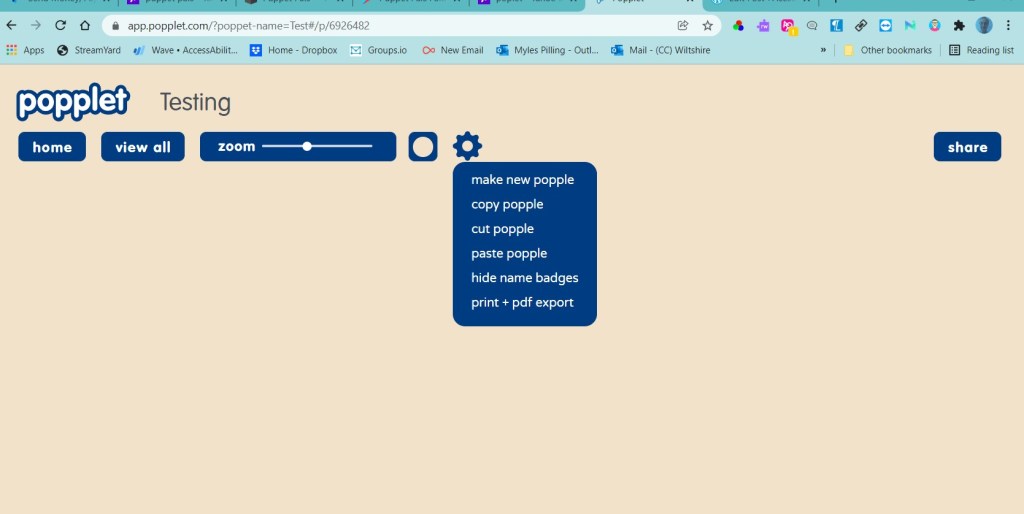
I was asked a question today does it work on Chrome as well as iOS apps. Well there isn’t a chrome app but you can run Popplet through the browser which is the next best thing

Screenshot of the browser version of Popplet

The advantage of using the browser is that a teacher can show this and work on it class. I know that teaching styles prefer to work away from the board but I see value in having a session using the interactive whiteboard or screen to discuss hot topics

New laptop windows 11 ready

I decide that I would splash out on a Windows 11 ready laptop to a) try out Windows 11 and b) see what the upgrade was like to do. The reason for this being as an AbilityNet County Co-ordinator I need to see how easy or difficult the process is as we will soon get clients asking for this. . I started 4 hours ago and with many updates I have got to a Windows 11 preview prerelease version as offered by this Windows 10 S machine.

Windows 10 S is a basic mode that only allows Windows Apps to be downloaded but it would let me run the PC Health check app either! That is a Microsoft app so confusion as step one. After searching for a solution online I found that if I went to Windows Setting then Updates and then Activation I could connect the Microsoft’s Store and switch it off there! A bit of a convoluted way of doing things. I discovered that I did have a Windows 11 ready machine and so could go ahead with either the update of preview or I downloaded the Windows Creation Tool but favoured the update as being the first option to try,

All these steps don’t make the process easy but its getting somewhere now. At this moment I am installing Windows 11 on my brand new laptop. An Asus E410M .

The install took 35 minutes and produced the desktop which is cleaner that Windows 10. Gone as the tiles. But then you are wondering where the settings are? To find that I right clicked on the taskbar and that brought up settings. The clue was the cogwheel symbol as in Windows 10 or I could have clicked on the 4 squares and selected from the icons there.

Conclusion

I bought a machine that was ” Windows 11 Ready” and I specifically asked the shop assistant if this can be downloaded in updates and he confirmed that to be the case. On firing up the machine I set it up using the Cotana voice which was friendly and clear and was able to connect to my Microsoft Account easily.

Going to updates I had about 15 updates to do which were necessary. I switched on Windows Insiders Preview in order to get his faster and found that happened by the final updates on Windows 10. I had to switch off Windows 10 S becuase it wouldn’t let me install the Windows PC health check to see if my laptop was compatible with Windows 11. Once checked and gained a successful response I started the Windows 11 update. It took an hour to download and then 35 minutes to install. But then I was up and running. Please note no Windows 10 everything is docked on the taskbar and away you go.

I would allow 5 hours to do this depending on updates, etc, .

One final thing I checked whether it was Activated under System and Activation and it showed “Active” on the Windows Insider Preview. I check updates and there were about 9 to do which happened very quickly and didn’t need to restart. Then how do you shutdown? Go to the 4 squares and next to your account is the switch icon and left click that. To fire up it was all up and running in less than a minute!

Exam Writer pad

A colleague pointed this out to me and when I looked at I was really impressed how easy it was to set up and run. The Narrator feature is very simple and what dyslexics want and need. The exam setup and prompts would help those with organization problemous. Maybe the constant prompting would be a little distracting so I would have toned it down.

It’s free to download so I don’t know how this package attracts funding to improve and develop as there is no source information of who has produced this. This is a downside as I feel we should know the author.

General smartphone information

Smart phones are very much part of all our lives. So much can be done on them and without them we would find our lives less connected and less available to do the jobs we need to do in life e.g. give covid results or show a covid pass.

A useful page that has been sent to me is on the link below. You can find useful information about what is the best phones to shop for in 2021 as well as apps you might want to use. Not particularly AT but accessible information is always welcome at AAS!

https://www.cellphonedeal.com/blog?msID=aed8544b-b16d-4b00-aea3-f6ab50837166

happy christmas and a happy new year!

Just wanted to take this opportunity to wish all my readers a Happy Christmas and a COVID free New Year!

Santa With Face Mask Glass Ornament Ornament 40319

Web page was not reading content in supernova

The screen reader Supernova is a great tool for the blind and enables the operations of the computer to be navigable by the use of key combinations that are simple and straightforward to use. A client of mine had a strange issue which we puzzled with for an hour in that he couldn’t get the content of pages to read back to him as before.

After logically working through the relevant top menu of SuperNova and trying various things it was the Speech menu that gave the answer. Under Speech> Advanced Options there was an unselected box ” Dolphin cursor to speak automatically.” When this was ticked all the page content came to life and read back line by line.

If this happens to a SuperNova user this is the fix to use.

How this occurred is a mystery . We actually reloaded SuperNova to see if that would correct the issue but it didn’t. We think a shortcut key press may have done this but we don’t know. The user was having problems with other software at the time so it’s difficult to say what happened without going into Event Viewer but I don’t think that show what happeend either!