More from ATEC – AT for the Workplace

This is a follow on from last weeks post about ATEC. Here are some of the products seen at this great event for Assistive Technology in Oxford.

Brain in hand (http://www.braininhand.co.uk)– is an app that helps the user monitor their anxiety and stress levels . Its use is in the workplace  to help people overcome barriers to engaging in work and to target support and intervention where and when its needed most.

ember- is a star college initiative using an app to support people with learning difficulties in the work place. It makes use of location -based technology to deliver bespoke training to the user. Contact dfinch@natstar.ac.uk  for further details. They hope to launch this in the autumn this year

Digital Accessibility Centre(DAC) are a welsh based non for profit social enterprise project. The aim is to audit and accredit companies and organisations for their disability awareness and inclusion. User testing takes place by disabled users and the idea is to provide a transparent and robust testing service that aligns with WCAG2.0 Web Content Accessibility Guidelines. For more information go to :-http://www.digtalaccessibilitycentre.org 

For a range of assistive technology go to http://www.inasyst.co.uk . They have a useful catalogue and products that can help sensory and dyslexic users in the workplace. From text to speech to visual stress their is a plethora of products to choose from. In the same vein http://www.sightandsound.co.uk have a range of goods to help those with blindness or visually impairment. I like the RUBY handheld device whihc magnifies in crystal clear High Definition.

Finally, in this section – more to follow in future days – is Wyvern Training which now provides free assistive product training videos on their website portal. Go to http://users.wyvernportal.co.uk  for more information.


ATEC 2016 Oxford 

What a great day! And what a great event! It is also  good to see it being so well supported ! Well done Antony Ruck and the team. A really worthwhile day for both networking and CPD?

Barclays Bank – Paul

Barclays Bank have a new app that you can use for your banking needs . It’s called Launchpad – QRCode logon banking , thoughts and feedback on this app would be appreciated. Not sure if it’s android but I assume it is as they thoroughly test their software! Workplace adjustments – not just reasonable adjustments is a term I thought was useful to use. It gives the emphasis to the setting giving it more focus see approach. What is challenging to companies is that in Barclays case they use not the latest tech and Cisco systems so the need is to build bridges for flexible licensing, personal licenses. Holistic AT that makes use of videos would be great – see Wyvern learning or Sarah Jane-Peake’s site LaunchPad  for examples of this!

Stuart Edwards -Dept. of Work & Pensions

Access to Work is a not a benefit but an essential tool. 12,000 access to work applications. Small adjustments don’t lead to having large funds. Grants towards giving access tools. Not the whole thing! Mental health and learning disabilities will mean more impact into these areas. 62,000 per year by the end of this parliament. Personal budgets for the grants. New online form filling, data gathering. Making more decisions on line. These are just some of the main points from his keynote.
Some future tech that Access to Work are going to look into or keep an eye on:-

  • 3D printing for kits needed
  • Individual needs
  • Driving less cars a game changer
  • Holographic signers – interpreting the users gestures

Debra Charles – Novacroft

Massive skills gap by  2020 – business leader, true talent lying in society. Showcase what can be achieved. Being made to feel different impacts massively your life. One size doesn’t fit all ! Something amazing in everyone.

Changing perceptions to make a difference, about belonging. Look for people to help you. Words that cause damage were shown . Help people feel valued. Positive contribution. Talent and technology work together. Work in a different way. Building a team that has positive impact. Make an impact on society. Get lots of fantastic people together and make a difference. Creative, good, able. Small things make a difference .

#saynotonormal. – showcase in October. Children – mini clip to show a difference. Add it to the website. Create a toolkit for businesses and education.

Dolphin Systems
Supernova and camera use – straightforward and easy to use. One way communication only. Clarity is very good. Very sharp. Is there another product on the market that does this? Using a mobile phone camera can do this on an iPad for instance . But the quality will not be as good which necessary for the VI user. Another feature is changing the colour scheme to suit the individual user.

  • Magnifier + speech ( version) – read and capture . It will OCR and use in word. Will speak it back to the user.

Claro Sotware

Claro ScanPen – not wifi dependent . Write about lighting and background paper issue.

Time to process information, audio allows more processing time

Simple software to use!
Claro Read software

Scan other file formats in

Scan from screen – text to speech . Select a area of picture to copy to the clipboard.

Office 365 plus pro free for students in university. Install office 365 for free for students ( up to 5 users).

Screen Rule – Screen tinting

ClaroRead for Chromebook ,chrome browser

The Edge – isn’t very accessible – chrome extensions into the edge browser by Autumn 2016

ClaroRead SE – simple , play,stop, toolbar . Makes it an easy tool for the user

Cloud access for different versions
Buying a key that last for a long time . Not subscription. More about upgrading potential. Remote configuration . Design to be user friendly especially for a DSA Assessor

ClaroPDF
Nice settings to change the background and provide tints

Annotation toolbar – highlight, draw shapes, provide notes. All compatible and therefore a useful research tool for students who are needing to look at source material

Appv. Virtual deployment tools for apps for iOS.
Notetaker

Conversor -Notetalker – takes an audio file of any talk or lecture. In order to do this you need a good external microphone to your smartphone,

Audio quality – directional conversor mm1 45,000

£21 on DSA for the app and microphone

Directional Wireless microphone – Bluetooth for lectures – removing background noise

Pairs for individual solutions

Battery pack booster for phone useage

External microphones need to be used with smartphones

More general hitting of information using bookmarking. Giving choice to the individual to choose the tool that best meets their need on the PC transfer software,

Compiling information into one place.

6-7 mins for a 45 min lecture

Nice idea for searching by word and a maths search tool.

Clear interface for editing.

Export into word (July) PDF now!
August – Notetalker transcription service @  24hr £12 per lecture I think.

Certified training programmers offered to DSA assessor and professionals  by Notetalker

I will write about some of the products I saw in a post tomorrow ! That’s all the keynotes and workshops I attended covered!
AbilityNet

I have become AbilityNet’s county co-ordinator for Wiltshire  which means that I will be  work ing with a team of volunteers who help people use their computers. In particular, we work with individuals who may need help due to their disability and additional needs. This is about hardware and access. I have known of the work of AbilityNet for many years and as a local WiltsOnline Digital Champion it seems a natural direction to take to increase my experience in the voluntary sector.

I also aim to do some paid work with them in the form of assessment as  a freelance consultant which would increase skills in the area of DSA and broader disabilities than my specialism of learning disabilities. This would mean more face to face assessment and problem solving.

I am seeing my first client in my voluntary role next week!

Green Screen by Do Ink tip

Just been working with the app Green Screen which is very easy to use. I like the paintout option which is useful if you don’t have a green screen cloth! I was able to use a video that played with different images being usee as the screen. Just use the paint brush from the editor. Have fun!

Home School Educators and SEN Teachers

Thanks to Jenny Wise I have  just put on a list of interesting websites that may interest those who home school educators and  SEN teachers . Here is what Jenny wrote:-

“Hello!

As a homeschool teacher and the parent of an autistic child, I’ve learned a lot about how important it is to pay attention to the individual needs of every student — especially special education students, who may need specific classes or individual help to be successful.

It can be tough to know the best approach when reaching out to those with special needs, so I’ve done some research to help educators and families get started. Would you be interested in sharing them with your audience (https://aas123.com/resources/helpful-resources-for-parents-and-teachers-of-special-education-children/ )

For students of all ages:
Creating the Optimal Environment for a Kid with ADHD

Suggested Classroom Interventions for Children with ADD & Learning Disabilities

The Life-Changing Impact of Autism Service Dogs

Addressing Special Education Needs for Students Learning English as a Second Language

22 Tips for Teaching Students with Autism Spectrum Disorders

50 Must-See Blogs for Special Education Teachers

The Ultimate Guide to Water Safety for Parents and Caregivers of Children with Autism

Teaching Your Child About Peers with Special Needs

And here are a few that high school and college educators, parents and students will find helpful:
Teaching College Students with Autism Spectrum Disorders

Autism and Addiction: Coping with and Treating Your Dual Diagnosis

Choosing a College: Planning for Teens with ADD

College Resources for Students with Disabilities

I hope these will make a positive impact on special needs children, educators, and families!

For further details go to http://www.SpecialHomeEducator.com


James Winchester’s site

Came across a fascinating site which is doing great work in gesture and movement. James is using a wealth of resources . I particularly like the Kinect ones and will be trying them out myself on my laptop! Thanks James! Respect!
senclassroom.wordpress.com

Groups in Office 365

Groups in Office 365 works great when you are in an Office 365 business setup with lots of colleagues. I would like to work with external to my organisation colleagues around the UK for specific roles. Here is what I am discovering. You can establish a group email to write to but not access other of the tools like files, shared calender and notebook. Admin ( owner of the site can) but not a user. You can email to the group address – useful for tracking emails and receive emails to the group like a distribution list.

As organisations grow and need smarter ways of handling email’s then this kind of facility is useful compared to scrolling through hundred’s of email. Groups.io is one that has a lot of the tools and more than the Yahoo groups that people use. If using a site like groups.io forwarding from the group email is essential to smooth running which is part of the setup procedure. But to operate the file and calender you need to go to groups.io rather than having it integrated into your chosen emailing system. I like groups.io and use it for BATA.

I found this useful article on Groups in Office 365:-

http://en.share-gate.com/blog/groups-for-office-365

Strikingly good website!

This won’t win pun of the year but the adage “simple is best” applies to using this one page website. Having a straightforward, no-nonsense approach to web building makes sense to me. This is good for self-promotion and making one message get across to your audience very clearly and attractive. It can lead toother more detailed and structure information. It is free to build and therefore attractive to education, professionals and parents alike.  To see my strikingly website click on the link below:-

aas123.strikingly.com 

Special World  News

Just to say some useful information has come through from Special World  here is the link :- 
Special World News – April 16

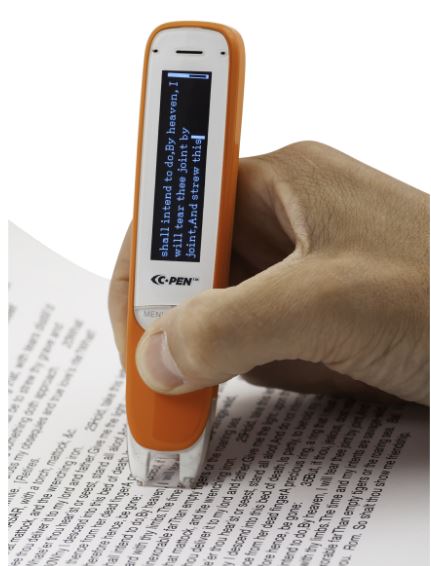
The C-Pen Reader

It’s a joy to recommend a local company near where I live! The C-Pen reader is a portable OCR scanner that can work as a file storage device, text to speech listening tool and audio recorder to name but a few. I suggest you check out their new website for what these pens can do. Approved for use in exams by the JCQ the exam pen will enable pupils to access exam papers for themselves. The pen allows a struggling dyslexic reader to have text decoded into speech by scanning a line of text. But the pen does much more than that and enables pupils to access definitions of words, store audio files, etc. A student on a course I was running the other day said she wished she had had one of these earlier in her career as its technology that really enables.


http://www.readerpen.com

C-Pen