Access to coding tool – testers required

From Fil McIntrye:-

Birmingham City University are currently seeking participants with physical disabilities to trial a coding/programming system.  If you know anyone who would be willing please get in touch with Chris Creed.

Participants would need to have at least a passing interest in coding or technology development.  Full details below.


Many thanks

Fil”

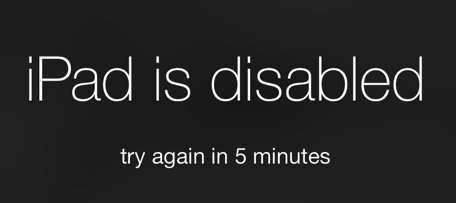
“iPad is disabled” message

dims

Interesting problem to solve this week. A client had the message “iPad is disabled” and her iPad was effectively locked. it would not even connect to iTunes account . The answer was to switch off completely have the USB cable ready to be connected . When starting up again hold down the Home button until you see the connect to iTunes message.  This enabled me to reset the iPad and have it back up and running,

This will explain how to do it:-

  1. Disconnect the USB cable from the device, but leave the other end of the cable connected to your computer’s USB port.
  2. Turn off the device: Press and hold the Sleep/Wake button for a few seconds until the red slider appears, then slide the slider. Wait for the device to shut down.
  3. While pressing and holding the Home button, reconnect the USB cable to the device. The device should turn on.
  4. Continue holding the Home button until you see the Connect to iTunes screen.
  5. iTunes will alert you that it has detected a device in recovery mode. Click OK, and then restore the device.
  6. Follow the prompts in Setup Assistant and proceed to “Set up your device.”
  7. If you used iCloud for backup, tap Restore from a Backup, then sign in to iCloud.
  8. Proceed to “Choose backup,” then choose from a list of available backups in iCloud.

SleepHelp for Autism

Hi Myles,
I hope your week is off to a great start! I noticed all the helpful autism-related resources you have on your site and thought I’d reach out to let you know about the work my team is doing. I work for Sleep Help, a site dedicated to promoting sleep health and wellness. We’ve been researching the connection between sleep disorders and autism, and we’ve created a resource specifically to help adults and children with autism get better sleep: https://www.sleephelp.org/autism-asd/
In this guide, we cover the current research behind how and why autism can affect sleep, including melatonin production and sensory complications. We also include many helpful sleep and bedtime tips for both adults with autism and caretakers of children with autism.

Synapptics v7 – new update

I have this email from Synapptics which explains some new and interesting developments for their Android-based system for blind and partially sighted:-

Dear Myles,

We’re writing to let you know that Version 7, our new release of Synapptic software, is here! 

We’ve now added over 20 new features! Download your FREE 15-day trial version today, by visiting our website atwww.synapptic.com and try it out for yourself!

Here’s a glimpse of some of Version 7’s great new features:

• Our new Synapptic Screenreader, makes it easy to access a whole world of apps, enabling you to switch easily between Synapptic and Android screens automatically, with instant speech!

• Add your favourite apps onto Synapptic’s Main Menu, like WhatsApp for free messaging to friends & family, Be My Eyes for free sighted assistance, Spotify to listen to music and podcasts, Netflix for films and Audible to access the world’s largest collection of audiobooks

• Make calls easily through automated phone systems, where you need to select options, and pick up your voicemail messages quickly

• Our enhanced Synapptic web searching design makes it easier to search the Internet, with results displayed in a clear and simple Synapptic list.
Visit our website at www.synapptic.com and check out our latest V7 videos for details on all the new features.

What’s more, we’re also launching our new phone and tablet product range, which includes the most up-to-date models from Samsung. Check these out by heading over to our website at www.synapptic.com

Contact us today on 0191 909 7 909, email us at sales@synapptic.com or visit our website to place an order or for further information.
Kind regards,

Adrian

Adrian Sach
Director
Synapptic Ltd
Tel: 0191 909 7 909
Mobile: 07967 470 854
Email: adrian@synapptic.com
Web: www.synapptic.com

We’ve moved!  Our new postal address is:

Synapptic Ltd, Adelaide House, Adelaide Court, Belmont Business Park, Durham, DH1 1TW.

Synapptic. Seeing things your way. ®

This email and any attachments to it may be confidential and are intended solely for the use of the individual to whom it is addressed. Any views or opinions expressed are solely those of the author and do not necessarily represent those of Synapptic Ltd. If you are not the intended recipient of this email, you must neither take any action based upon its contents, nor copy or show it to anyone. Please contact the sender if you believe you have received this email in error. All orders are subject to our Terms and Conditions of sales and services, which are available at www.synapptic.com/tandc.html.
Synapptic Ltd, company registration number 07907528.

Bear

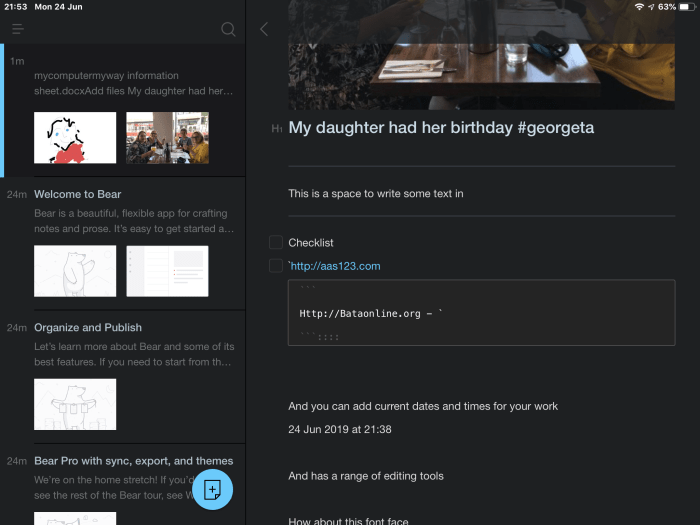
There a lot of different type of note taking tools put there and although I do like Notes on the iPad Bear offers a few more tools. I like the way you can organise your information. And it can be moved around up the tree to be made more important,

The range of tools are good – there are tools for editing around the screen which I have always found tricky on the iPad and apple doesn’t like having arrow keys.

There is a checklist button for making to do lists. A useful festures is hashtags which would enable searching and tracking of your work.

Of course there is images and drawing,, bullet points, different type of headings. A small selection of fonts , including open dyslexic That would be useful but as it is an app that can just be used to quickly get information down.

Here is a screenshot of what it looks like:-

There a few themes to use. Some are inapps purchase. This one is dark theme which is good for standout notes and clarity in low light.

Finally it would be useful for secondary aged students with its more mature ans practical tools.

Automatic captioning by Microsoft

www.bloglovin.com/blogs/free-technology-for-teachers-1315757/how-to-automatically-caption-translate-powerpoint-6985728027

Sleep Help

I was asked to put this up on my blog so i am able and willing to do this. Seems like something worthwhile to share, especially appropriate as i am writing this in the dead of night due to having a cold keeping me awake! And it’s soppose to be my holiday , Grrrr!

Sleep help guide for people with Autism and ADHD

Office Lens

Microsoft Office Lens has a very useful function I want to share with you today. If someone gives you a business card as they often do to me I promptly put them in my wallet and forget about them! When I do remember I have them and I have some time I go about adding them to my phone contacts. This is slow and laborious.

Now enters Office Lens a free download on iOS and Android .  There is an option to take a photo – business card- . If you focus in so that you get a good clear image of the card it will take the card and if you choose the option “OneNote & Contacts” it will create two entries one for OneNote and the other goes straight into you Contacts folder with name address, website telephone number, etc

..No mor cards forgotten in jackets now!

AbilityNet Volunteer Day

Brilliant day as always for AbilityNet Volunteers. We helped those who are disabled with their tech and their access needs. This is freely given and a network of volunteers operate throughout the UK.

Friom Microsoft to Dolphin Systems , no isolation to smart speakers and then some free stuff. I will mention a few things:-

Microsoft.

Seeing AI showed some real potential and use especially the text convertor. Really cool and useful too! I shall be recommending this app more widely now.

Inclusive communications and content

Office lens – nicely frame , ocr and put into immersive reader does the scan documment as well and can do OCR

Microsoft Translator – translates speech to text giving you caption display. Migth try this on a talk or seminar. Useul for the hearing impaired.

A few helpful websites:-

Aka.ms/microsoftaccessibility

Aka.ms/disabilityamswerdesk

Aka.ms/accessibilityuserservicei

Willing to take on board requests. Invited to complain about Microsoft!!

NO ISOLATION

This is impressive both for its help to children and for adults who need siimple commmunication tools. Something worth looking into, love the AV1 robot that puts the user in the middle of any environment.

Dolphin Systems

Noel Duffy

Increase in sight loss liable double from 2 million to 4 million

80% over 65

20% most interested in technology

Mixed technical ability

Older group might not be able to access technology

Easy Reader – smart phone app – free

Guide Connect – interface that masks the screen, tv remote friendly, connects to overdrive, bookshare, consistent approach. Free support up and running in one hour. Not free!

Googe Keep

Have often mention this app. It will do locations and reminders which has a use for carers of Alzheimers and dementia sufferers.

Free Sofftware

Metaclick – dwell click , to enable a physical disabled user.

https://www.senteacher.org/download/89/MouseDwellClick.html

AT bar for windows – text to speech , tint screen, works in any browser ( drawback copy and paste) reasonable speech engine.

Amazon Echo

My talkiing newspapers

service

“Open up my talking newspaper”

“Info sound “

“Info sound select”

Regional newspaper
When to use Switch Technology?

Most users do not need to use switches. But for those with cerebral palsy and physical disabilities and profound multiple learning difficulties switches can be really really useful.

The main reason for using switches is because Hand usee is not possible and therefore we need to use alternative inputs ; this would be via touchscreen or through switches.

What software do use switches? We tend to use cause-and-effect software such as you can see at Ian Bean’s website. There is a whole progression involved in switches which Ian Bean set out in his switch progression map..

How are switches used with pupils? First of all there may be repetitive switch movement which is purely random automotive actions with no meaning. Then there is meaningful action where there is a definite movement forward towards the switch to press it and whatever playing or method the user uses to do such as hand movement, foot movement, and head movement.

Best switch movement is one which is totally initiated by the pupil not any adult intervention such as hand over hand under hand. One more thing is I prefer people to use the phrase “again” or “more” rather than “hit the switch.” The latter takes the focus off the activity which I think is a mistake as the content is king!