Livescribe inq smart pen

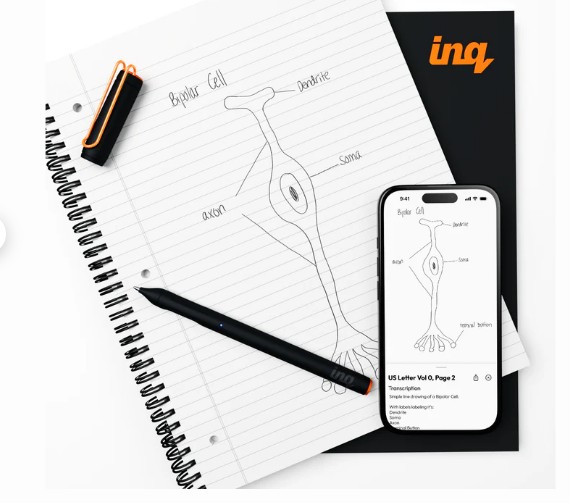
Smart pens have been around for a long time and I have written about them on this blog. Finding one that works seamlessly is not so easy but with inq pen this does work well. The pen needs a special book with all the electronic microdots on it to locate and make sense of information. It’s Bluetooth and so you can connect instantly to the book and also, through AI, directly links to the cloud making it a tool for handwriting recognition. It also links to your mobile phone and provides audio linkage to the information as well making it an all-round tool for the classroom.

For more information go to https://inq.shop/products/inq-writing-set.

i am retired but still interested

One of my colleagues said when I told him I was retiring he said ” no you won’t!” meaning I would have trouble hanging up my boots. But the reality is I do different things now. This happened when I left my local authority I just morphed into doing something else. Now, the same applies here.

Do I miss the business? Yes, of course, but when you get to a certain time in your life and your body is letting you know it won’t be working in the way it used to. It is time to think differently – and do things differently. I have still got my mental faculties but it’s not able to sustain concentration like it used to.

I continue helping in Assistive Technology but as a volunteer co-ordinator for AbilityNet. For instance this afternoon I am at a one-to-one event session with three of my fellow volunteers helping seniors access their NHS apps and other medical services. It’s rewarding work and a continuation of what I have already did but with a more appropriate age group!

Opportunities to serve abound and so I introduced today a new section under resources called ” Life Changes.” We all experience such changes in our lives and it’s useful to draw in other people’s experiences and strategies to help with what life gives to them.

Lastly, I am not working , sure. But I continue to be useful in a voluntary capacity. So if you as an individual or organisation wish to have advice or support do reach out as I am listening. As someone who has worked in the assistive technology industry for a significant amount of time I may have something to offer you.

I love to speak publicly . So if you wish to have a custom talk for your group or organisation just reach out. This can be done remotely or in person. I still have something to offer and the capability to deliver it.

nasen awards 2025

This is my fifth nasen awards event I have attended. Each one better than the last. My involvement is as a judge for the nominations in each category. There are three teams to look around 50 shortlisted entries which is then wittled down to a winner and then runners up (usually two or three). It’s a brilliant event and so needed in the field of special education. The reason I do this in my retirement is that I believe in the concept and the practise.

Special Educational Needs is a demanding and often unrecognised. Therefore, to have an evening where you can dressed up to the nines – in a dress suit in my case, have a wonderful three course meal and experiences first class entertainment and convivial company at your table of 6 other like minded individuals is a great honour and privilege.

This year it was held at the Vox Centre, NEC Birmingham. The Genting Hotel is where I am staying and it’s a moment of luxury for those of us who are lucky to stay there. During the event I was pleased to see that COSMO won the Inclusive Technology of the Year award. I watched this company since it’s inception grow and be used effectively in special schools. A glowing coloured switch that works in connection with a set of apps that are freely given to users when they purchase the switches. I’ve seen it being used in PE lessons effectively. A well-deserved award for a great piece of kit.

Thank you nasen for allowing me to judge your awards. Can’t wait until next year when we get to award 17 more deserving individuals, organisations and schools.

Neurodiversity Empowered

Great free event that you can attend virtually for free this Saturday 10th May

https://www.bulletmapacademy.com/neurodiversity-empowered

COMMUNICATION WORKS

Just spoken about “The Power of Assistive Technology” at the above event at the New Bridge Academy School which is a large special school of 380 pupils with complex needs. The talk was well received and a number of useful connections made and I noticed many people used the QR Codes to download both the films and access to Teachers for AT.

So what else did I see? Well a shoutout to CanDle who are doing a great job in helping pupils with AAC use their devices. They are covering the nation with partnerships to enable AAC to be used effectively with the individuals.

Also Scanmarker Pen which is reader pen have produced this simple and effective guideline ruler that will help to keep your pen inline as you scan. This is a simple but very effective way to make a good scan for reading a line of text at a time.

Lastly, my good friend and colleague Rohan Slaughter was speaking at the event about the MSc EduAT course at the University of Dundee. Watch out for the work that he and his colleagues are doing with DFE on AT Assessment. This will be a thorough job and much needed in the profession as it takes a long time to get a complex assessment down.

Alison Tootil , Headteacher , gave me a tour of New Bridge Academy and it was very impressive to see the range of work being done there and in using technology to access the curriculum,. Thank you for sparing the time to show me around.

Now , on to the next event which will be the TPEA conference again in Manchester. What is it about Manchester that is making all the conference events happen there!? Let’s hope the weather improves. It has not stopped raining since I got here.

Wiltshire dyslexia association event

Resource Handout

WDA Event – Thusrday 5th October 2023 – County Hall, Trowbridge

Assistive Technology Workshop – Arran Smith & Myles Pilling

Microsoft 365 – Learning Tools -https://www.microsoft.com/en-gb/education/products/learning-tools

Dictate – Speech to text

Immersive Reader – Text to Speech

Edge – Read Aloud, Dark Theme, Language selections, Background themes

Access to Work

Dragon Speech Recognition – £679 – (cheaper to find Dragon 15  on Amazon at https://www.amazon.co.uk/Dragon-Home-15-0/dp/B07GRDZ3ZJ/ref=sr_1_2?crid=2Y7N1LPJA5J92&keywords=Dragon+speech+recognition+15&qid=1696411880&sprefix=dragon+speech+recognition+15%2Caps%2C65&sr=8-2 )

https://shop.nuance.co.uk/store/nuanceeu/en_GB/Content/pbPage.home

Zoomtext – $85 a year – https://www.freedomscientific.com/products/software/zoomtext/

SuperNova –   £425 https://yourdolphin.com/SuperNova

NDVA – £free – https://www.nvaccess.org/download/

School software

Texthelp Read&Write – £150 https://www.texthelp.com/en-gb/products/read-and-write-education/

Clicker – https://www.cricksoft.com/uk/clicker/win-mac

DocsPlus – https://www.cricksoft.com/uk/docsplus

Inspiration 10 – https://www.inspiration-at.com/

Parents Apps

Remember the Milk –  £free – https://apps.apple.com/us/app/remember-the-milk-to-do-list/id293561396

Claro ScanPen – £9.99 – https://apps.apple.com/gb/app/claro-scanpen/id994933713

Notability – £free – https://apps.apple.com/gb/app/claro-scanpen/id994933713

NTE Hub -£free –  https://apps.apple.com/gb/app/ntehub/id1462397305

Glean – £10 a month – https://glean.co/pricing

iOS Accessibility Settings

Spoken Content – https://support.apple.com/en-gb/guide/iphone/iph96b214f0/ios

Notes – Scanned documents, Microphone (no wifi needed)

AI Assistance

Bing ChaptGPT –  £free https://www.tomsguide.com/how-to/how-to-use-the-new-bing-with-chatgpt-and-what-you-can-do-with-it

List of Chrome Extensions for Dyslexic users

Readlax – text to speech and stripped webpage

ProStudy online – research tool for students- especially if you have a Pro-Study account

Voice In – Speech to text

Helperbird – suite of tools to make your web browsing a dream

OneNote Clipper – works with One Note to take screenshots to go straight into OneNote

ReadWrite – research tools

Natural Reader – books and epubs reader

Dictation for Email

Colour Enhancer – colour filters for websites

Lightkey – AI word prediction

Lightkey – AI word prediction

Orbit Note – annotate your PDF’s
The Dyslexia Show – 24th & 25th March

I am looking forward to attending this important event that was such a success last year. Especially as we were just coming out of COVID then. I can truly recommend the show which is free to attend but sessions will be charged for.

24th & 25th March at the NEC Birmingham

My subject will be :-

“The use of Assistive Technology in the Classroom and the Workplace”

It’s a wide ranging topic and will cover both what hardware and software is being used as well as what might be useful to consider to put into practice. Free and costing apps and software will be showed and demonstrated.

So why not book your place now at https://dyslexiashow.co.uk

If you want to listen to content on the days then please use this Spotify link

Spotify Link to The Dyslexia Show

Changes in Google that affect synapptics tablets

This also applies to any third party apps being used on a device as well.

Just been with a client today using a Synapptic Tablet. She had trouble with her emails which we eventually found out was caused by Google blocking the email function on her tablet. 

Solution:– 

Need to go Security settings on the google account concerned and  do the following

 – setup two factor authentication which will need a smart phone or mobile phone for a text message

– next go to security and go to “Third party apps with account access” and add “Synapptics” to the list

A 16 digit code will be generated which needs copying down or taking a photo of. It’s a one-time code that you type into Basic Email Settings of Synapptics  ( synapptics doesn’t allow pasting into the password area !) under Password.

I used IMAP settings with port values Incoming 995 and SMTP port settings of 465. You can find these on the web if needed. I set them in Synapptics under the “Advanced settings”  in Email. 

Can you help this student?

Hi. I’m Geane, a PhD student at the University of Southampton.

My research is about finding ways for visually impaired people to be able to do more sport/physical activity. I’m seeking young adults with VI to take part in my online survey.

I would very much appreciate if you could share my advert with a link of this survey to your visually impaired members in your social media or online community.

My advert is this:

Are you visually impaired between 18 and 30 years old? Do you do physical activity or play sports? I want to hear from you all, regardless if you are active or not. If you are active I would like to hear about your experience with physical activity, sports and technologies. If you are not active, I would be interested to know why. Please fill in this online survey https://isurvey.soton.ac.uk/33270. If you have any questions, contact Geane Fontinele directly on gdaz1e17@soton.ac.uk Study Reference Number ERGO/FEPS/ 51707.

I look forward to hearing from you.

Kind regards,
Geane Fontinele
PhD student in Web Science
University of Southampton

Rocketbook

Smartpens have been around for a longtime but the process can be difficult for some . Also the books are a ongoing costs and you cannot rub out the ink and start again.

The rocketbook does allow you to rub out your work and start again but it’s selling point is the ability to transfer work through a scan and it does accurately represent your drawing as the image below exemplifies

In the example I have stated what I think it would be good for. But it’s by no means exhaustive .