https://www.podbean.com/media/share/pb-4eutu-e2d239
Having programs load on the start is vital fir disabled people with loss of hand function. Also , looking at the new look on Facebook and loving the privacy wizards now on there !
Parents in Lockdown using Technology
This is supporting information for the recent webinar on “Assistive Technology and The Dyslexic learner” done with the British Dyslexia Association about helping parents use Assistive Technology in the home and at school. 2,000 people signed up for the webinar and we had over 1,000 people on the call – Amazing! I featured this event on my weekly Podcast listen to it here:-
Below is a resource bank to find useful apps and websites that can help you during this time of lockdown. I have also included a teaching plan for those home schooling who would like some fresh ideas to use. Just keep scrolling!
Here is a list of apps you might find helpful with the links to finding them and how much they cost:-
Apps for Dyslexia
Clicker – free access to parents at home during Coronavirus
https://www.cricksoft.com/uk/clicker/clicker-at-home
AppWriter – (£free 30 day trial) – suite of tools from text to speech to speech recognition and word prediction. Works on all platforms.
https://www.wizkids.co.uk/private/appwriter
Lightkey (£free – basic but check that you can still use it after 30 days!)
ReadWrite - £27.99 - customisable fonts, backgrounds, word prediction, dictionary
Claro ScanPen £9.99 (iOS and Android) - reads text taken by inbuilt camera
https://itunes.apple.com/gb/app/id994933713
Claro Speak Plus -£9.99 (iOS and Android)– word prediction, OCR and text to speech
https://itunes.apple.com/gb/app/clarospeak-plus/id845128025?mt=8
One Note – £free - part of Office 365
https://itunes.apple.com/gb/app/microsoft-onenote/id410395246?mt=8
Popplet Lite – £free simple mind mapping
https://itunes.apple.com/gb/app/popplet-lite/id364738549?mt=8
Puzzles
Memorama (free) – pairs game to encourage matching and visual memory
https://itunes.apple.com/gb/app/memorama-pairs-game-free/id526728411?mt=12
My Own Puzzle(free) – create a jigsaw for up to 12 pieces using your photos
https://itunes.apple.com/us/app/my-own-puzzle-kids-app/id636443362?mt=8
Magic Puzzle (free) – up to 600 piece puzzle !!
https://itunes.apple.com/gb/app/magic-jigsaw-puzzles/id439873467?mt=8
Jigidi (free) play and make puzzles with other people as well onlne
https://itunes.apple.com/gb/app/jigidi/id878587596?mt=8
Cut the Rope (£free) – physics type game encouraging problem solving
https://apps.apple.com/us/app/cut-the-rope/id1024506959
Gears logic puzzles (£Free- iOS and Android) – hours of fun making the cog wheels turn – another physics problem solving game!
https://apps.apple.com/us/app/gears-logic-puzzles/id1277048602
Flow Free (£free – iOs & Android) – mathmatical problem solving and highly addictive make the colours connect around the screen.
https://apps.apple.com/us/app/flow-free/id526641427
Sensory Integration – Reaction time
Tap the Frog(free) – progressive game of reaction and eye hand co-ordination skills
https://itunes.apple.com/gb/app/tap-the-frog-doodle/id427774127?mt=8
Laybrinth2HD(£7.99) – rolling ball bearing using accelerometer
https://itunes.apple.com/gb/app/labyrinth-2-hd/id307758975?mt=8
Organisation
Google Keep ( free) keep notes, lists in a coloured tile
https://itunes.apple.com/gb/app/google-keep-notes-and-lists/id1029207872?mt=8
Visual Schedule Planner ( £14.99) use photos to plan your timetable
https://itunes.apple.com/gb/app/visual-schedule-planner/id488646282?mt=8
Timetable 2 weeks(free) plan a schools 2 week timetable
https://itunes.apple.com/gb/app/timetable-2-weeks/id914282051?mt=8
Art/Painting/Drawing
Paper (free -with in app purchases) draw and paint with colour wash
https://itunes.apple.com/gb/app/paper-by-fiftythree/id506003812?mt=8
Brushes Redux (free) – app used by David Hockney
https://itunes.apple.com/gb/app/brushes-redux/id932089074?mt=8
Colorfy (free -with in app purchases) for those who like adult colouring in
https://itunes.apple.com/gb/app/colorfy-colouring-art-book/id1009442510?mt=8
Music
Air Harp £0.99) play notes under the strings of a harp
https://itunes.apple.com/gb/app/air-harp/id364524199?mt=8
Figure (free) create rap and hip hop beats – everything sounds good on this creative tol
https://itunes.apple.com/gb/app/figure-make-music-beats/id511269223?mt=8
Social Stories
Book Creator One (free) only one book though
https://itunes.apple.com/gb/app/book-creator-one/id661166101?mt=8
Puppet Pals HD (free) – make up social stories – good for dialogue and creativity
https://itunes.apple.com/gb/app/puppet-pals-hd/id342076546?mt=8
Puppet Pals 2 (£free) – create stories using historical characters as well as yourself.
https://apps.apple.com/us/app/puppet-pals-2/id589141096
Teaching Plans for 12 weeks session
| Session | Teaching Points |
| Guess the animal | Recognise different animals by sharing drawings |
| Bike Ride | Follow photos and videos about journeys and choices |
| Maths | Aerobics was a hit. Look at part and whole. Found part and whole in Oak Academy content |
| Science (& Music) | Guess the material game https://www.bbc.co.uk/bitesize/articles/z6kdwty Looking at materials and the natural world under a visualiser. Songtime : “Let it Go” mime to the song as well as sing it. “ I want to be like you.” (Jungle Book) Have some instruments to demonstrate sounds – name game. |
| English – story writing | Kims Game – 10 objects to see and guess which one is taken away – use the visualiser Storybird – writing a story about a dinosaur who was sad… Why was he sad? What can happen to cheer him up? Artful Storytelling Make up a song about him . Sing “ If your happy and you know it” |
| Time Capsule | Going to do a writing exercise from Twinkl that may be of interest about writing/drawing to your future self https://www.twinkl.co.uk/resource/coronavirus-time-capsule-resource-pack-t-tp-2549605 |
| Geography | Only Leo & Maia so concentrated on drawing and pictionary game to start with Located where they are . Looking from different perspective – Google Earth – and seeing where I live and where Colin & Ann live in Edinburgh |
| Arts & Craft | Make something together using simple materials. Leading each step of the way Find a task using paper or card. Glue and scissors. https://www.youtube.com/watch?v=ob50DirreGY Strips of coloured paperStrawsToilet roll paperGlue – PVA or Pritt or UHUScissors |
| Textured Treasure Hunt (Frottage) | Continuing the Art Theme we will be using Oak Academy on the following link :- https://www.thenational.academy/year-3/foundation/texture-treasure-hunt-year-3-wk4-5# Needed:- A4 Blank PaperPencilsCrayonsBlack felt tip marker ( optional) |
| Maths | To recognize parts that are equal and parts that are not https://classroom.thenational.academy/lessons/to-recognise-parts-that-are-equal-and-parts-that-are-unequal/ Activity songsKim’s Game |
| History | Find something out of horrible histories that we can exploreObject/subject from the era. To describe and discuss how it was used. Show a photo of it. Research it. Horrible HistoriesSeries 3 Episode 4Stuarts, Middle Ages, Romans,https://www.bbc.co.uk/iplayer/episode/b011qmrz/horrible-histories-series-3-episode-4 Hygiene : Why did poor people not wash in the middle ages? Hygiene timeline https://docs.google.com/document/d/1HH_zuJbxu33K5TdXhjhjvJ2weEs05jB7oBtjz4huY-w/edit?usp=sharing Pinterest – Hygienehttps://pin.it/1kQVZ4X |
| Myths & Legends | Classic fairy tales and more unusual local ones SWGF: learning website and another schools site – not sure what it is called. https://www.youtube.com/watch?v=XOkFxTq2uf8 Myths and Legendshttp://myths.e2bn.org/ “The Gurt Wurm”http://myths.e2bn.org/mythsandlegends/view_myth.php?id=1852 |
Legacy Hardware- Alphasmart DANA
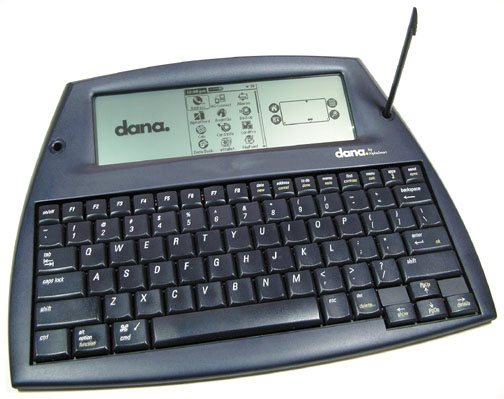
Typing and writing on an Alphasmart Dana :-
” So I discovered this in my storage that I had an old Dana which I used in the old days for meetings. The battery has gone. So if I were to resurrect it it would not work. So what use would it be now. This device must be 16 years old +. I love the keyboard so easy to type with. Well spaced and resposive keys. I do make fewer mistakes..
Using a USB cable they are good for support assistants and for colloabrative work. The support aassistants can make notes for the students or communicate to a deaf student discretely as it just types. The pupil can use it to write with another student in real-time . They can do joint projects with it and write directly to the screen,
Finally, I can try using the send button to send to a PC/Chromebook/ Android device. I think that will work. If it transfers into this article it will work. It did!”
Episode 30 – Tablets for the Vulnerable
https://www.podbean.com/media/share/pb-mar99-e147d6
Two charities you can approach
Devicedotnow and Wavelength ( the website is in the email and links also on http://aas123.com
Helping the vulnerable and lonely in COVID-19
Isolation is a big problem in our present time and never has there been a more important time to be connected than now . These two charities provide free technology in the UK to those who need it.
https://futuredotnow.uk/devicesdotnow/https://wavelength.org.uk
Episode 29 – “I am stupid”
https://www.podbean.com/media/share/pb-7d734-e0aa2f
Don’t believe the lie! Find the right technology that suits you. Use people like myself to find it with you
Episode 28 – Extensions to Chrome
https://www.podbean.com/media/share/pb-23gvs-dfc228
You can extend google chrome’s functionality with these free extensions to do useful jobs or provide accessibility
12 Great Educational Sites for Children
Listed in the article below are 12 great sites for children to explore during lockdown
Ghotit
Ghotit is aimed at the student who requires support, maybe as a dyslexic and in need of DSA. Ghotit provides a word processor and a context sensitive dictionary to show the meaning of words. It also has grammar tools that help give alternative words, better words or better grammar to a student’s sentence. It works with applications such as Google Docs and Microsoft Word. Take a look at the explanatory video at :-
Episode 27 – Accessibility on Chromebooks
https://www.podbean.com/media/share/pb-9vi7b-def05d
Have you considered using a chrome book? Cost effective and very efficient it is worth considering as an access tool as their is a comprehensive set of Assistive tools built in

