Many people believe they should run only the latest software on a new laptop. I had a client who was running Offcie 2013 on their new Windows 11 laptop. It’s been running for months now with no hiccups today where the machine got into a pickle and stopped loading Office 2013. It was showing there was no word running so after a search on the internet I did get lucky and found this article which solved the problem. The registry was giving false information so removing the date using this method enbale the program to run again. You have to log back into Microsoft 2013 and then it will run again.
Here are the instructions for all versions of Word:-
To delete the Word Data registry subkey, follow these steps:
Exit all Office programs.
Type regedit in the Search box (in Windows 10, Windows 8.1, or Windows 8) or in the Start Search box on the Start menu (in earlier versions of Windows), and then press Enter.
Locate the following registry subkey, as appropriate for the version of Word that you are using.Word versionRegistryWord 2016 or laterHKEY_CURRENT_USER\Software\Microsoft\Office\16.0\Word\DataWord 2013HKEY_CURRENT_USER\Software\Microsoft\Office\15.0\Word\DataWord 2010HKEY_CURRENT_USER\Software\Microsoft\Office\14.0\Word\DataWord 2007HKEY_CURRENT_USER\Software\Microsoft\Office\12.0\Word\DataWord 2003HKEY_CURRENT_USER\Software\Microsoft\Office\11.0\Word\Data
Select Data, and then select Export on the File menu.
Name the file Wddata.reg, and then save the file to the desktop.
On the Edit menu, select Delete, and then select Yes.
Exit Registry Editor.
Start Word.
If Word starts and works correctly, you have resolved the problem (a damaged Word Data registry key). You may now have to change several settings to restore your favorite options in Word.
If the problem is not resolved, restore the original Word Data registry subkey, and then try the next option.
NB Do not try this if you are not confident or not sure that is the problem
Synapptics provide assistive technology for the blind and partially sighted. They have revamped their website and on it is a large selection of training materials in different formats for the blind. I include a link here do take a look especially if you know anyone who is a user of the software,
A feature of Windows 11 that may not be well known is that Vocie Access in Accessiblity . It does not require internet which is a great help to schools using Microsoft Word and struggle with a consistent internet connection or using voice input in exams. A stripped down Word can then be used with voice input at no additional cost.
Had a chance to look at the Orcam Learn for schools and really is a useful tool. First of all, I like the voice, Such tools like this fall down due to the voices they use. This is a useful tool is inflection and tone to the sentence understanding. Also the targeting using laser lights are cool and useful for accurately recording. You can also hear individual words as well. But where the package wins out is in the recording of pupils individual progress. Orcam has worked hard with SENCO’s to find the information they wanted. So you can see in realtime use and how the children read as there is a listen mode and a reading mode. This makes it more comprehensive a tool for reading .
At the moment there is special deal going on so take a look at the link below for more details of that. It’s annual subscription fee for the software after the first year . There is a one-off price for the device around the £400 mark. Still quite difficult for schools to afford in this period of austerity, in my opinion, but I understand the price of developing this product and making it work in this way . Check it out at https://learn.orcam.com/gb/
Today I am attending the annual natspec conference. Natspec stands for National Specialist Colleges and the TechAbility event is it’s annual conference. This is a good assistive technology event put on by the national specialist colleges in the UK. I went a few years ago for BATA and found it useful to promote the work we do at the council and recognise the good work that has been going on this educational field.
Looking at the speaker line up it will be good to catch up on what Rohan Slaughter has been doing in the AT MSc course in Dundee. If I were younger I would go on that course. It’s been running for 2 years so I suspect there will be some interesting developments to share.
It will also be a chance to network with colleagues such as Fil McIntyre. I worked with him during the pandemic on remote assessment for schools. This was an interesting concept and an eye -opener into the current state of our education system. Apart from that I will attend a few other workshops and speak with colleagues about how AT is impacting the community.
It did not disappoint! Lots of fantastic sessions from technical sessions like Will Wade on some of the assisitve technology devices. that help disabled people to the update on the EduAT MSc course at Dundee University which is making headway towards a professional workforce for AT. I enjoyed it. all and look forward to the next one.
Renewed old and renewed acquitancies and made new ones! It was good to meet you all and thank you for your time. Hope to colleague with you all in the future.
A client requested that I upgrade the hard drive to 1TB. With SSD this would mean cloning across using either cloud or a device that would achieve this. But when I opened up the Dell I discovered a space for a 2.5″ SSHD which was a pleasant surprise. So the following steps were made to installl this additional drive
Fit a a thermal cover to reduce heat on the SSHD
Fit in position
Start up laptop
Go to Computer Management via right mouse click and select from list
Format the said drive – and set any partitions if needed
BATA are pleased to announce a conference on Web Accessibility. This conference will look how to write your own accessibility statement and how to be compliant with recent legislation. This conference is aimed at the education sector in universities and colleges and the workplace where you need to reach out to all people.
Free to BATA members with a promo code.
Non-members £25.00. There is an early bird rate using the promo code :- BATAEARLYBIRD
For full details click here and to get your tickets straight away go to :-
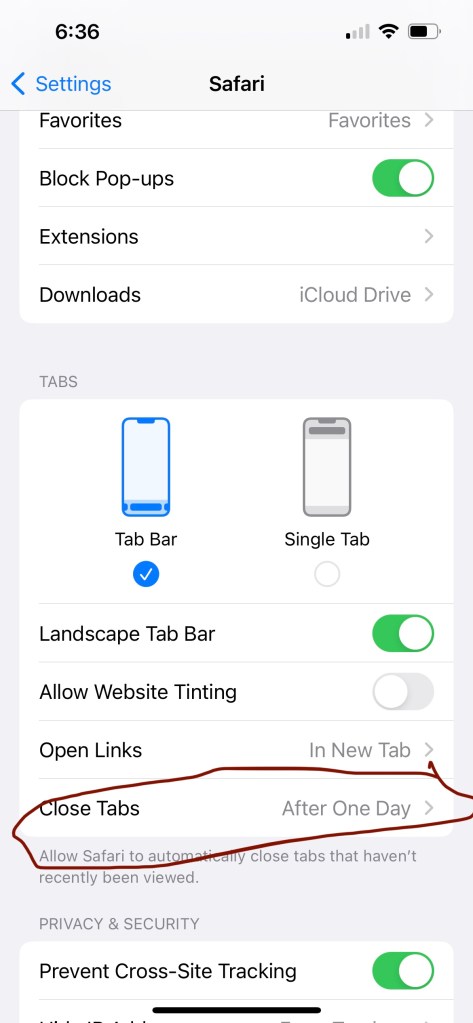
Here’s a tip . If you like me use your mobile phone to access websites on safari you would be having 100’s of tabs left open . My setting was set to “Manually” now I suggest you change that and make at time limited period . Eg mine is set to daily on my phone . Go to Settings >Safari>Close Tabs
With help from digital technology, differently-abled individuals no longer have to feel limited in terms of their career prospects. There are a number of ways you can use modern tech to your advantage, whether you’re learning new skills, networking, or seeking new employment. In this article, we’ll explore a few handy tips for furthering your career as a differently abled individual.
Remote Learning
If you don’t feel you’re adequately prepared to apply for the roles you want, you’ll find no shortage of online resources available that can help you to learn new skills or gain knowledge in your desired field. You can take free online courses or even get a certification or degree without ever attending classes in person. These opportunities also provide an easy way to network with
other professionals, which could help you find a job or get your foot in the door of your desired industry.
Consider a Home-based Business
If you’re not comfortable working in a traditional office setting, or if you have a potentially profitable idea, you might want to consider starting your own home-based business. With technology, all aspects of starting a business can be carried out fully online, including financing, creating a business plan, and even meeting with potential investors. Even if you’re working with employees, platforms like Slack and Microsoft Teams make it easy to manage personnel remotely.
Use Assistive Technologies
There are a number of assistive technologies tailored to a variety of disabilities that you can make use of to further your career. As computers are widely used in most vocations, you may be able to use alternative hardware, such as keyboards and input devices. Programs that can be adapted to accommodate various needs are also available, including screen magnifiers, voice recognition, and screen reading software.
If you work in an in-person environment, you can request mobility, seating, and positioning aids from your employer if you need these to make your job possible. If you have a physical disability, you may need to be provided with lifts, ramps, and special parking spaces.
Finding Employment
When you’re job searching, it’s important to have a well-written resume and an up-to-date LinkedIn profile. LinkedIn is invaluable for building connections in your field and can be used to find job opportunities. If you opt for the premium version, you’ll also be able to check who’s viewed your profile and send direct messages.
When building your resume, be sure to highlight your skills and make mention of any notable accomplishments. Having a professional-looking resume will help you stand out from the pile of candidates recruiters receive, so try a resume creator and free templates to achieve this. You’ll
be able to select colors and designs that suit your preferences and then add your photo and relevant work experience.
Once you’re ready to search for a job, it’s important to seek out a job that best suits you and use the appropriate tools to apply for it. Most job applications are time-consuming, as you’ll be required to fill in copious amounts of details in order to be considered, so it’s best not to waste your efforts on positions you aren’t invested in trying.
You may also consider applying for fully remote jobs, as these are far more available now that more and more companies are transitioning toward a hybrid work environment. There are a number of job boards that are dedicated solely to remote jobs, which should help you narrow down your search.
With leaps in remote technology, differently-abled individuals are increasingly equipped to find employment that accommodates them and meets their needs. With the right tools at your disposal, you’ll be able to bolster your expertise with the necessary skills and successfully land a job in a burgeoning field.
Accessibility Solutions aims to find the right technological fix for various challenges that are faced by those who are differently abled. Find a personalized solution at: http://www.aas123.com



 AccessAbility Solutions