Always on the look out for a great device that gives innovation. Lima seems such an idea for one-off cost (£70) you can have portability of all your files and folders across all your devices without the cost of a monthly fees. The way it works it connects your files and you via your external drive and your modem – so its accessible whenever you need it. With powerful encryption that only you can know and access it is safe from hackers – especially if you use an unbreakable code of random letters and numbers. The question to ask is – do you need access to your data all the time – data being photographs, films, documents, etc? I am not sure yet I need that. I do use cloud based storage which I use to do applications with rather than use data all the time. I have a google drive and a dropbox so not sure I need this yet but the idea is based on you being able to access your data remotely – even when you computer is switched off! That maybe a reason. Anyway want to know more?
Category: new hardware
Have you heard of Google Carboard?
Well I hadn’t until today where I had a tremendous session at NAACE’s ” Making IT better” conference in Leicester today. Had the chance to try a Occulus Rift device which is a virtual headset using a Samsung Galaxy S7 phone. Then someone mentioned Google Cardboard. You can find this at:-
https://www.google.com/get/cardboard/
Literally you print yourself a cardboard headset! Can’t wait to get home and print one out and try it with my iPhone 6. There are only few apps that will do VR but the Android equivalent has loads of apps. I intend to research this and print it here .
Watch this space!
I did try to print one out but you have to buy one I have one on order with ebay and its going to take till 14th April to get it! If anyone knows how to print your own out please reply to this blog
On-screen keyboard has word prediction facility in Windows 8.1
Just discovered that if you search for “on screen” in Windows 8 you get a much more complete keyboard and a built in word prediction tool. A freebie and useful addition to Windows 8 .1 and would like to hear how this might help your pupils in class using the word prediction to help dyslexia pupils.
Tablets for SEN

We talk often on this website about the usefulness of tablets. Today I want to share thoughts about Windows based tablets. Before considering a Windows 8 tablet solutions it is important to consider what is a good base equipment that will meet the needs of your special needs students.
Windows Surface is useful for pupils who just want to use Word. But it is not complete solution for using your more specialised software. I will be investigating and listing useful apps for a basic Windows Surface tool in the App Mapping Database. The version of the Windows Surface to consider is the Windows Surface Pro which is a full version of Windows 8.1 not a cut down. This allows your old software that you used before to be included if that is important to you.
If using a tabletpc with Windows 8.1 then this would present no compatibility issues with your old software. The advantage in using a table is the instant on/off and quick startup which isn’t so easy on traditional Windows based laptops. Also, unlike the Apple products there is a USB port. So for those considering Switches and alternative peripherals you can plug in what you have used before. There are some useful Windows 8.1 accessibility features which I will share with you in another post soon.
Leap Motion
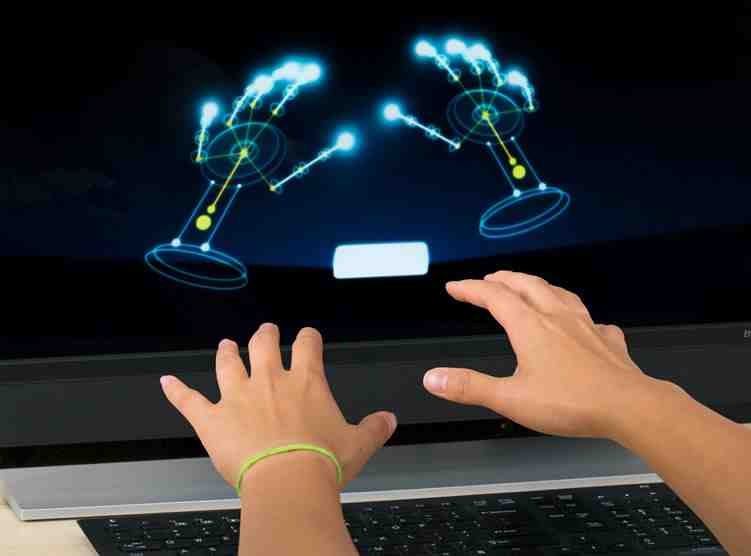 ” Leap motion is a device that can turn your pc into a kinect type device using your hands. It can be used to control the programs and operating system by using a program interface called Pointable from the AirSpace store. This store provides interesting applications for this access tool.
I liked the music and art applications the best! Using it as a control tool for the pc you need to hold your hands over the leap motion controller which is no bigger than a USB flash drive and creates am ” invisible field” above the device. You can see how this works when you use the air mouse controller software.
A program that works well with is device is dasher – used as a n interface for head pointers it is a wierd word prediction software that works well with the Leap. Otion. Dasher is free , just google for a link. It needs practise but with effort you can write what you want.
You can purchase leap motion from Maplins at £69 .
Leap Motion
” Leap motion is a device that can turn your pc into a kinect type device using your hands. It can be used to control the programs and operating system by using a program interface called Pointable from the AirSpace store. This store provides interesting applications for this access tool.
I liked the music and art applications the best! Using it as a control tool for the pc you need to hold your hands over the leap motion controller which is no bigger than a USB flash drive and creates am ” invisible field” above the device. You can see how this works when you use the air mouse controller software.
A program that works well with is device is dasher – used as a n interface for head pointers it is a wierd word prediction software that works well with the Leap. Otion. Dasher is free , just google for a link. It needs practise but with effort you can write what you want.
You can purchase leap motion from Maplins at £69 .
 AccessAbility Solutions