As of today the fact that the Google mini no longer makes phone calls without the use of Google Duo is a tragic setback for the disabled community. It was predicted to happen in mid December and today is the day when it actually happened. It seems a stealth move which is falling underneath the radar and not made explicit enough in my opinion.
What we feared has happened and sadly this is disempowering blind people with lack of hand function where only voice is the main input to finding things and taking control. I have a blind user who actually depends on this to be more independent and not only receive calls but actually make them.
I am deeply saddened by googles decision to do this. And I would urge the disabled community to stand together and challenge this.
Google recommends Google duo to make the phone calls but that is only part of the story. In order to use Google Duo you have to access your Google contacts. The problem with that is it doesn’t allow for searching the Internet like you used to be able to do and therefore it is not a practical tool for those who struggle with searching for things and making phone calls.
There are two points to this:-
1. Why is the UK only been single out for this?
2. Could something be put in place that can enable disable people to make the phone calls they so earnestly desire to do?
If anyone has an answer to this please get in contact via this website or contact me at myles@as123.com. This unilateral decision by Google where it’s not haven been consulted about is a great affront to those who fight and champion and help people with disabilities to use Assistive Technology
I had a phone call this from HRMC saying that I had been sumound to court for tax fraud. Nice. But not at all true and can be easily checked. I have accountants and they would never let that happen.
So I found this on the Halifax website which applies to most types of phone scams;-
My Colleague and fellow AbilityNet volunteer Dave Goldsbrough enlighted me about all things Linux. Do listen to his podcast “Techbull” as it contains lots of useful information including a series on Linux.
After listen to Dave explain about how nearly all our financial and service industry use Linux I felt I should try loading a version of Linux called Ubuntu on a machine that was old and not used for anything else. After finding a 32 bit version of the software which also worked with a ISO software called Etcher . Unfortunately, couldn’t get it to work with Rufus which would be another ISO burner. I created a loadable flash drive. It was then a simple matter of loading onto the device. I could choose to keep the operating system it was using and run alongside it with Unbuntu or having it do a complete install of Ubuntu and remove the previous operating system. As I no longer needed the device to be so slow I decided on the later. Notice I am not telling what operating system I was using. The netbook I installed it on was a Samsung N10 which was running on 1GB of RAM! Processor was 1.6 Ghtz . So not the fastest. I used the N10 a lot in the early 2000 for students and the advantage was its size. Students could work on their netbook and have their textbooks on the same desk.
Once loaded which was relatively straightforward for most people to do I was presented with a desktop that resembled an Apple environment. Ubuntu is free and shareware so it’s attractive to people who can experience for free – includes Mozilla, Libra Office and some useful Accessibility options bulit in. In the Settings you can select Universal Access and this gives the user – High Contrast, Large Text, Screen Reader, Beep on Caps and Num Lock. For the hearing impaire there are visual alerts. Typing has sticky keys (slow keys delays the key press), bounce keys ignore fast duplicate keypresses, Enable by Keyboard. Then on another tab it is Pointing and Clicking which has Mouse keys – controlling the keyboard using the keypad. Simulated Secondary Click triggering a secondary click by holding down the primary button and Hover Click which triggers a click when the pointer hovers. Finally, the Profile tab which shows the Accessibility Profiles Indicator which puts an icon at top right to give these options.
So it has built in Accessibility simular to other Operating Systems and I look forward to testing each one.
So why don’t we see Ubuntu being used more? Maybe because its free we don’t think it’s going to be good. But there are advantages such as no need I can see for Antivirus software as few attacks occur. If anyone does have some other opinions as to why Ubuntu is not used more then please drop me a comment at the bottom of this article. Thanks once again for David reignited my interest in this system. I am of the opinion to use any operating system that helps my clients in a better way. I would not recommend it on a machine you depend on until you have tested it and would certainly try the dual operating system first.
BATA last year in the Educationalists Special Interest Group put on a year long series of webinars to look at ways that Assistive Technology is being used in the education sector. It’s a webinar series that provides useful and valuable information to any education setting. Topics from practical Assistive Technology in the classroom to current initiatives such as the DFE Edtech Strategy. Perhaps, one of the most helpful is Exam Arrangements. Although aimed at the UK it does have some application to the wider world.
In helping a friend to access Outlook’s data files I needed to trace where the hidden AppData folder was. In order to do this I needed to reveal hidden files. This comes with a health warning. Only do this if you know what you are doing. Any changes here could cause problems for your operating system. This is purely to locate missing folders that were once visible in thi0s client’s case. This video below may be very helpful to you.
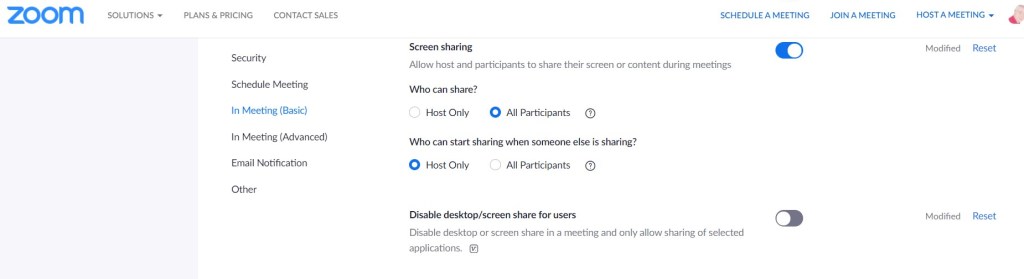
In the latest Zoom update they have introduced a rather silly default which may catch Zoom users who do screen sharing. In previous versions you could share your whole desktop screen quite easily. Now, in the latest update it switches that off! So you are restricted to sharing applications only. This will catch people out and may catch you out.
It’s a simple matter to switch it back on. Go to Settings, and half way down basic settings you will see the option to switch off “Disable Desktop Screen sharing.” Why on earth it hasn’t set the other way round I don’t know!
This week is running this free online conference on Wednesday 18th November still time to book your place
What do we mean by ambitious teaching? It’s having higher expectations of what pupils can achieve and the means by which it can be done. Much can be learned from the field of special educational needs on increasing individual pupil potential and achievement. Get it right for your pupils with additional needs and you get it right for everyone. Hence why we called this conference “Assistive Techniology for All using ambitious teaching.”
Never has there been a better or more important time to learn about how Assistive Technology can enable all pupils achieve more and gain control over learning using 21st Century means. To harness the new technologies to be efficient and effective in all school phases will be the challenge of our times.
This day conference is for all who have an active participation in education in primary, secondary, HE and FE, Universities and Colleges. It’s scope is wide and we would like anyone to attend for free and discover how to take the opportunity afforded us by the sad reality of Covid-19 and to make the best of a bad situation.
Schools and educational institutions have had to step up to the mark and accelerate their use of technology. How many settings had heard of Zoom before Covid-19 let alone use it? Government via the DFE Edtech Strategy group have send more emphasis should be placed on suppliers making their products more accessible.
The conference will spam from 10:00-3:00pm with regular short breaks in-between each session for comfort. It will be interlaced with inspirational thought leaders in the field of special needs and assistive technologies with workshops led by product suppliers to show how best their product can support and lead ambitious teaching
Once registered we will send you a link for the conference with a programme nearer the time. Our programme is developing fast we have notable people already signed up to attend such as Aaron Smith ( Microsoft) and Carol Allen (Inclusi) . So it’s going to be finalised by the 18th November. Put it in your diary and either spend the whole day with us or drop in and out. Sessions will be recorded so that you can replay them later and you will never miss a session.
Hi. I’m Geane, a PhD student at the University of Southampton.
My research is about finding ways for visually impaired people to be able to do more sport/physical activity. I’m seeking young adults with VI to take part in my online survey.
I would very much appreciate if you could share my advert with a link of this survey to your visually impaired members in your social media or online community.
My advert is this:
Are you visually impaired between 18 and 30 years old? Do you do physical activity or play sports? I want to hear from you all, regardless if you are active or not. If you are active I would like to hear about your experience with physical activity, sports and technologies. If you are not active, I would be interested to know why. Please fill in this online survey https://isurvey.soton.ac.uk/33270. If you have any questions, contact Geane Fontinele directly on gdaz1e17@soton.ac.uk Study Reference Number ERGO/FEPS/ 51707.
I look forward to hearing from you.
Kind regards, Geane Fontinele PhD student in Web Science University of Southampton


 AccessAbility Solutions