Natural Reader Online (Dave Banes)

Thanks to Dave Banes for this post:-

Free and Low Cost Assistive Technology of the Week 32/17 – Natural Reader 

Natural Reader is a well established text to speech technology that works across a variety of platforms. Windows, Android, iOS and online.

NaturalReader Online is a text-to-speech web application with high quality premium voices for personal use only. Login from any computer to convert any written text such as MS Word, PDF files, non-DRM eBooks, and webpages into spoken natural sounding speech.
https://www.naturalreaders.com/online/index.html

Windows and Mac
NaturalReader is a text-to-speech software for personal use. This easy-to-use software with natural-sounding voices can read to you any text such as Microsoft Word files, webpages, PDF files, and E-mails.
https://www.naturalreaders.com/software.html

iOS
https://itunes.apple.com/gb/app/naturalreader-text-to-speech/id598798210?mt=8

Android
https://play.google.com/store/apps/details?id=com.naturalsoft.naturalreader&hl=en_GB

screenshot of Natural reader for IOS

Windows 10 – update gives new features

The latest large update gives useful features to Windows 10 users . Read on :-

New Windows 10 Insider Preview features
Here are some recent highlights, including the build number where they first appeared.2 Go to the Windows Insider blog for more details on all the latest Insider Preview builds for both PC and Mobile.

▪ Stay better connected. Pinned contacts display a counter if there are unseen messages. To share a file, simply drag-and-drop onto a contact to start an email — or share directly via the share picker.3 (Build 16199)

▪ A new design. The UI for Start and Action Center includes elements of our new Fluent Design System such as Acrylic Material — a cool, translucent effect. (Build 16215)

▪ Pinned sites are back. We heard your feedback — and you can now pin a website to the taskbar from Microsoft Edge. (Build 16215)

▪ A better handwriting experience. The new handwriting panel has more gestures, easier editing, and emoji. Fill the panel and lift your pen off the screen — the text will shift so you have room to continue writing. (Build 16215)

▪ A clever way to keep track of events. Using visual intelligence, Cortana (with your permission) can prompt you to create a reminder when she notices event posters that you’ve added to your camera roll4 – or when you use your pen to circle event information for an event on a website.5 (16215)

▪ A totally new touch keyboard on PC. Enhanced text prediction, shape writing with the one-handed touch keyboard, and dictation on the desktop.6 (Build 16215) Plus the keyboard supports 26 languages, including Simplified Chinese, Traditional Chinese, Korean and Japanese. (Build 16226)

▪ OneDrive Files On-Demand. Access your files in the cloud without downloading and using storage space on your device. All your files, even online-only files, can be seen in File Explorer and work just like every other file on your device. (Build 16226)

▪ Currency converter in Calculator. One of the top customer feedback requests since the launch of Windows 10 is now available for Windows Insiders to try. (Build 16226)

▪ Narrator gets artificial intelligence. Now Narrator can do things like generate descriptions for images that lack alternative text. The service also includes the ability to extract text from images using optical character recognition. (Build 16226)

▪ Link your phone and PC. This first set of ‘linking’ features is focused on cross-device web-browsing using an Android phone. Give it a try and let us know your feedback. Follow these simple steps to have your browsing sessions from your phone automatically show up on the PC that you’ve chosen. Then register here, if you’d like to help us refine these features even further. (Build 16251)

In other news
▪ Listen to our latest Windows Insider Podcasts. Go to our podcast library to find out how experiential gaming builds empathy, and learn life lessons from a third grader on how gamifying coding builds friendships. If you like what you hear, subscribe and rate the episode on iTunes, Google Play, or Stitcher for the chance to win a NinjaCat T-shirt.7 Then, check back to hear more stories from Windows Insiders.

Info for IT Pros
▪ Windows Server — now available as an Insider Preview. We recently released the first version of the Windows Server Insider Preview Build. Download the latest version and explore improvements to: container and software-designed networking, HTTPs, time accuracy, networking transports and more. Plus, the Windows Server Core base image has been optimized and is now over 20% smaller.

▪ New security features. We have released several new preview security features for Windows Defender Application Guard and Windows Defender Security Center in Windows 10 Insider Preview Build 16232 – and we’d like to hear what you think. To discuss these new features, and get best use scenarios and practices, visit the Windows 10 security space on Microsoft Tech Community.

▪ Introducing Windows Analytics Upgrade Readiness. In this three-part video guide, you’ll learn to leverage powerful telemetry data, gain insights and recommendations about your organization’s upgrade readiness, and follow a guided workflow based on Microsoft best practices.

▪ The Ultimate Guide to Windows Server 2016. Download this free e-book to learn about the latest technology in Windows Server 2016 and what it means for your organization, including: better protection, improved datacenter efficiency, new modernization capabilities and more.

LEGO BOOST

Great article on LEGO BOOST – a programmable robot kit set with an easy to use, no words

LEGO BOOST – £149,99 on Amazon UK

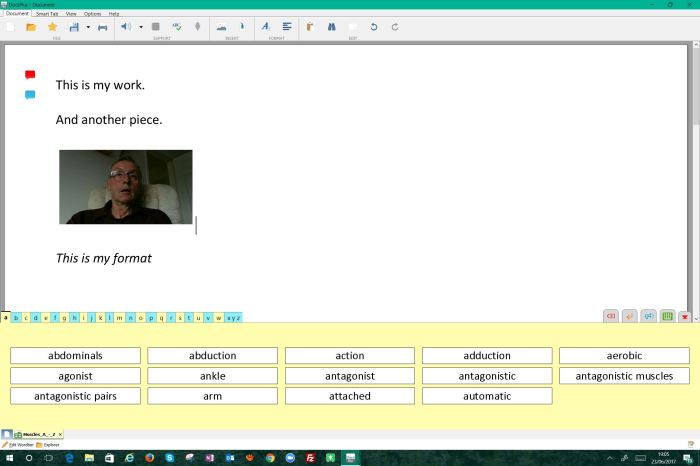
DocPlus by Crick Software

Another new product and this time it is for older learners. This combines the best of WrtieOnline  and Clicker 7 all in one place. with more integration with other software. With good integration with Microsoft Word you can immediately use it as an alternative to  it, So you can do the following:-

  • text to speech that is excellent and not robotic
  • audio memory notes ( as in Clicker) have been added
  • Word grids
  • Camera (back and front)
  • Word prediction
  • Mindmap tool
  • Formatting has been upgraded to include bullet points, centre, right, left, images around text
  • ……and much more!

DocPlus makes a great addition to the Crick family and would help pupils who need a more grown up form of support.

And there is more , in the next version there will be these additions I am told:-

1)        Exam Mode: Different aspects of the program can be enabled/disabled to match the individual student’s access arrangements
2)      Auto save/restore: Automatically backs up the student’s work in case of computer crash / power cut etc.
3)      Tile PDF: PDF reader can sit underneath the document so the student can see/read the question whilst answering in the document above.
4)      Edit PDF: Where the exam authorities allow answering directly onto pdf (e.g. Scotland), DocsPlus supports this and allows speech / predictor / spelling support depending on Exam mode settings

DocPlus

Windows 10 still free for Assistive Technology Users

yes, that’s right! If you are are a user with a disability you can still get Windows 10 for free just follow the link below:-

https://www.microsoft.com/en-gb/accessibility/windows10upgrade

Thank you Microsoft.

Immersive Reader works in Office 365 Word

If you are using Office 365 I discovered an interesting tool now available in the online apps like Word. I will also try PowerPoint but figure OneNote would be a better app to try.  OneNote works but that’s all. Not Excel or PowerPoint. But Word is more than enough to work. Maybe run a ebook through it  done in Word.To try this,go to the Word app and in the “Tell me what you want to do?” help window type Immersive Reader. Make sure you have some text already in word to try out. The immersive reader has great tools for teaching how words are built from composite elements of vowels, blends and consonants, etc.  Here is a screenshot of what it looks like:-

screenshot-2017-03-01-at-21-16-34

Padlet Now Has Desktop and Mobile Notifcations

https://www.bloglovin.com/blogs/free-technology-for-teachers-1315757/padlet-now-has-desktop-mobile-notifcations-5464149683

Strikingly – your one page website!

AAS on Strikingly.com

The above website I have just created using a simple web builder called strikingly.com . This is one I hadn’t heard of until today. I must say I find it easier to navigate that wordpress and as a current look which I have been wanting for a while. A scrolling down screen. Not too much information visible. And best of all a simple web address which is:-


http://aas123.strikingly.com 


If you are thinking of re-designing your website this is certainly one to consider for a simple look with just a few social media links and content. It is one I shall use effectively. Time to build and check the links – 1 hr – simples!

Also you can edit in iOS which something I can do in WordPress awkwardly ! But can’t when using my other favourite web building site Wix.com. Wix has more bells and whistles but I am liking what I am seeing here! Keeping it simple is good for business I think. What do you think folks?


HubPages 

AccessAbility Solutions are on hub pages ! Yet another social media tool to see ! Go to AccessAbility4u

Windows 10 update

A very large and laptop changing update came in yesterday for those on the windows insider programme. Watch out for this as it might take time to come through to you, . You do have to agree and give it permission to re-install windows 10 on your machine so my experience was it worked first time but did take a lot more than the 20 minutes it told me it would take. The actual download installed in a usual amount of time but the upload to my machine and installation took 2 hours!   One feature that will have some implications for dyslexic users is the note taking facility in Cortana. If you say “Hey Cortana, can you write me a note,” you will then be able to add in a short sentence. Unfortunately it seems to only allow one shot and it automatically goes into OneNote. So what would be useful would be a pause facility. I do like that it goes straight to OneNote! For more about what it does please click below:-

https://blogs.windows.com/windowsexperience/2015/11/12/first-major-update-for-windows-10-available-today/