Great little video explaining the check it feature on texthelp’s readwrite program. One minute and 12 seconds of your time !
Category: new software
Carol Allen on DocsPlus
The energetic and effervescent Carol Allen has been using Clicker for ….. a long time…. but now she is using DocsPlus to support pupils with recording needs in secondary schools . Here is what she says:-
Good News for Office 365 personal users
Microsoft have announced that office 365 users can now have office installed on 5 devices on their office 365 personal user accounts .
Here’s the post:-
Fido2 – a new way to logon
Robin Christopherson ( Head of Digital Inclusion), AbilityNet wrote this article about how usernames and passwords should give way to other means. Read his article here at:-
https://digileaders.com/new-log-in-put-end-passwords-good-for-disabilities/
The alternative is something called Fido2 – you can try this out at:-
https://www.noknok.com/trynow/
In essence this is what it does – it uses a range of methods to authenticate

Nok Nok provides a choice of any device, any platform and authentication method like tokens and biometrics voice, face, touch, iris and more. By eliminating friction, Nok Nok will increase user adoption of passwordless multifactor authentication, improve security posture and at much lower costs.
I confess I have not tried this for my site administration so over the next couple of weeks I will research it and get back to you on a blog on this. But it does sound feasible and doable.
Clicker Connect Symbol Stix
A new version of Clicker Connect has symbol option now. So welcome to Clicker Connect Symbol Stix. For more details click on the link below:-
http://www.cricksoft.com/uk/clicker/ipad/clicker-connect-symbolstix
New features in Edge will help dyslexics
In the latest update on Windows 10 there are some features built into Edge that will help dyslexics. The first is the browser can read aloud and not read out code. Also words are highlighted as spoken.
Text to speech is the no1 feature that most dyslexics ask for. So that has given a powerful tool at no cost to the user. It should help Edge to be the browser of choice for Dyslexics.
Another useful feature is making use of Learning Tools to make the browser a more useful learning tool. By analysing the text for its component grammar elements it allows users to see what makes good writing.
SprintPlus
SprintPlus is a help for dyslexia and those who struggle with reading, spelling and writing. Using text to speech it makes the connection between speech and writing which I like. As a teacher of special needs I would often see the value of making speech relate to writing as it made more sense to a cognitively challenged child if reading related to their own experience rather than books that do not.
Try SprintPlus on a 2 month trial at:-
Are there changes to Speech Dictation in Word and OneNote by Microsoft?
This is NOT true. It’s the ease of access speech recognition system that will get an upgrade to the quality of Cortana and that is not the same speech recognition system as Office 365 which is not affected.
There are rumours circulating that Microsoft are going to remove speech recognition from their system apart from Word. Can I say that this is a rumour which I can now confirm is not true. Our colleagues in the Assistive Technology in the Workplace arena are concerned that it may impede their work by its removal.
- Is there a system update that will remove speech recognition from all but Word? Not true!!
- Does this affect OneNote? No
- What about the Learning Tools? Not affected
- Is there going to be a replacement product? Not being replaced but improved!
Hector Minto was invited to comment and he has.
Hector has said the rumour is wrong about the removal of speech recognition . In fact there will be upgrade to improve the quality on the ease of access speech recognition system which is different to the Office 365 system. That is unaffected!!
Choose it Maker 3 – free trial
You can have a two week free trial of the great product Choose it Maker 3. Ideal for early years, primary and special setting it is really a brilliant product for teaching choice making or a learning activity .
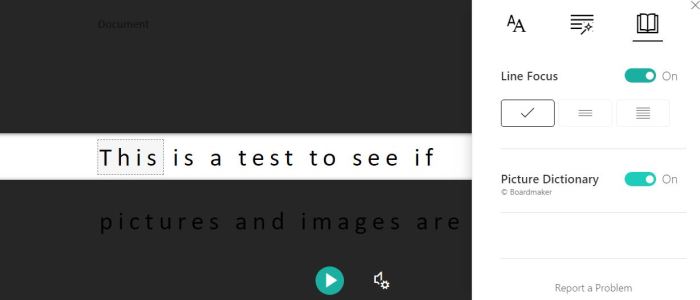
Picture Library in Immersive Reader
I said a few weeks ago that we expected a picture library to be included in Office 365 and Word 2016. If you type in the help section Immersive Reader and select the Book icon you get the picture above. Select Picture library and you will find that if you click on a word a helpful picture appears underneath it.
 AccessAbility Solutions