Windows 10 stuck in Safe Mode

Anyone had this problem?

Just happened to me today when I tried to load a DVD!!

Apparently I learnt some new options can be accessed if you do get stuck in safe mode. It hasn’t solved my problems yet but here goes. Hopefully , either on the desktop click on the windows logo or splash welcome screen then on the power icon. You will see the options Shutdown or Restart. Hold down the shift key and press Restart and new options will appear like continue, turn off troubleshoot, etc.  Reset the PC option after pressing troubleshoot is what I am looking at but -oh dear! – it brings my pc back to a default condition. Drat!! I will try the recovery disc I got from the internet called Easy Recovery. I have a choice of devices so I am going for what looks like my standard CD/DVD. Restarted and the screen has gone black!

Help Google required! Using my speech input into google I asked ” My computer is stuck in Safe Mode in Windows 10 how do I get out of it?” Numerous suggestions appear . The one I choose was to right mouse click over the start menu and select run then type “msconfig” and see what I can change there?  I had  the computer on minimal selection  and so I changed it to “normal boot”  Black screen appears and then a polite “Please wait.” – and voila !  My screen is back. I haven’t lost my files and the machine reset to factory setting. Phew!!

That was really bizarre! And all because I wanted to play a DVD . GGrrr – Microsoft! Bah Humbug, Microsoft!!

If anyone can tell me what happened to make my computer do all this I would be grateful? Reply to the blog or facebook page.

Focus on BETT by Special World

A lot has already happened in the world of special needs with New Years honours for Professor Barry Carpenter and also for Sal Cooke of BATA council to name two. So this issue of Special World concentrates on BETT this year. Take a look at the many articles from around the world and see a larger context of the Special Needs world.

BETT edition of Special World

Smartamp

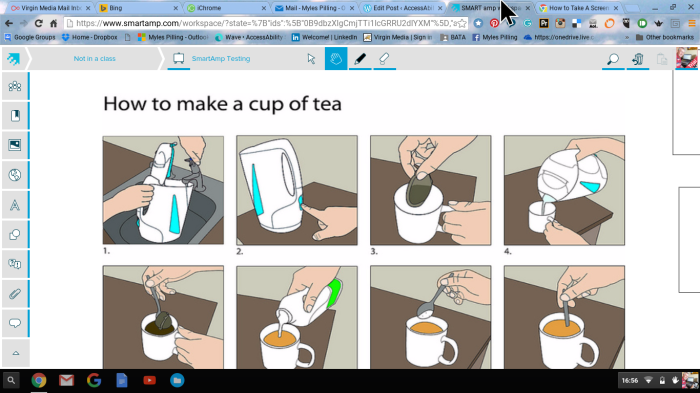
Nothing to do with guitar amplification but a really great tool for the flipped classroom! Made by the makers of SMART Interactive Whiteboards ( They now consider themselves developers of software more than hardware suppliers!)  it is a cloud based tool.  Users can communicate with an electronic pinboard ( similar to Padlett) but includes more media – like youtube videos and there is interaction with the board via your mobile device. Given you have a working wifi then you can interact with screen in realtime and pupils can see their work appear on the screen like this:-


Screenshot 2016-01-14 at 16.56.08

The only problem is there isn’t a PDF option to printout but watch this space. I think it may be a development. We will see after BETT

For more information go to http://www.smartamp.com 

Enlight

Enlight is another photographic app I have enjoyed using. This will cost you £2.99 from the App Store as its an iOS app. This little app is great for making interesting images from your photos and produces a good result with simple menu selection of the different effects tools. I particularly like the Effects tool. So if you want to make great looking artwork using your own photos then consider this app.1930807_10154570515322818_4026798750353546196_n


Pic Collage

Pic Collage is a useful app for the iPad that has now been developed for Windows 8.1 and 10. It is free but comes with a watermark when printed out. To remove the watermark it will cost £1.49 but worth it as the results are simple and effective. A great little edition to the world of photography and poster making. The range of thing you can do with this app using a touch enabled device is great from posters to advertise events to collages of your christmas party. I recommend you take a look through the windows store.

Collage 2016-01-04 14_29_15


Mobile Technologies – What’s the Point!

Leads and Cables 

Back in the beginning of micro-computers we thought it marvellous that their was a small box that ran a cassette tape that loaded a series of beeps and tones that meant we “sometimes” got our programs loaded!

Computers then required cables and power to function. So you were confined to your desk or dinning table and have things weighed a fair weight as well has having the following:-

  • a bulky monitor 
  • a cassette tape 
  • a cpu  
  • a keyboard 
  • a mouse 
  • a dot matrix printer

It could hardly be called mobile.

Laptops and Wifi broadband connectivity 

The next technology leap was laptops and wifi broadband connectivity. This meant we could take our computers anywhere we liked with us. At first hotels were not able to make use of this technology but that has changed from being the unusual to becoming the norm. Laptops meant that we could work in different locations at times convenient to us including travelling on planes and trains accessing the internet via on-board wifi systems.

SmartPhones and Tablets 

The next development has been in smartphones that can do more than make a call. Now the ability to email, make a video call and surf the internet reside in your pocket. Unthinkable at the time of the first microcomputer where it took 2 days to get a reply to an email! Couple that with being freed from your cables and leads this truly means freedom and “anywhere , anytime ,” technology. The introduction of the iPhone then the iPad has inspired a whole range of tools and devices that allow us to do anything we like on the internet and with our data.

Cloud computing and the Internet of Things 

Being freed from our cables and leads is only the start. We can now be freed from software on a single device. The present trend is to have data and software held elsewhere ( probably Iceland!) and across ALL our multiple devices. Yes, multiple devices. Where as it was considered almost impossible to own your own computer we now have more than one device in your home. In fact each member of a family will own or have access to a device.

Then, there is the internet of things. A term that is as almost as misunderstood as to what the Cloud means! The internet of things refers to devices that:-

  • speech input giving and receiving of information  
  • control the heating of your own remotely 
  • monitor your heath and fitness through a range of body worn devices 

Such devices are truly making a difference in our world. People with Alziemers regaining functions they had lost through speech recognition and expert systems such as Siri to a wearer of an apple watch because it noticed a heart condition before the user and had notified a doctor (remotely and instantly)  who immediately arranged treatment!

Conclusion 

So these are the trends we are seeing and experiencing. Couple this with knowledge that Solomon would envy having through the worldwide web and we are the most informed and most liberated of learning than we have ever been.  A new type of skill set is needed to make use of these opportunities. I wish to end by listing some of them to inspire you to take one step forward to having mastery of one or more of them. So let’s start the list:-

  1. To make use of the vast amounts of knowledge available we need to understand what we need to access this information. Keywords and phrases are so important along with the understanding that if you don’t know something you should consider using the internet to finding it. Asking the right questions will usually give the right answer!
  2. Management of your own data – both through your own portable hard drives but also have access to them on cloud-based storage device
  3. Understanding that data can be accessed across any device you want to use as long as you maintain a database of your username and passwords
  4. Microsoft and Apple talk about services and connectivity across their products constantly. They talk little of software now which implies they see the future in the above terms as well.
  5. Finally, we access what other people make but now we have the capability of creating and publishing our own materials and ideas. This is indeed liberating and powerful but not to be confused with the trend to celebrity and pushing one’s ego in front of others!
2015 in review

The WordPress.com stats helper monkeys prepared a 2015 annual report for this blog.

Here’s an excerpt:

A New York City subway train holds 1,200 people. This blog was viewed about 4,600 times in 2015. If it were a NYC subway train, it would take about 4 trips to carry that many people.

Click here to see the complete report.

LearnPad partnering with Classroom Monitor

Having a mobile solution to recording what goes on in your classroom and to have instant  feedback from your students is a useful combination to have . Not to mention having LearnPad’s curriculum to use with your students. Please take a look at:-

LearnPad with Classroom Monitor

Oxford press & Teachers Trust

This looks a useful tools for schools looking at ways of making their CPD more effective. Take a look at :-

Oxford Press & Teacher’s Trust

The Codpast

The Codpast is a website/podcasting site that are for Dyslexics to understand their needs and to find help and resources. Supported by donations and by suppliers such as Texthelp it is a very useful resource and I thoroughly recommend it. Do go and visit them and subscribe if you can at:-

http://thecodpast.org