This is another great little app for Android which makes lists for you and sends reminders. You can set up categories so your list are organises. And it is free. Looking for reminders? Or a way to keep your life organised then To Do List
Author: AccessAbility Smyles
Specialist ICT SEND Consultant,
Committed Christian,
Loves photography and computing
Plays piano and guitar - both badly!
Maps.me

If you prefer to find your way around and not eat up data then why not make use of an app that downloads maps from countries all over the world. This is a great little app for Android and iOS . For more details of what this app does go to:-
A Collection of Handy Chrome Tools to Enhance Teachers Productivity
Accessibile VR
Useful article on how to make VR accessible for the physically disabled
AccessibleVR
Red screen on startup on a Windows Surface
After a recent update I experienced a bright red screen on startup which didn't affect the functionality of the device just looked like there was a problem! ( red for danger).
If you experience this I managed to resolve it by following these instructions . You might need to re-install some passwords remember which Microsoft account you log onto the device with before you do these steps
Anyway, here is the solution :-
https://support.microsoft.com/en-us/help/2884723/the-surface-pro-startup-screen-is-red
Associate Fellowship of Higher Education
I achieved another milestone in my career by gaining the above award. This is a national scheme for staff in Higher Education to achieve a standard that is recognised by this sector. So if you are a university or higher education setting requiring some Assistive Technology input to your course for special educational needs that please comsider using me. Contact me via this website.
For more details of this scheme go to:-
https://www.heacademy.ac.uk/individuals/fellowship/fellow
Teaching tips from the Macular Society
This work I contributed to has now gone live. The aim is to give simple helpful advice to schools about visual impairment. There is AT advice contained within each subject area:-
www.macularsociety.org/teaching
Is Technology delivering in schools?
This article printed in the Guardian does ask this question which is answered by a panel of experts of which one John Galloway I know. It questions the use of iPads as useful tools in schools and debates the introduction of certain technology into schools like VLE’s which were introduced too soon and which Google now have taken forward.
As a tablet trainer myself I do see the power of its use when it is linked to teaching & learning not as a reward or bright shinny thing as it was in the beginning.
Anyway read for yourself at
DocPlus by Crick Software
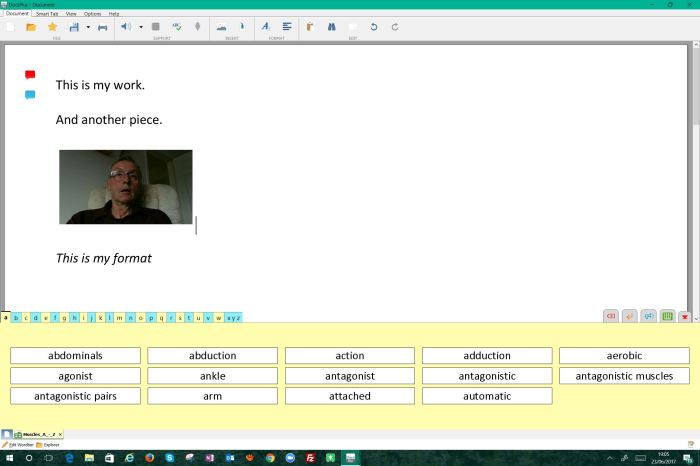
Another new product and this time it is for older learners. This combines the best of WrtieOnline and Clicker 7 all in one place. with more integration with other software. With good integration with Microsoft Word you can immediately use it as an alternative to it, So you can do the following:-
- text to speech that is excellent and not robotic
- audio memory notes ( as in Clicker) have been added
- Word grids
- Camera (back and front)
- Word prediction
- Mindmap tool
- Formatting has been upgraded to include bullet points, centre, right, left, images around text
- ……and much more!
DocPlus makes a great addition to the Crick family and would help pupils who need a more grown up form of support.
And there is more , in the next version there will be these additions I am told:-
1) Exam Mode: Different aspects of the program can be enabled/disabled to match the individual student’s access arrangements
2) Auto save/restore: Automatically backs up the student’s work in case of computer crash / power cut etc.
3) Tile PDF: PDF reader can sit underneath the document so the student can see/read the question whilst answering in the document above.
4) Edit PDF: Where the exam authorities allow answering directly onto pdf (e.g. Scotland), DocsPlus supports this and allows speech / predictor / spelling support depending on Exam mode settings
Windows 10 still free for Assistive Technology Users
yes, that’s right! If you are are a user with a disability you can still get Windows 10 for free just follow the link below:-
https://www.microsoft.com/en-gb/accessibility/windows10upgrade
Thank you Microsoft.

