TechSharePro 2018 , Barclays Bank, Canary Wharf

TechSharePro 2018

Attended the TechSharePro event At Barclays, Canary Wharf today. Here are some of the highlights

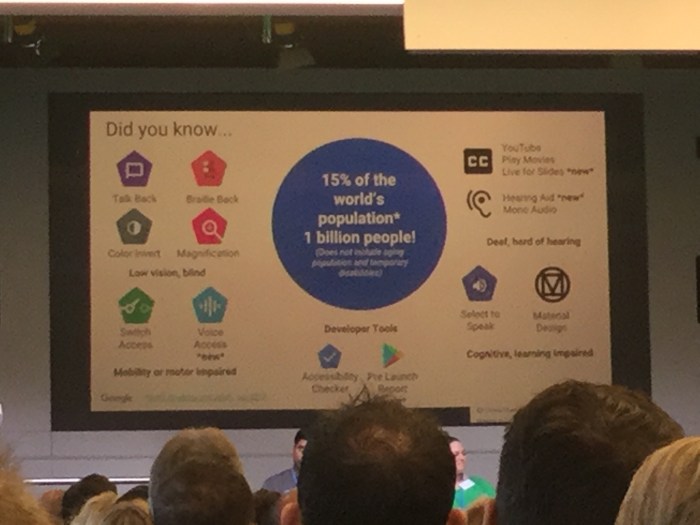
Google Accessibility

Voice access – control the whole of the device, voice control on a chromebook? Can’t wait to try it out!
Research – User research

Important ideas can come from just 5 people!

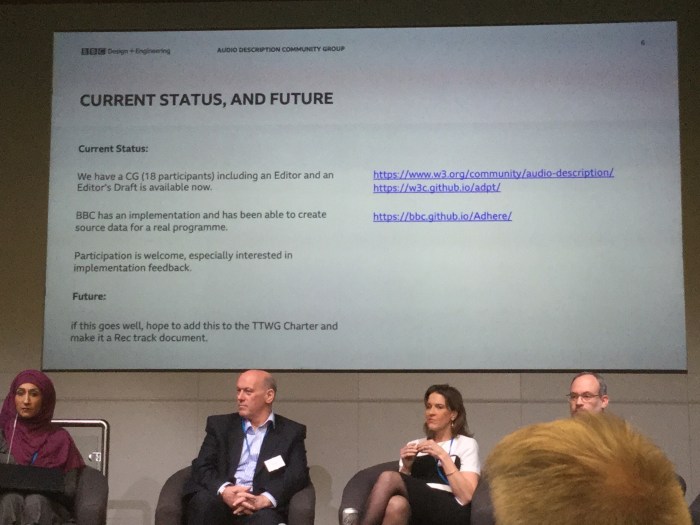
Accessible Media – 150,000 programmes with Audio Description

Channel 4 very good audio description

BBC no proprietry open standard format . Able to mix and create good audio description. Interchangeable media incorporating all types.
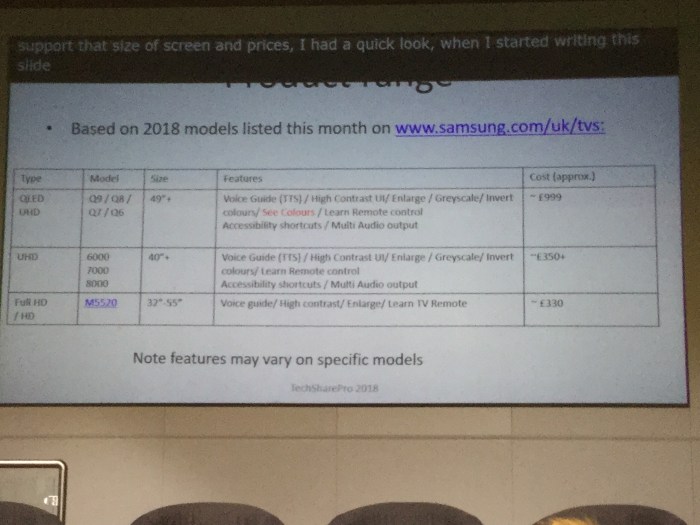
Samsung tv’s do have fairly good accessibility features

And a 32inch screen but alas you have to press the remote button to access voice control
Accessibility Theatre

National Theatre are using Smart glasses for open caption theatre. Brilliant idea and looks a cool place to visit if you are hearing impaired.
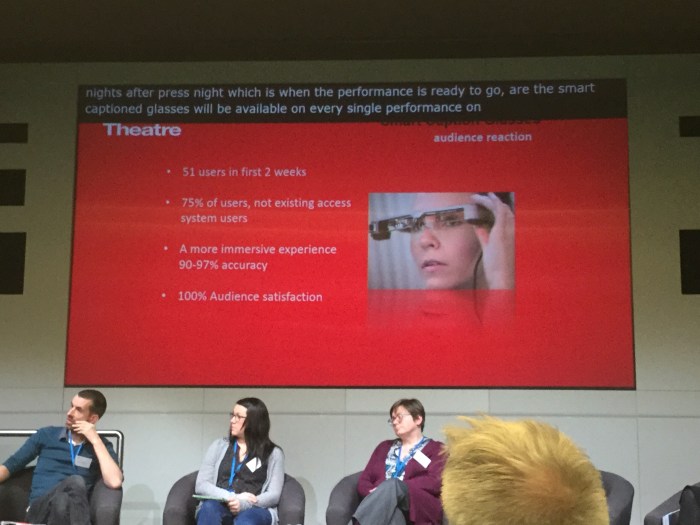
Great stats!!
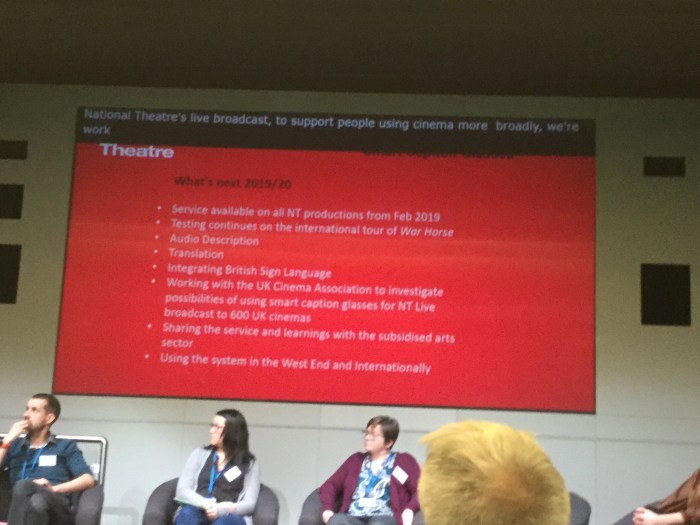
Great plans for the future

Body mapping for non-verbal communicating children – didnt quite catch this talk but sounded interesting as body image is everything in our culture these days

Neil Millican – Sustainable Accessibility

IAAP & Apprenticeship, RNIB, HEX DESIGN, ABILITYNET – recognised profession

Trail blazer group first intake for Apprenticeship in 2019

Reduced reality – filter over stimulation
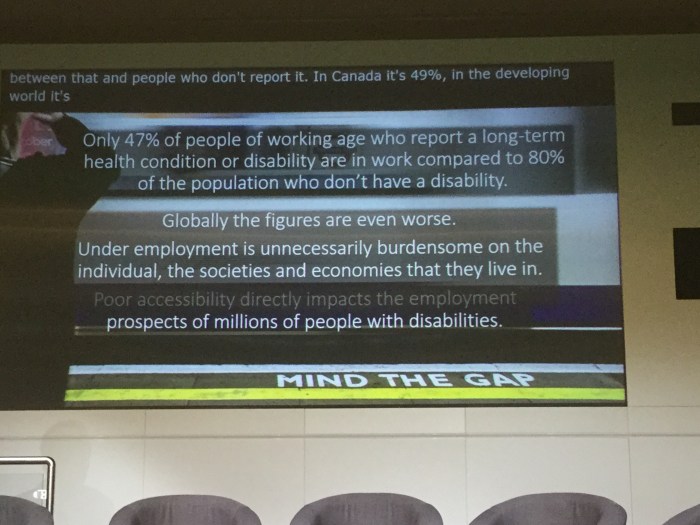
Make disability factors mandatory (Amen!)

VivifyMe – Android and apple in the future . Launching August 2019

Dementia friendly app but can’t tell you what it does yet ! Because i honestly don’t know!

Lewis Hine – “friend finder”

Http://Www.lewishine.org

http://www.nosolation.com

“Prom in a box “ – live prom link through A1 robot – great idea to get teens and young people who because of illness miss so much to attend a prom.


Accessibility in Apple

Find out all you need to know about accessibility at:-

http://www.apple.com/accessibility

Email:- accessibility@apple.com

Speech Recognition on Chromebooks

Came across this useful bit of information on text to speech input into Chromebooks, You can also use Voice Typing in Google docs as well. But what applications are there out there that controls the Chromebook? Let you know if I find some.

https://mcmw.abilitynet.org.uk/chrome-os-chromebook-speech-recognition-2

Future Decoded conference

futruedecoded

This event occurred last week and there were at least three speakers I know – Hector Minto and Arran Smith (Microsoft) and Neil Millican ( Atos).  Addressing the accessibility in Mainstream software they were looking at how assistive technology enable people to be employed and up front in all kings of organisations. Now I wasn’t there so why not take a look at this link for the whole event:-

https://futuredecoded.com/session/e9c8fee2-19b5-e811-bce7-000d3a2231dd 

Chromebooks have screen readers built into their browser

ChromeVox is the built-in screen reader that comes as accessibility tool as part of Chrome OS. It is quite useful and with it’s range of shortcuts powerful for those who are visually impaired on blind. I was testing a website on my chromebook and found that it was there!

If you have a Chromebook and want to try it out. Press CTRL+ALT+Z to enable it and to unenable it repeat the CTRL+ALT+Z.  Use TAB to step through the options , speech guides you through. Search + space acts like enter and the cursor keys navigate in detail around a menu. Here is the help section link

Using DocsPlus in exams

Crick Software’s DocPlus has an exam mode which means it can be used in exams reducing costs in scribes and readers. Read more here:-

Exam mode in DocsPlus

Rise on Tribunerals

term-insurance-required-for-parentsAn article by Mary Boulsted states that parent disputes with councils have doubled in the last two years and 89% of cases are found in favour of the parent.
This is something I predicted would happen in 2013 if the system was failing special needs because the specialists are not there .

I believe it’s a better thing to have a responsive system that admits it can’t find the funds but let’s find a way to help. A can-do attitude goes a long way in my opinion. Then we can direct much needed funds in a more constructive way.

Mary’s Article

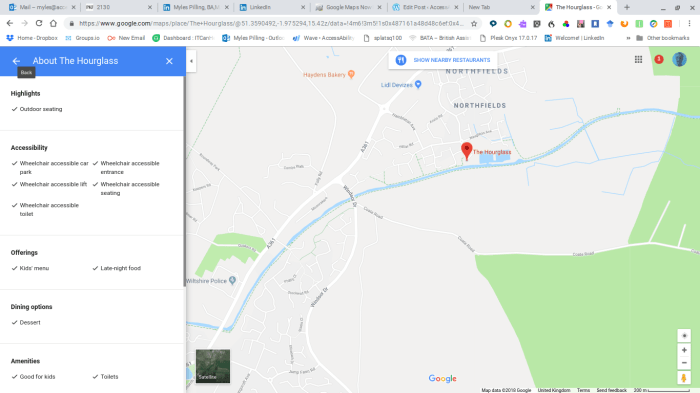
Google Maps gives accessibility information about locations

In 2017 Google launched an initiative to get accessibility information from locations. Using other companies they now have a substantial amount of information for disabled users to have about locations and their access on Google Maps. For more information go to:-

Accessibility Information on Google Maps

Screenshot 2018-11-04 at 08.57.50.png

Social Stories

Looking at Social Stories today and how to make them using ICT.

The preferred method is one sentence with picture per page.

Social stories are used with people on the autism spectrum for interpersonal communication and the introduction of  new events or situations that may be difficult to cope with. It can also be used to look at alternative responses by looking at different outcomes.

There are seven different sentence types to use in a social story:-

  • Descriptive sentences: are truthful and observable sentences (opinion- and assumption-free) that identify the most relevant factors in a social situation. They often answer “why” questions. eg “If you upset people you will not make friends”
  • Perspective sentences: refer to or describe the internal state of other people (their knowledge/thoughts, feelings, beliefs, opinions, motivation or physical condition) so that the individual can learn how others’ perceive various events. eg ” Other people get angry when you diss them”
  • Directive sentences: presents or suggests, in positive terms, a response or choice of responses to a situation or concept. eg ” Go out and make friends”
  • Affirmative sentences: enhances the meaning of statements and may express a commonly shared value or opinion. They can also stress the important points, refer to a law or rule to reassure the learner. eg  “Migrant workers are not taking our jobs as they work in jobs people in the UK don’t want to do.”
  • Control sentences: identifies personal strategies the individual will use to recall and apply information. They are written by the individual after reviewing the Social Story. eg ” If you are feeling anxious draw a level of anxiety on a glass – half full, 25% , 75% or 100%
  • Cooperative sentences: describe what others will do to assist the individual. This helps to ensure consistent responses by a variety of people. eg ” <name> will help you to budget for the week.”
  • Partial sentences: encourages the individual to make guesses regarding the next step in a situation, the response of another individual, or his/her own response. Any of the above sentences can be written as a partial sentence with a portion of the sentence being a blank space to complete. eg ” After pressing the electronic checkout at the supermarket the next step is to scan the item”
  • Social Story ratio: Two to five cooperative, descriptive, perspective, and/or affirmative sentences for every directive or control sentence. eg “When thinking about going to work you need to  get ready for work by looking tidy , wearing uniform(is appropriate) and breath deeply to avoid becoming anxious”

Making Social Stories in PowerPoint

  1. Decide which template below would suit your chosen social story
  2. Click on it to load it up
  3. Write a short phrase or sentence ( see above different types of sentences to use)
  4. Make sure you click outside the text box or else the next step will not work
  5. Add a picture online or one from your own library of images
  6. Repeat for the next slides until all are used
  7. You can always add a slide keeping the same layout – one sentence, one picture method
  8. Now you can either print out the slides or run through it with your client prior to an event or when you have 1:1 time to prepare your client

Social Stories Templates

Social Story 4 Template

Social Story 6 Template

Social Story 8 Template

Social Story 12 Template

Social Stories Examples – ideas to get your started!

Social Story 4 Template – Going out

social-story-8-template friends

Social Story 12 Template – Approaching strangers 

Other subjects could be:-

  • Dealing with bullying
  • Dealing with swearing
  • Relationships
  • Handling money


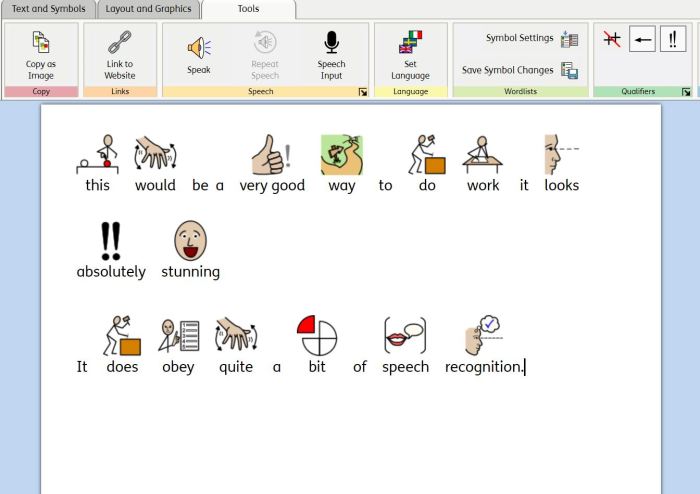
Speech input in WidgitOnline

There has been a new and useful addition to the symbol package WidgitOnline. You can now input into the software package using your voice. And it instantly symbolizes the text. Awesome for children who struggle with traditional reading but obviously not so good for children with poor articulation. Teachers and support assistants will find this easier to create symbol text with.

symbols spoken into widigt online using speech input