Chromebooks have screen readers built into their browser

ChromeVox is the built-in screen reader that comes as accessibility tool as part of Chrome OS. It is quite useful and with it’s range of shortcuts powerful for those who are visually impaired on blind. I was testing a website on my chromebook and found that it was there!

If you have a Chromebook and want to try it out. Press CTRL+ALT+Z to enable it and to unenable it repeat the CTRL+ALT+Z.  Use TAB to step through the options , speech guides you through. Search + space acts like enter and the cursor keys navigate in detail around a menu. Here is the help section link

Using DocsPlus in exams

Crick Software’s DocPlus has an exam mode which means it can be used in exams reducing costs in scribes and readers. Read more here:-

Exam mode in DocsPlus

Rise on Tribunerals

term-insurance-required-for-parentsAn article by Mary Boulsted states that parent disputes with councils have doubled in the last two years and 89% of cases are found in favour of the parent.
This is something I predicted would happen in 2013 if the system was failing special needs because the specialists are not there .

I believe it’s a better thing to have a responsive system that admits it can’t find the funds but let’s find a way to help. A can-do attitude goes a long way in my opinion. Then we can direct much needed funds in a more constructive way.

Mary’s Article

Google Maps gives accessibility information about locations

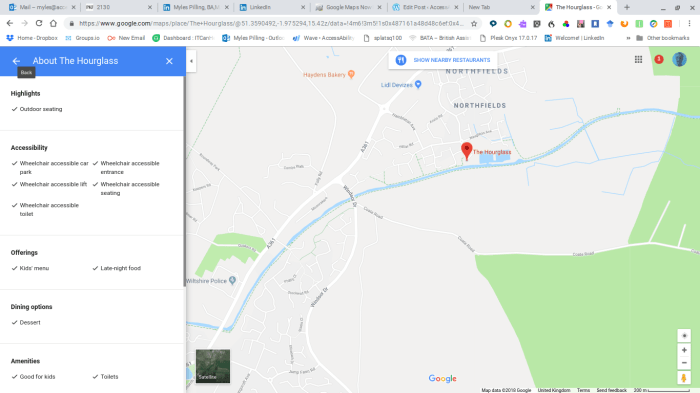
In 2017 Google launched an initiative to get accessibility information from locations. Using other companies they now have a substantial amount of information for disabled users to have about locations and their access on Google Maps. For more information go to:-

Accessibility Information on Google Maps

Screenshot 2018-11-04 at 08.57.50.png

Social Stories

Looking at Social Stories today and how to make them using ICT.

The preferred method is one sentence with picture per page.

Social stories are used with people on the autism spectrum for interpersonal communication and the introduction of  new events or situations that may be difficult to cope with. It can also be used to look at alternative responses by looking at different outcomes.

There are seven different sentence types to use in a social story:-

  • Descriptive sentences: are truthful and observable sentences (opinion- and assumption-free) that identify the most relevant factors in a social situation. They often answer “why” questions. eg “If you upset people you will not make friends”
  • Perspective sentences: refer to or describe the internal state of other people (their knowledge/thoughts, feelings, beliefs, opinions, motivation or physical condition) so that the individual can learn how others’ perceive various events. eg ” Other people get angry when you diss them”
  • Directive sentences: presents or suggests, in positive terms, a response or choice of responses to a situation or concept. eg ” Go out and make friends”
  • Affirmative sentences: enhances the meaning of statements and may express a commonly shared value or opinion. They can also stress the important points, refer to a law or rule to reassure the learner. eg  “Migrant workers are not taking our jobs as they work in jobs people in the UK don’t want to do.”
  • Control sentences: identifies personal strategies the individual will use to recall and apply information. They are written by the individual after reviewing the Social Story. eg ” If you are feeling anxious draw a level of anxiety on a glass – half full, 25% , 75% or 100%
  • Cooperative sentences: describe what others will do to assist the individual. This helps to ensure consistent responses by a variety of people. eg ” <name> will help you to budget for the week.”
  • Partial sentences: encourages the individual to make guesses regarding the next step in a situation, the response of another individual, or his/her own response. Any of the above sentences can be written as a partial sentence with a portion of the sentence being a blank space to complete. eg ” After pressing the electronic checkout at the supermarket the next step is to scan the item”
  • Social Story ratio: Two to five cooperative, descriptive, perspective, and/or affirmative sentences for every directive or control sentence. eg “When thinking about going to work you need to  get ready for work by looking tidy , wearing uniform(is appropriate) and breath deeply to avoid becoming anxious”

Making Social Stories in PowerPoint

  1. Decide which template below would suit your chosen social story
  2. Click on it to load it up
  3. Write a short phrase or sentence ( see above different types of sentences to use)
  4. Make sure you click outside the text box or else the next step will not work
  5. Add a picture online or one from your own library of images
  6. Repeat for the next slides until all are used
  7. You can always add a slide keeping the same layout – one sentence, one picture method
  8. Now you can either print out the slides or run through it with your client prior to an event or when you have 1:1 time to prepare your client

Social Stories Templates

Social Story 4 Template

Social Story 6 Template

Social Story 8 Template

Social Story 12 Template

Social Stories Examples – ideas to get your started!

Social Story 4 Template – Going out

social-story-8-template friends

Social Story 12 Template – Approaching strangers 

Other subjects could be:-

  • Dealing with bullying
  • Dealing with swearing
  • Relationships
  • Handling money


Speech input in WidgitOnline

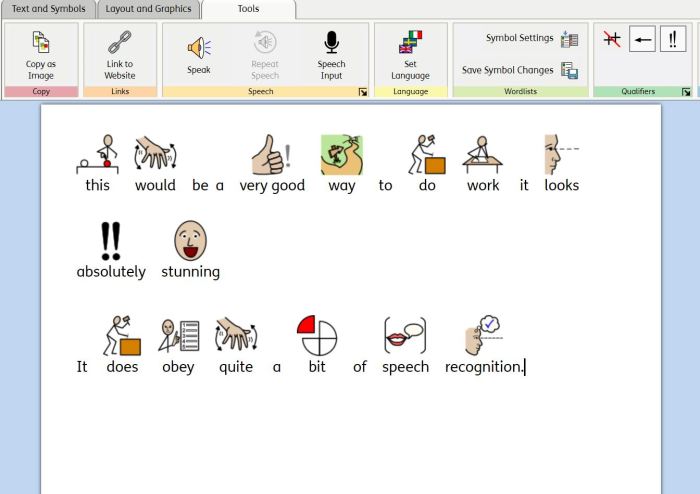
There has been a new and useful addition to the symbol package WidgitOnline. You can now input into the software package using your voice. And it instantly symbolizes the text. Awesome for children who struggle with traditional reading but obviously not so good for children with poor articulation. Teachers and support assistants will find this easier to create symbol text with.

symbols spoken into widigt online using speech input

Commtap.org

It’s always great to come across a resource that is useful and shareable. It is free to join and explore the resources. Very good for Speech and Language Therapists, Care workers and Teachers.  You can make communication grids in Powerpoint as well.

For £39 you can buy a perpetual license for 1yr to add a symboliser to PowerPoint. It would be good if it could extend to Word as well. Maybe in the future. The symbol set is clear and is called Mulberry. You can additional symbol sets ( there is one on the site). Any resources you make can also be added to the site. Any take a look at:-

Create a resource and share it

For the site go to:-

http://www.commtap.org

You can have a free 30 day trial at:-

http://symboliser.commtap.org

“Check it “ feature on Texthelp ‘s readwrite

Great little video explaining the check it feature on texthelp’s readwrite program. One minute and 12 seconds of your time !

twitter.com/teamfindmyflow/status/1049607806318456832

BATA Forum

bata


Do you know what is Assistive Technology?

Do you have questions about what AT can do for you or your service users?

Are you an individual with a newly acquired disability do you know where to look for help?

The web is great for interaction and debate!  The British Assistive Technology Association have setup a free service to engage with the public who have questions they would like answers to their Assistive Technology questions.  BATA has 100 members across the industry and could help you to meet your need.

Take a look at:-

BATA Forum

Experiences of a totally blind users with Disability Technical Helpdesks

Great article expressing the need for more training for mainstream helpdesks. Well done , Slack , you come out well in this article

Accessibility training needed