Finding meaningful work with a disability:practical guidance that actually helps

People with disabilities are a large, skilled, and motivated part of today’s workforce, yet finding a job can still feel harder than it should. Barriers like inaccessible hiring processes, employer misconceptions, or unclear accommodations can slow things down—but they don’t define your potential. This article is for people with disabilities who want realistic, empowering strategies to find work, build a career, and advocate for themselves along the way.

A quick orientation before we dive in

Finding a job with a disability isn’t about “overcoming” who you are. It’s about matching your strengths to the right environment, knowing your rights, and using tools that reduce friction. With the right approach, many people find roles that are flexible, fulfilling, and sustainable long-term.

Jobs That Often Work Well

There’s no universal “best job” for people with disabilities. That said, certain roles tend to offer flexibility, autonomy, or remote options that many job seekers appreciate:

  • Customer support (remote or hybrid)

  • Writing, editing, or content management

  • Software development, QA, or IT support

  • Data entry, analysis, or research assistance

  • Accounting, bookkeeping, or administrative roles

  • Design, marketing, or social media management

These roles often allow for flexible schedules, assistive technology, or work-from-home setups—but success depends more on the employer than the job title itself.

How to Start the Job Search (Without Burning Out)

Job searching can be exhausting, especially when you’re managing health, mobility, or energy limitations. A more structured approach helps.

A simple, repeatable process:

  1. Identify your non-negotiables (schedule, location, accommodations).

  2. Search job boards that highlight inclusive employers.

  3. Apply in small, consistent batches.

  4. Track applications so you don’t duplicate effort.

  5. Follow up only when it makes sense.

This method keeps momentum without overwhelming you.

Resume and Interview Tips That Work in the Real World

Your resume should focus on outcomes, not explanations. Employers care about what you can do and how you’ve done it before.

On your resume:

In interviews:

You are not required to disclose a disability unless you want to or need an accommodation for the interview itself. If you do disclose, keep it job-focused:

  • Explain what helps you work effectively

  • Tie accommodations to performance, not limitation

A Practical Accommodation Planning Checklist

Before accepting a role, it helps to think through what you may need to succeed.

Consider:

Planning ahead makes accommodation requests clearer and more confident.

Learning and Credentials as Career Leverage

Sometimes, the fastest way to open new doors is by building skills that align with flexible or higher-demand roles. Earning an online degree can strengthen your resume, increase earning potential, and help you pivot into fields that offer more control over how and where you work. A business bachelor degree can be especially useful if you want to develop skills in accounting, business, communications, or management that apply across industries. Many online degree programs are designed to fit around full-time work, making it easier to balance employment, health needs, and education at the same time. You can learn more about one such option here.

Organizations That Actively Support Job Seekers With Disabilities

Some employers and nonprofits intentionally design inclusive hiring pipelines. One widely trusted resource is the U.S. Department of Labor’s Office of Disability Employment Policy (ODEP), which provides guidance on inclusive hiring, accommodations, and employment rights.

This is a good starting point for both job seekers and employers committed to accessibility.

Frequently Asked Questions

Do I have to tell an employer about my disability?
 No. Disclosure is a personal choice unless you’re requesting accommodations.

Can an employer legally refuse accommodations?
 They can only refuse if the accommodation causes “undue hardship,” which is a high legal bar.

Are remote jobs easier to get accommodations for?
 Often, yes—but accommodations can apply to any work environment.

Should I work with a job counselor?
 Many people find disability-focused career counselors helpful, especially during transitions.

Know Your Rights (This Matters More Than You Think)

In the U.S., the Americans with Disabilities Act (ADA) protects qualified individuals from discrimination and gives you the right to reasonable accommodations. Knowing this framework doesn’t make you “difficult”—it makes you informed.

A final word

Finding a job with a disability is not about fitting into a broken system; it’s about finding or shaping a workplace where you can do your best work. With the right preparation, support, and self-advocacy, meaningful employment is not just possible—it’s achievable. Take it one step at a time, and don’t underestimate the value you bring.

Supporting residents with sigjht loss in care homes:practical tips, case studies, and training insights

Supporting Residents with Sight Loss in Care Homes: Practical Tips, Case Studies, and Training Insights

By Dan Morgan-Williams, Founder of Visualise Training and Consultancy

With an ageing population and more people living longer, sight loss is becoming increasingly common in UK care homes. Over 2 million people in the UK live with visual impairment, and many are residents in care settings. Yet sight loss is often overlooked, leaving residents at risk of isolation, accidents, and reduced quality of life. This article offers practical guidance, case studies, and training-style tips to help care home owners, managers, and staff create environments where visually impaired residents can thrive.

Understanding Visual Impairment in Residents

Older adults are particularly affected by conditions such as age-related macular degeneration (AMD), glaucoma, cataracts, and diabetic retinopathy. Each condition affects vision differently. For example, AMD impacts central vision, glaucoma often reduces peripheral vision, and cataracts cause overall blurriness. Understanding these differences is crucial for tailoring support to individual residents.

Case Study: When Sight Loss Goes Unnoticed

Mrs H, an 82-year-old resident, had gradually lost her sight due to untreated glaucoma. Her care home staff assumed her withdrawal from activities was due to dementia. In reality, she avoided social spaces because poor lighting and cluttered walkways frequently caused her to fall. Without appropriate support, she became isolated, her mood declined, and her health needs increased. This example highlights the risks of failing to address visual impairment in care homes.

Environmental Adjustments: Quick Wins

Simple, low-cost changes can dramatically improve residents’ independence and safety:

✅ Place high-contrast strips on stair edges and bathroom grab rails.
✅ Ensure all areas have consistent, layered lighting (ambient + task).
✅ Avoid clutter and keep furniture in consistent locations.
✅ Use matt flooring to reduce glare and confusion.
✅ Label important areas such as toilets and dining rooms in large print or tactile signs.

Case Study: A Success Story

Mr L, a resident with macular degeneration, moved into a care home that had recently invested in staff training and environmental changes. The team installed brighter LED lighting, used high-contrast crockery, and trained staff in sighted guiding techniques. As a result, Mr L regained confidence, re-joined group activities, and reported a significant improvement in his wellbeing. This success demonstrates how small, thoughtful adaptations can transform daily life.

Staff Training & Awareness

Training staff to understand and respond to sight loss is critical. Many residents will not openly discuss their difficulties, so staff must learn to recognise the signs and adapt their communication accordingly.

✅ Always introduce yourself by name when entering a room.
✅ Offer your arm when guiding, rather than pulling or pushing.
✅ Describe surroundings and explain changes, e.g. “We are about to step into the lounge; the chairs are on your left.”
❌ Do not move furniture without informing the resident.
❌ Do not leave doors half-open — it creates hazards.
❌ Do not shout; speak clearly instead.

Emotional & Social Wellbeing

Supporting social inclusion is just as important as physical safety. Residents with sight loss may withdraw from activities if they feel excluded or isolated. Care homes can:
✅ Adapt group activities with large-print or tactile resources.
✅ Provide verbal descriptions of group events.
✅ Encourage peer support and involve family members in planning.

Partnerships & Resources

Care homes don’t need to tackle sight loss alone. Local authorities, sensory support teams, and charities such as RNIB and Guide Dogs offer valuable resources. Eye Clinic Liaison Officers (ECLOs) can also provide practical advice. Accessing grants or funding for equipment can reduce costs and improve outcomes for residents.

Conclusion: Taking Action

Supporting residents with sight loss doesn’t have to be complicated or costly. With the proper awareness, staff training, and environmental adjustments, care homes can dramatically enhance the quality of life, independence, and dignity of their residents.

At Visualise Training and Consultancy, we deliver tailored Visual Impairment Awareness Training for care teams. Our lived-experience trainers equip staff with the confidence and practical skills needed to provide outstanding, inclusive care.

OPTIONAL PARAGRAPH – To learn more about visual impairment awareness training for your staff team, check out our eLearning and face-to-face options at https://visualisetrainingandconsultancy.com/training

Notes to Editors:

A photo of Dan Morgan-Williams with his Guide Dog ZodiacDaniel Morgan-Williams

Visualise Training and Consultancy Ltd was established in 2014 by Daniel Morgan-Williams, who founded the company despite experiencing gradual vision loss due to retinitis pigmentosa.

Daniel’s motivation to start the business arose from his experiences of a lack of accessibility and inclusion within workplaces and broader society. This affects people with sight loss, hearing loss, tinnitus and those who are Deaf. Many disabilities are hidden, so they are not easily recognised.

What began as a focused approach centred on sight loss and its associated challenges has since grown to encompass all forms of sensory loss. This enables employees to develop their careers through workplace assessments that recommend reasonable adjustments and awareness training for colleagues.

To find out more, visit https://visualisetrainingandconsultancy.com

Tiny Routines, Big Shifts: How Creative Learning Sticks for Special Needs Kids

Image via Freepik 
 
Every child learns differently, but for parents of children with special needs, the challenge is often about finding the right fit—not just a good one. Traditional instruction can fall flat when attention, sensory needs, or emotional regulation come into play. That’s where creativity steps in, not as decoration, but as survival. It’s in the moment a finger-painting session becomes a breakthrough or when a quiet rhythm game unlocks a child’s voice.  

These aren’t just activities—they’re access points. In this guide, you’ll find ideas that feel doable, rooted in daily life and human rhythm. Whether you’re a working parent juggling too much or simply someone craving traction, this is for you. Let’s start where your child already is, and build from there. 

Sensory-Rich Hands-On Learning 
 
Start with what they can touch. Children with sensory processing differences often learn best when their bodies are involved, not just their eyes. That’s why everyday items—bins of rice, sponge shapes, fabric swatches—can become the heart of a lesson.  

Think less about instruction and more about invitation. Set up a low table, offer textures, and let their hands lead. These hands-on sensory activities not only build engagement but help reinforce memory and language through movement and touch. They transform the abstract into the real, anchoring lessons in experience rather than expectation. It’s not flashy, but it’s deep. 

Motor-Skill Building Through Creative Play 
 
If your child fidgets constantly or struggles with focus, they may not need to sit still—they might need to move smarter. Build in what their body craves. Obstacle courses made of couch cushions, finger painting with shaving cream on a window, or even just pouring water between cups in the bath can serve as activities that build motor skills.  

These aren’t filler. They’re foundational. Movement creates the rhythm for regulation. And when regulation comes, learning follows. These play-based practices help kids process frustration, build coordination, and connect with the world at their own pace. 

Inclusive Group Play for Connection 
 
Children with special needs are often unintentionally sidelined when group activities rely too much on verbal instruction or competitive pacing. But what if the group centered around presence instead of performance? Picture kids in a circle, each with a drum, responding to rhythms. Or moving scarves through the air with no right or wrong.  

These inclusive group music and movement experiences offer emotional access, not just cognitive engagement. They build trust, social mirroring, and shared energy without pressure. The goal isn’t mastery—it’s connection. And connection, in a safe space, builds everything else. 

Expressive Art as Emotional Outlet 
 
Sometimes words won’t work—but color does. Markers, clay, chalk—they can say what a child can’t yet speak. For many children with special needs, emotional regulation is a daily mountain. Art flattens it. By creating space for mess and meaning, creative outlets become more than “arts and crafts.” They’re scaffolds for emotional language.  

As kids draw themselves as superheroes, or swirl angry red paint without judgment, they make sense of internal storms. Over time, these rituals can reduce tantrums, boost confidence, and create entry points for conversations you never saw coming. 

Building Language with Tangible Symbols 
 
Verbal language isn’t the only language. Many kids communicate with objects, pictures, or gestures long before they form words. For some, those tools remain vital. Using symbol systems for communication development—like a soft spoon to request food or a textured square to say “I’m done”—makes expression concrete. These aren’t just backups for speech; they’re entire pathways.  

Tangible symbols create choice, reduce frustration, and offer a framework for understanding routines. They also give caregivers a shared toolset that invites interaction, not just interpretation. When a child controls how they’re understood, everything shifts. 

Outdoor Sensory Engagement 
 
The environment matters. Indoor activities can get stale fast, and not every child thrives under fluorescent lights. That’s why fresh air, texture, and movement work magic together. Imagine a path of different ground materials—grass, mulch, pebbles—that encourage slow, sensory exploration. Or a wind chime corner, built at child height, that turns wind into wonder. 

 Spaces like these aren’t random—they’re designed. Creating or accessing sensory-rich outdoor spaces gives your child room to regulate, recover, and reengage. These gardens aren’t retreats. They’re classrooms without ceilings. 

Balancing Needs and Busy Lives 

You don’t have unlimited time. You’re balancing IEP meetings with work calls, dishes with doctor visits, and it can feel like there’s no room left for intentional learning. That’s where rhythm—not schedule—can help. You don’t need an hour. You need three connected minutes, repeated often.  

Some days, reading a single page of a picture book while stirring dinner is enough. For working moms especially, balancing work and caregiving demands isn’t about perfection. It’s about picking the moments that matter, knowing that your child doesn’t need a Pinterest-worthy learning station—they need you, tuned in and present, even briefly. 

Conclusion 

Creativity in special needs parenting isn’t optional—it’s the operating system. You are improvising daily, not because you’re unprepared, but because your child is complex and alive. The strategies here aren’t prescriptions. They’re invitations. You’ll try some, tweak others, abandon a few—and that’s the point. These aren’t hacks. They’re tools for presence.  

Your child’s progress won’t look like a graph, but you’ll feel the shift in moments: the calm after a shared activity, the joy of a story retold, the tiny reach for connection. Keep building from those. The work you’re doing—imperfect, creative, relentless—is the curriculum. 
 

Discover the latest in assistive technology and empower your journey with AccessAbility Solutions, where innovation meets inclusivity for individuals with unique needs. 

Submitted by Suzanne Tanner

assisitve technology for adults in the workplace

With the advent of Access to Work a goverment initiative that enables employees to access a range of services including asissitve technology has a significant impact on the workplace. So what kinds of technology and what needs can assistive technology help with differently abled people ( like this term as the more negetaive term – disabled people).

Sensory Impairments

Asisitve technology can enable those with visual impairment to have maginification available to them to enbale there visual impairment to be alleivate to a major extent. All software can be enhance through a toolbar that works with any software. Tools that enable enlragement of text for PDF’s and websites. Some of the tools are free or built into the operating systems but also can be met by admittedly expensive software but necessary to get the customising potentials of this software. Some visual conditions vary each day so this customisation offered byt these specialised software can aide access. For those with hearing impairement the use of hearing aids that can be customised to suit the situation is useful. Captioning tools especially for online meetings is key. Both free and padi for solutions can help those with hearing impairment to take part in meetings. Smart glasses with AI that can help hearing impaired users to interact with colleagues and customers as captions can be gernated diredtly to thr screen,

Physical Disabiliites

Access is now avaialble via specialised periphherals from eye-gaze to swtiches to joysticks and on-sceen keyboard. Moutning and positiioning are key to enable the user to access their hardware and fulfil their productivity in the workplace. Such users are generally wheelchair users and therefofre ramps and physical access to a desk for a wheelchair.

Neurodivergency

Perhaps the most significant category of need and the most impactful as solutions can almost make neurodivergency almost disappear. From spelling correction to mindmapping to organisational tools enable and empower the neurodivergent user to be productive. For those with ADHD prioritisation of tasks can be signifcantly impact the user in the workplace as their stress levels reduce onve that felling of being in control of your workflow is felt. For meetings thte use of AI can enable a revolution in note-taking means manual note takigin is history. Checking the AI notes is worth doing to ensure action points and notes are accurate. AI can also be used to comprise detailed breakdown and explanation of projects for those who find writing such documents difficult.

We have spoken in general terms so far. So what products do this? As an independent consultant I have to be aware of multiplatform solutions as well as a wide range of free and paid for solutions. So the following list is not exhaustive but essential

Visual Impairment

SuperNova form Dolphin Compute Systems – £425 https://www.visionaid.co.uk/supernova-magnifier

NVDA Screen reader – £free – https://www.visionaid.co.uk/supernova-magnifier

Windows 10/11 – £free – Magnication access within the operating system

Apple iOS devices – Zoom and Voice Over for maginifcation and contol

Hearing Imparment

Windows 10/11 – £free = captioning tools

PowerPoint – £free =captioning option

Microsoft Teams – £free – captioning

Caption Ed – subscription-based Lite £25.00 a month or £50.00 for prfessional. https://caption-ed.com/

XRAI Glasses – Free, Premium and Ultimate subscription packages for smart glasses https://xrai.glass/

Physical Disabilities

Incluisve Technology – one stop shop for switches, joysticks, mountings. https://www.inclusive.com/uk/

Neurodivergency

Texthelp Read&Write – £250 per year for individual users enterprise – talk to texthelp systems for detailed pricing for organisations – https://xrai.glass/

Global Tasks – access to work and talk to texthel for subsription model – https://www.texthelp.com/en-gb/solutions/dsa/global-tasks/

Grammarly – free grammar tools with ai https://www.grammarly.com/

Goblin Tools – £t – range of ai tools to aide writing for specific audiences – https://goblin.tools/

Co-Pilot – £free – artificial intelligence – great for finding research and pracical jobs – https://copilot.microsoft.com/

For a wider discussing of ai please look at and comment on my discussing ai blogsite. https://discussingai.blog

Writing with AI

As an experiment with Artificial Intelligence I asked the question of how schools with limited budgets could utilize assistive technology and then expanding the answer to include examples of how this could be done?

This is the result. What do you think? Useful or not? Accurate or not? What else do you need to do?

“Cost-effective assistive technologies for schools encompass a variety of tools designed to support students with different learning needs. For example, text-to-speech software can aid students with reading difficulties by converting written text into spoken words, and it’s often available for free or at a low cost. Speech-to-text programs are similarly beneficial for students with writing challenges. Additionally, simple yet impactful tools like graphic organizers can help students plan and organize their thoughts, and they can be easily created with common software like word processors. For students with visual impairments, screen magnification software and audio books can be invaluable, and many are readily accessible at minimal or no cost. Furthermore, specialized keyboards and alternative input devices, such as trackball mice, can assist students with physical disabilities in interacting with computers more effectively. These technologies not only support inclusive education but also foster independence and confidence in students with diverse needs.”

I think you would need to mention new technologies that may not be included in a broad article such as this. Fine as a general introduction but more needs to be given. So maybe AI provides a canvas on which our human creativity can look at and explore with. As a teacher it gives a basis on which to build on more in-deoth concepts and to teach pupils to keep asking insightful questions. The development of creative thinking could follow this route. It’s certainly present in Co-Pilot where you are prompted to expand but the teacher needs to suggest ideas, combinations of ideas and expand even further. I’ll ask Co-Pilot to draw me a teacher asking pupils to expand their questions!

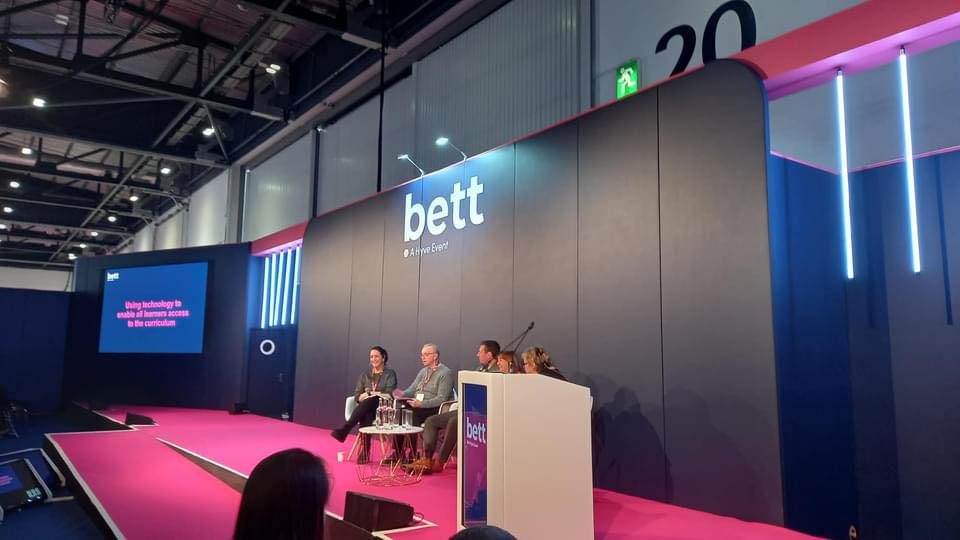
BETT 2024

Education Panel discussion on ” Using Assistive Technology in the Curriculum”

I can’t tell you how many years I have been coming to BETT but it’s more than a few years! This year was different in that unlike any other year two things happened.

  1. I was approached to give my advice about Accessibilty at the show to an independent consultant who was advising on this for all the BETT shows around the world.
  2. Networking – I kept bumping into colleagues I have worked with both in the past and present.

But what impressed me apart from those two things? Here goes:-

Scanning Pens of different types are appearing.

There is a new scanning pen ( not from scanning pens though) called Scanmarker Pro £199.06 . This scans text both online and offline, has a phonetic translator into different languages. A larger LCD display, It’s a touch screen and has a bluetooth and wifi connection as well. And more. I haven’t explored this yet so will write about it when I have.

Alos, the IRISpen Reader. Offers similar options including Photo translation, live recording and live translation. It also as a digital display and in effect is a portable scanner too with two versions the IRIS Pen Air which has the above functions and the cheaper IRISPen Reader which is a basic reader pen.

Cantoo Scribe is an innovative assistive technology software that can adapt content to suit student needs with all the access tools from text to speech to magnification and what excitied me the ability to OCR into PDF and magnify content such as a diagrams and geometric shapes and angles. Can’t wait to try this out too! I have one client I am excited to share this with. Designed by a French company I can see the potential.

A lovely set of people ( they come from Blackburn Lancashire!) not that I am biased have a comprehensive computer coding approach and they work in an inclusive way with pupils with special education needs. It was their first BETT and jamcoding offers pupils and teachers a tailored programme to help teachers understand and use programming even if you are not a computer buff to start with. It’s also got a CPD accreditation which you can put on on your CV. In essence it’s a curriculum.

Another company from abroad brought their dyslexia friendly teaching tool to the show C>onstructor has a visual and multisensory way of buidling words based on scientific research done on how the dyslexic brain works. It’s also able to build on visual memory to find the words you want.

On another front I was impressed with Digital Poverty Alliance who are trying to bridge the digital divide that exist in our national who refurbish and send out to schools and homes technology to help those who can’t afford it. Take a look at what they are doing at https://digitalpovertyalliance.org/ it’s really important and I was pleased to hear they work with AbilityNet too!

Back to software. Class is a virtual classroom that looks a bit like zoom but allows more accessible tools and perfect for Hybrid learning in drawing students and teachers together. It can also look and feel like Teams and this virtual classroom can work effectively in creating a more inclusive classroom. Especially important for us the UK when many pupils have not returned to the classroom since COVID. Take a demo at https://www.class.com/demo

Everybody counts is a online maths curriculum that is priced with school budgets in mind. There are characters of a diverse nature – culturally and disabled characters in the package.

Something I am definitely going to follow up is Teachers Talkk Radio. Over a million listeners this sounds a fantastic way to get information and get your messages out . Tune in at http://www.ttradio.org

Last I featured on Russell Prue’s BETT Radio this year. Take a look and listen at this website – go to Day 3 and 10 minutes in you should hear myself and Dave Presky give an interview about the Power of Assistive Technology film series. https://learnradio.net/home/bettradio/

http://bataonline.org/impact if you want to get your copies of the films designed to stimulate discussion in schools.

Awaiting our slot on BETT Radio