How to add a program to the startup on Windows 10

Occassionally I find a technology solution that can help make life easier for the disabled user. This enables a program to startup automatically when the computer is switched on. This is useful for speech recognition programs as well as communication programs. Beware though, making system changes can effect the running of your laptop. I take no responsibility if this goes wrong for you!

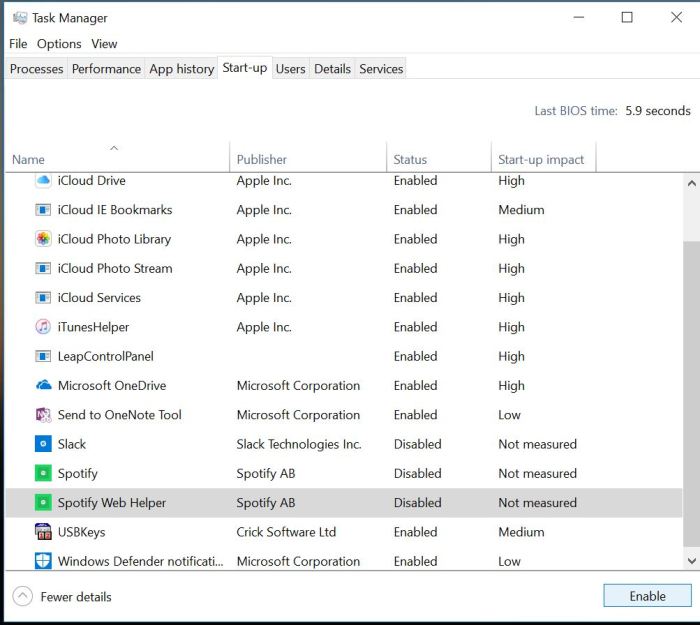
In Windows 10 it is more difficult to find startup than it was for Windows 7.

First , find the program you want to put into the startp folder

By creating a shortcut from the windows start menu and putting it on the desktop it should be possible to put this directly into startup via this method

1. Copy your shortcut from the desktop

2. Win+R

3. Type: shell:startup

4. Paste into the startup folder

Job done!

Here is a handy video to show you the process:

https://www.youtube.com/watch?v=htkkZGik-Lk

Why is it so important?

In order for those with physical difficulties in their hands to say have their speech recognition load up to the desktop on startup. This makes their access much more functional.

Reimagine Accessibility

This is a 30 minute video looking at how accessibility in primarily the workplace and education environments. It introduces you to people making a difference for accessibility in the world. So take a look….

//play.vidyard.com/nkFuksLcX5j7x6VQk2GHSq.html?v=3.1.1

SprintPlus

SprintPlus is a help for dyslexia and those who struggle with reading, spelling and writing. Using text to speech it makes the connection between speech and writing which I like. As a teacher of special needs I would often see the value of making speech relate to writing as it made more sense to a cognitively challenged child if reading related to their own experience rather than books that do not.

Try SprintPlus on a 2 month trial at:-

www.sprintplus.co.uk

DWP Report on Assistive Technology

The government have issued a report on the benefits of using Assistive Technology in the workplace. Apart from the obvious benefits in terms of access and equality AT is becoming more affordable and more widespread through the use of integrating AT into mainstream software and hardware producers. The danger is that we think free always is the way to go. The truth is it depends on the individual and the personal choices that people make as to AT being effective. This is a key element which is not addressed in this report in my opinion. The good points refer to up to date technologies being used so training and information sharing is vital. The report has findings which I fully endorse.

DWP Report on Assistive Technology

Are there changes to Speech Dictation in Word and OneNote by Microsoft?

This is NOT true. It’s the ease of access speech recognition system that will get an upgrade to the quality of Cortana and that is not the same speech recognition system as Office 365 which is not affected.

There are rumours circulating that Microsoft are going to remove speech recognition from their system apart from Word. Can I say that this is a rumour  which I can now confirm is not true. Our colleagues in the Assistive Technology  in the Workplace arena are concerned that it may impede their work by its removal.

  • Is there a system update that will remove speech recognition from all but Word? Not true!!
  • Does this affect OneNote? No
  • What about the Learning Tools? Not affected
  • Is there going to be a replacement product? Not being replaced but improved!

Hector Minto was invited to comment and he has.

Hector has said the rumour is wrong about the removal of speech recognition . In fact there will be upgrade to improve the quality on the ease of access speech recognition system which is different to the Office 365 system. That is unaffected!!

Apps for Seniors

Some useful apps for seniors to use :-

Apps for Seniors 


Pic Collage – for creating cards, posters and displays 

Colorfy – colouring books for adults 

Jigidi – make your own photos into jigsaws 

National Trust – useful location and find a NT place 

Tube Map – london undergound 

Clubhouse – Utility Warehouse for self-filling in of your energy meter ( Utility Warehouse only) 

Carbs & Cals – photo way of seeing what calories you are eating 

Prize checker – NS&I premium bonds 

Redspottedhanky –  plan and buy your tickets for train journeys – save money 

OS Maps – detailed and useful tool for hkers and ramblers 

Push Doctor – video call a doctor 

Ask NHS – find information about your medical needs using text and video 

Safe Place – have you lost anything? Then this is the app for you!!  

BBCWeather – planning a day out? Or a day in the garden? 

Tabs HD – find any song and get the guitar cords 

Classical Guitar – play a guitar on your ipad 

Air Harp – play long with your harp on a musical score 

Bebot – fun synthesizer! 

Fitbit – record your personal health data 

Places Locker – local gym with videos about the exercises to use 

GearedUp – puzzle game with gears 

Flow free – visual puzzle game 


Choose it Maker 3 – free trial

You can have a two week free trial of the great product Choose it Maker 3. Ideal for early years, primary and special setting it is really a brilliant product for teaching choice making or a learning activity .

choose it maker 3 trial offer 

Schools & AAS

AAS provides services to schools that enables your busy SENCO to be supported and informed. We also do individual assessments. This is important to enable the right technology to be matched to the individual’s special needs. Without the individual buying into the solution offered then the ICT provided will not be as effected. AAS gives you cost effective solutions at reasonable costs to the school. Check out what we do :-

Schools Support – aas123

New rules on VAT on Digital Devices in the UK

BATA have made an announcement that their are new rules on VAT payment for digital devices. If you are supplier or consumer you might be interested in this:-

https://mailchi.mp/dc7ccde50fec/new-rules-for-vat-on-digital-devices-published?e=d2bb926db7

Please sponsor me!

This year I am walking for BATA as we raise funds for the RNIB and BDA as well as BATA. Click on this link and it will take you to our Just Giving page. Please contribute as it will make a huge difference to those with sensory and cognitive disabilities.  We shall be doing an 11 mile walk around Ladybower Reservoir in the Peak District.  See the video below for a fly through of the walk


Derwent Reservoir
BATA Sponsored Walk Route