Using Instagram to get your message out

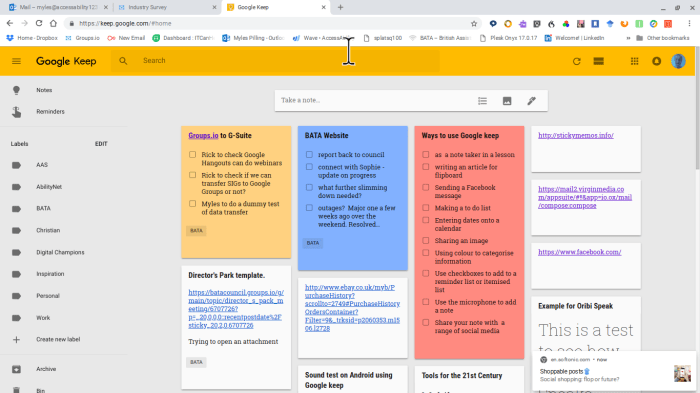
I run a few websites for organisations and discovered that Instagram can be a powerful tool for sharing images and short captions to Facebook and Twitter. It is possible to use your mobile and be able to send a message out to your other social media outlets using this method as you can see by this screenshot:-

Screenshot 2018-10-10 at 22.27.06

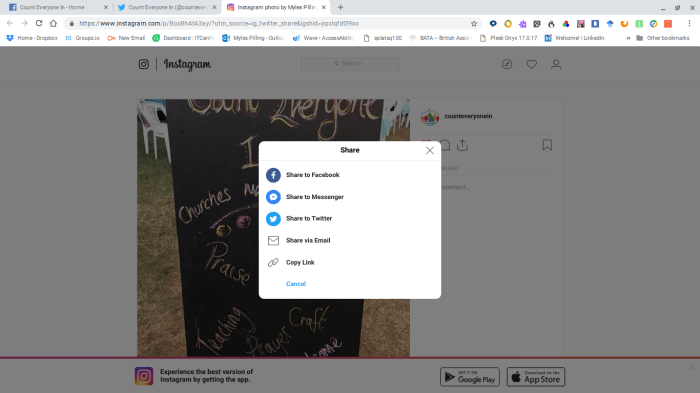
These accounts have to be connected up to Instagram which is a simple matter to do on your mobile. Create your message and then choose where you would like to send it. This screenshot from my desktop shows your options.

Have fun!

Tackling Dyslexia

Last week was Dyslexia Awareness Week and the focus was on Assistive Technology as well as removing the stigma associated with being dyslexia. The following link takes you to an article on how AT is tackling dyslexia:-

https://www.londonnewsonline.co.uk/technology-assists-in-tackling-dyslexia/ 

Productivity Tools & Enabling Technologies – to Infinity & Beyond!

Terms are rife in the world of technology. One that resonates in the workplace is productivity tools. It’s another phrase for Assistive Technology which has a kind of medical feel to it. I like Abi James’ phrase she uses which is Enabling Technologies. This refers to the empowerment Assistive Technology brings to the lives of individuals.

At AccessAbility Solutions we believe in the enabling and empowerment that technology can bring to individual lives, like the author who has macular degeneration and may need to rely on speech recognition in the future if it deriorates further.  It also applies to the dyslexic learner who may need text to speech in order to decode words and also their meanings. Linking the sound of the word and its constituent letters to the visual word is a powerful aide to the dyslexic.

Abi also referred in her recent webinar for the need to understand beyond what current products to use to the wider need for strategies to employ for successful integration. Abi works on the BDA New Technologies group and along with her colleagues have come up with a strategy called STREET. It’s process led and can be jumped in on at any stage.

STREET

At a time in our education system where ICT is not being promoted so much and often questioned of its value we have a problem Houston. In the UK we do not have a m,ain source of impartial help and advice that is available that relates to Schools. We used to have this. It was called BECTA , now we don’t ! So where can schools go to to receive appropriate advice? This issue in my opinion needs urgent attention and so I would love to hear any educationalist suggestions you may have.

Back to the STREET strategy. If all the  areas are covered it is likely that a new technology will be introduced successfully. I know from my own experience that “simple is best” and that when the technology is matched to the needs and preferences of the user it will work.

One blind lady I have worked with was given the chance to use an Echo Dot. She loved the experience and before I knew it she had bought herself one. She uses it to play games, listen to music and books.  Not only that she bought a second one for her bedroom so that she could have quiet music to go to sleep with. Is the Echo Dot a specialist equipment? No, it is a mainstream, off the shelf device that is being used to enable someone with a severe sensory deficit to access things she loves and activities to her life. That is enabling technologies at work and the trend in the future is going to increase with the advent of AI.

The Shape of Things to Come

This was the title of a 1933 sci fi classic. Whether all the predictions about Artificial Intelligence become true or not what is clear is that it will be good news for the disabled. Seeing AI and Soundscape are 2 apps that show the potential of being able to navigate  successfully your environment .  But we will enter the world of our technology knowing what we want to do before even we do! This could have a massive impact on our lives particularly older people who through disability may need technologies that anticipate need before it happens.

To some extent this is already happening. An Apple watch saved someone’s life when they were having medical problem  before they new it. An alert was sent to the person’s watch to seek medical help immediately and he took himself to the hospital where it was discovered he had ruptured an ulcer. Click below for the full story:-

http://uk.businessinsider.com/apple-watch-saves-life-doctor-says-2018-5

The downside or upside depending on your viewpoint is that has more people wear smart watches that measure heartbeat more and more people are finding our their heartbeat is irregular and going to the doctors to discover they have Atrial Fribulation or AF!! The incidence of AF is being discovered as more widespread than anyone knew!

https://www.tomsguide.com/us/smartwatches-saving-lives,review-5488.html

Wearables is the generic term and we all recognise their usefulness. I personally like to track sleep patterns as I am really poor at getting a good night’s sleep. How else can you know how long you’ve slept. You’ve been asleep, right?  It’s not just the sleep but the quality of sleep – how much was light? How much was REM? These devices graphically show this. So although none of these devices can solve your medical or personal issues it does give you useful information you can act on, make goals for.

One negative effect of wearables is distraction. Great as it is to be notified it does cause you to break off conversations inadvertently (or intentionally!) which my wife says is most infuriating!!

So the future beckons!


#21st Century Dyslexia

So many great tools are now embedded into mainstream products which is good news for the dyslexic learner. Did you know that in Word Office 365  you can:-

  • hear definitions when you right mouse click over a mis-spelt word
  • you can also have the definition read back to you with a sub menu and “Read Aloud”
  • you can Review your work under Learning Tools now embedded in Word and have it read back in Syllables, have the background change colour  and the page layout can be altered to suit.
  • you can use speech recognition to enter text directly into your document without the need for additional speech recognition software

For a  short video presentation  of more assistive tools for writing and reading , click on the link below:-

Some great advice on Assistive Technology in the Workplace

This article may help your organization make the most of relevant and effective AT solutions

Assistive Solutions for your staff and company

Carol Allen on DocsPlus

The energetic and effervescent Carol Allen has been using Clicker for ….. a long time…. but now she is using DocsPlus to support pupils with recording needs in secondary schools . Here is what she says:-

Carol Allen on DocsPlus

Aaron Smith , Microsoft Specialist in Dyslexia and SEND on new products from Microsoft to help Dyslexics

Good to listen to Aaron deliver a great session at last night’s WDA event for Dyslexia Awareness Week. Products like Learning Tools were talked about and the roll out now embedded in mainstream products like OneNote Outlook, Word, Edge…. to name a few!

Things I did not know was the enhanced dictionary in word which gives definitions as well as correct spellings. Things that are part of the package are much easier for students to see and use.

Also, I like the subtitle tool which can also be made to instantly translate via Google Translate into any language – well almost accurately! But the subtitling in real time is impressive.

Dictation works well on integrated devices such as the surface and surface book. It was good to see how accurate that is now. And to see all the features available in OneNote app that comes on the surface device.

It looks as if OneNote will not now need to have learning tools installed. The next rollout sounds as if it is incorporated into it. That should be happening in a few days time!

All in all very impressive! Well done Microsoft for making accessibility possible for ALL. Now the message needs to get out to schools. How that is done is via news announcements through mass media and local events like the one above where the product can be demonstrated by experts who from first hand experience of their own disability can speak with authority. Well done Aaron Smith , we salute you!

Staying safe on Facebook

If you are a Facebook user I learnt this week that anyone can contact you via messenger. This is a little disturbing but if you get someone contacting you and you don’t know them or they are pretending to be someone you know think carefully.  Is it an odd message from them? Something doesn’t sound quite right. You can block them and this is via opening their message in the chat area and then click on the cogwheel displayed and “block” and it will take you to your Security area to block the unwanted contact.

For further ideas on how to protect yourself on Facebook please go to:-

https://www.digitalunite.com/technology-guides/social-networking-blogs/facebook/how-stay-safe-facebook 

Flixel & Cinematography

Came across this unusual app which creates stunning images that gives  parts of the image with moving footage. Great for social media and will have a go at creating something myself. In stunning HD this is so beautiful.


Sri Lanka Beach

Girl on a swing

Outer Space


Wonderful resources for complex needs


pop stars

All the above pictures contain a range of switch method and eye gaze access to give the pupil choices


Find wonderful resources for FREE at ianbean.co.uk. Register for free and you will be in for a treat with a wealth of switch accessible resources for p level pupils. Resources are flash media created so won’t run on chrome or ios but will work on PC. As most specialist schools and colleges use PC’s that won’t be a barrier. If you want to use an iPad that may be issue.

Ian is a world renown practitioner and lecturer on ICT SEND whose expertise is legendary in the field of PMLD. There is much to admire and like especially the fact these resources are free. This is the way we have always been in the special education sector. Willing to share the good stuff among fellow professionals. So take a look at:-

http://www.ianbean.co.uk