This is advance notice that at the end of December 2024 I shall be retiring and therefore winding up AccessAbility Solutions.
I am 72 yrs old and due to a medical incident earlier this year which has led to a pacemaker fitted my body is telling me to slow down. In fact, I have always said that if my body is telling me this I should retire so that is my cue!
I have worked in the Special Needs and Assistive Technology area for 40 years and it’s been a privilege and honour to be at the forefront of so many assistive technology initiatives and projects such as “The Power of Assistive Technology” films series and the “Teachers for AT” Campaign.” You can still download the films and join the “Teachers for AT.”
I am stepping down from the British Assistive Technology Association Council, of which I have been a member since 2013. I am also ceasing my subcontracting for Neurobox. I may do the occasional conference or inset.
I am keeping going with AbilityNet as a County Co-Ordinator as I feel that is where my skills are really needed with an appropriate age group of seniors and disabled people.
It’s been a blast! Certainly the last 12 years of doing AccessAbility Solutions. Thank you for visiting here! I will keep this website going and post things that inspire and inform people so keep watching here.
As always a great show that takes me back to my roots in education which was special educational needs teacher for severe and profound learning disabilities. In terms of new kit Dr Paul Blenkhorn and David Stephens have some exciting additions coming to their Sensory Readable software in the new year. Making use of Voice Access Control and Live captioning there are going to be new features that give instant text to speech feedback and the saving of live captioning into MP3 format if needed. This could have huge implications for hearing impaired students as well as those needed text to speech feedback for their work and studies. Really pleased to meet David and Paul as the first exhibitors to TechAbility 2024.
The actual conference itself proved to be very worthwhile and well planned. The have the keynote just after lunch was genius to allow people to get there and settle into the conference. I also love the hot topics sessions – a round table affair where things like Supporting the Supporters of AT and Professional Members for Assistive Technology were discussed. All good news and the right direction for us to take at this time in our history.
Rohan Slaughter gave a detailed and important lead on AT Competancy Framework based on research and practise. He did a brilliant job of collecting information from delegates and then recording this back live and comparing it to what a live team of research contributors have told him. The good news they were very compatible and we all felt we were all singing from the same hymn sheet by the end of the talk. I look forward to the research being published and more tools being developed that can help assessment and training to occur.
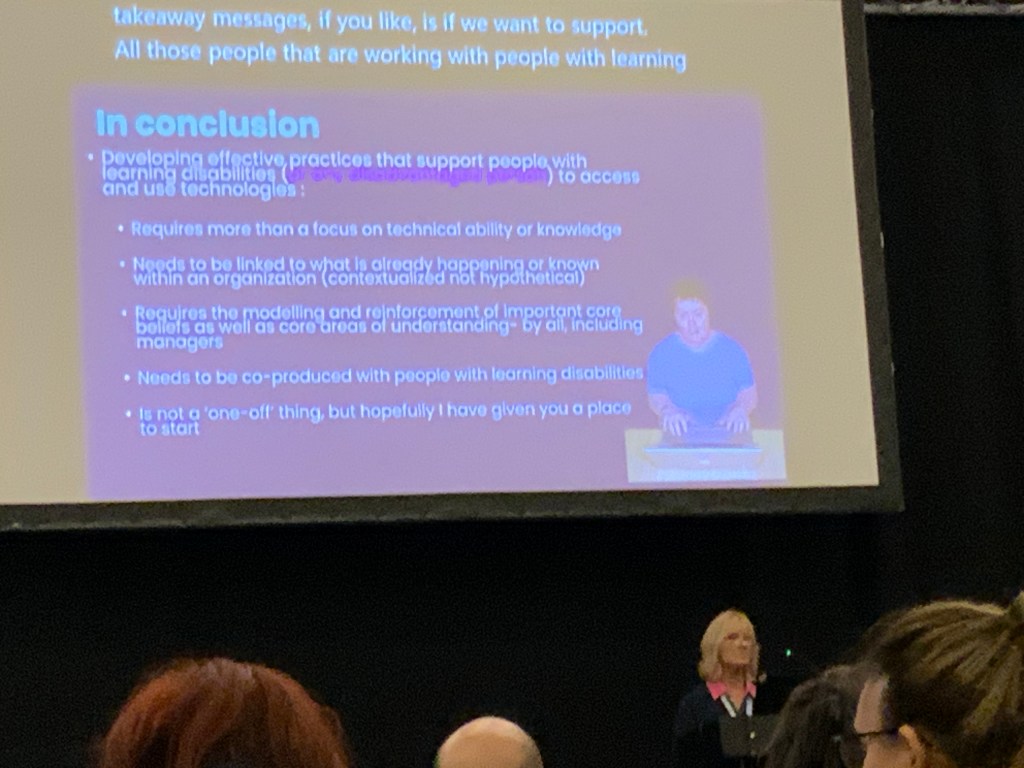
Training was the theme for Professor Jane Searle also as she has been looking at assistive technology for people with learning disabilities. She’s produced a set of videos with SeeAbility & the Open University to help train support/care workers to make effective use of AT. As someone who has been in this industry for as a long as I have means their is a kindred spirit who see the changes needed in our care system to make the phrase “ It’s not my job” as regards assistive technology for people with learning disabilities go away!
Thanks to Fil McIntyre and the TechAbility team for yet another great conference. I recommend you head over to the training section of the TechAbility website for some great resources that can help you. https://www.techability.org.uk/training/
discussingai.blog is now open and ready to take your comments, thoughts and ideas about artificial intelligence. Both Tereza and I feel the way forward is to start a debate on the subject and gather as many uses of ai that people care to share with us.
Working collaborative on this subject can help to have a healthy idea of ai and it’s use. We need a balanced and constructive approach which we can’t do with out your help. So please go across to https://discussingai.blog now and look at the content and add your own.
Look forward to reading your comments and content! It would be great if you could put some comments on the site so that we can move the conversation forward. Look at for news of conferences on AI that is taking place.
Probably in the next week or two depending on training commitments and family matters I might be launching a new website. Artificial Intelligence has become the “elephant in the room.” Some teachers embrace it, other teachers fear it and still other teachers see it as a threat to critical thinking.
It is the buzz word of the moment but what actual research is being done to compare these AI tools to ethical standards and criteria? The blog I am about to publish will explore the possibilities and give a chance for others to comment and make their contributions to the cause of seeing it’s potential and recognising the safeguards needed. Join the debate. I will be publishing soon and will give you a heads up when it’s ready to go!
Having a paperless office is a concept that was the aim and dream of every organisation and company. We now have the tools to go straight from tablet to cloud filing .
Cloud-based file storage has made the dream a reality. It offers the following
Direct posting from a source device to the cloud
Handwriting recognition software can translate any writing on a tablet into an electronic document.
Having a sensible and clear filing method can enable work to be stored directly into a folder accessible to not only you but your PA’s and support assistants.
Saves space rather than physical filing cabinets.
Important to have a backup drives to avoid any loss of data and system of backuop- form daily through to monthly backups.
Most cloud-based storage systems have their own backup systems.
Examples of cloud-based systems are:- Dropbox, Google Drive, Microsoft OneDrive would be the main contenders and of course their other cloud-based systems to use the above are the most popular.
Security of data is extremely important and good systems have the ability to encrypt the data so one can access it without the proper authentication. This usually referred to as two-step authentication . One example of this would be Microsoft Authenticator which uses your mobile phone to verify a number visible on the cloud=based storage before accessing your files.
Without these methods data would be less secure. We have all heard of data being leaked by the use of USB devices, They can get lost and if not password protected will be a security risk. This is another reason for using the cloud. Even hard disks are not totally secure and safe. I have had hard discs fail and lost data that I cannot retrieve. Devizes that fail also can cause a data lost that is not recoverable.
So the ideal would be for mobile devices to connect to the cloud with automatic backup and linking directly to the folders you need your entries to go into.
Things to avoid are nesting. That is the creation of folders within folders. Losing your way around an electronic filing system. Having a clear understanding of your organisations filing system which could be done via a mindmap software that can show you the filing structure and ways you can access the folders. Such cloud-based systems are hierarchical and that suits the way mindmaps can be viewed – top down, left to right, etc. . –
Choose An Accessible Home With These Considerations
House hunting when accessibility is a key requirement presents unique challenges and necessitates careful consideration. This guide, courtesy of AccessAbility Solutions, is designed to help you identify essential features, anticipate future needs, and make informed decisions to find a home that enhances your daily living. With strategic planning and the right resources, finding the perfect accessible home becomes an achievable goal. Let’s take a look:
Understanding Non-Negotiable Accessibility Features
Identifying key accessibility features and building standards is crucial. Consider door widths, ramp access, and bathroom modifications. Look for lever handles instead of knobs, as they are easier to use. Check for lower countertops and light switches for wheelchair accessibility. Ensure the home has a step-free entrance and wide hallways, and evaluate the kitchen layout for mobility. These elements can make daily living more comfortable and safe.
Thinking Long-Term for Evolving Needs
Planning for the future is essential. Your needs might change over time, so consider homes that can adapt. Look for properties with open floor plans that allow for easy modifications. Multi-level homes might not be ideal if mobility decreases. Consider a single-story layout to avoid future renovations. Think about potential changes in health and mobility and choose a home that can evolve with you.
Budgeting for Your Accessible Home
Determine what you can afford before house hunting. This involves assessing your finances and understanding your budget constraints. Research the local housing market to get an idea of prices. Use online real estate platforms to compare prices and features of accessible homes. Knowing your budget helps narrow down your options and prevents financial strain.
Evaluating the Surrounding Neighborhood
The neighborhood is just as important as the house. Ensure the area is accessible and meets your needs. Look for neighborhoods with smooth sidewalks, curb cuts, and accessible public transportation. Check the availability of nearby healthcare facilities, grocery stores, and other essential services. Consider the community’s overall safety and accessibility of public spaces. Evaluate the proximity to family, friends, and support networks.
Planning and Completing Repairs
When it comes to maintaining your accessible home, ensuring that necessary repairs are completed in a timely and efficient manner is crucial. Whether it’s widening doorways, adjusting countertops, or upgrading bathroom fixtures, it’s important to address these updates with professionals who understand the specific needs of accessibility. By using an app designed to connect you with home repair services, contractors, and experts, you can easily schedule appointments or even video chat with specialists to discuss your needs.
Exploring Grants and Loans for Accessible Homes
Financial assistance can ease the burden of purchasing and modifying an accessible home. Research grants and loans available for accessibility modifications. Various government and non-profit programs offer financial aid; the U.S. Department of Housing and Urban Development (HUD) provides resources for home modifications. These funds can significantly reduce the cost of making necessary modifications. Understanding your options can help you find financial relief.
Conducting a Thorough Accessibility Inspection
When you find a potential home, conduct a thorough inspection with accessibility in mind. Hire a professional inspector familiar with accessibility standards and find out exactly what they’ll check for, which might include even flooring, adequate lighting, and accessible entryways. Ensure that all rooms are navigable and that essential features like bathrooms and kitchens are accessible. An in-depth inspection can reveal hidden issues that might not be immediately apparent.
Finding an accessible home requires careful planning and consideration. By understanding key accessibility features, planning for future needs, budgeting wisely, and evaluating neighborhoods, you can find a home that suits your requirements. Digitizing documents, assessing modification potential, exploring financial aid, and conducting thorough inspections are also crucial steps. With these strategies, you can navigate the house hunting process more effectively and find a home that enhances your quality of life.
Today I have been volunteering at an event organised by BT ( British Telecom) to explain to customers about the digital switchover that is currently in progress across the UK. This means our aged analogue systems and exchanges will be phased out in favour of more reliable and infinitely flexible systems digitally.
It is literally a 10 second job to plug your phone into a BT Smart Hub 2 . This hub has the connections built in.
What happens if you have a telecare system?
You will have backup systems in the form of a battery and a Motorola handset with integral wifi of it’s own. If you have a mobile that will also be useful.
Will I need to buy a new phone?
No, 99% of handsets are able to be plugged in without any cost.
Will it cost me to have my phone switched over?
No, it’s completely free
What about vulnerable adults?
There are systems and procedures in place that can help you. Ring the BT customer line and they will put you through to the relevant department. Becoming registered as a vulnerable person is also useful and will flag you have additional needs
What if my router is not near where I use my phone?
No problem there is an adaptor that can be paired with your BT Smart Hub 2 and you connect your phone to that.
I use Alexa can I use that on Digital Voice?
Yes with the the BT Advanced Phone as an Alexa button. At the moment there isn’t a way to use your Alexa smart speaker directly with your phone other than making calls out linking to a mobile phone. Sadly, at the moment you can’t answer calls with Alexa. At least, I don’t think so. Siri can make calls on an iPhone and you can have auto-answer but that means you might get scam calls.
What about Google Nest ? Can I use that?
Again, only if you have a mobile phone to connect through.Receiving calls is difficult to answer on Google nest with your voice.
What about scam calls?
BT have a secure and useful Scam call detection at source. This is included in your Digital Voice switchover as standard. In other words, this is more secure than your analogue system!
It was very informative to sit next to and work with a BT technician and the services have improved greatly since a year ago. For instance free backup phone and battery in case of power outages. Still for voice only users there needs to be advice that responds to voice without the need to press a button to activate it. Watch this space I am going to make a request to the RNIB about it.
Unlocking Potential: How Employers Can Make Job Opportunities More Accessible to People with Disabilities
In today’s diverse workforce, inclusivity is not just a buzzword but a necessary strategy for growth and innovation. If you’re an employer, making job opportunities more accessible to people with disabilities is not only a legal imperative but also a significant advantage in tapping into a broader talent pool. This approach requires deliberate actions, ranging from the application process to long-term career development, guaranteeing all employees can thrive in their workplace. AccessAbility shares more:
Simplifying the Application Process
The first step to making job opportunities more accessible is by providing accessible application opportunities. This means ensuring your job application portal is fully accessible, supporting screen readers, offering alternative formats for visually impaired applicants, and including captions for auditory content. Consider also simplifying your application steps to reduce complexity, which can be a barrier for people with cognitive disabilities. Also, providing clear instructions and real-time assistance during the application process can help alleviate stress and confusion, ensuring candidates can showcase their true capabilities.
Investing in Employee Development
One great way to attract and keep talented people with disabilities is by offering perks like funding for continuing education. For instance, helping them get a cybersecurity degree from an accredited online university can equip them to safeguard your business’s computers and networks (consider this option). Online courses are flexible, so employees can juggle work with other responsibilities like medical appointments or family care. Teaming up with online schools to create customized programs can make this perk even better, boosting skills that are vital for your industry.
Building Supportive Networks
To further enhance accessibility, it’s beneficial to utilize networks that support people with disabilities. These networks can be invaluable in understanding the challenges faced by disabled individuals and providing resources tailored to their needs. Integrating feedback from these networks into your workplace policies can lead to more effective and inclusive practices. Engaging with local advocacy groups and attending workshops can also provide deeper insights into creating an accommodating and supportive work environment.
Ensuring Reasonable Accommodations
Offering reasonable accommodations is crucial in making your workplace truly inclusive. This may include ergonomic adjustments at the workstation, flexible scheduling, or providing specialized equipment. Establishing a proactive accommodation process that encourages employees to express their needs without hesitation plays a critical role in fostering inclusivity. Additionally, periodic reviews of the accommodations offered, based on employee feedback and technological advancements, keeps your workplace adaptable and supportive of all employees’ needs.
Participating in Diversity Recruitment Events
Another proactive step is participating in diversity recruitment events that focus on inclusivity for people with disabilities. These events are often a gateway to meeting potential candidates who are eager to find employers who understand and appreciate their unique talents. By actively involving your current employees with disabilities in these events, you can provide real-life testimonials on the effectiveness of your inclusive policies. This not only enhances your credibility but also demonstrates a genuine commitment to diversity and inclusion.
Enhancing Understanding of ADA Regulations
Finally, increasing awareness and understanding of the Americans with Disabilities Act (ADA) regulations within your team is essential. Regular training sessions, informative workshops, and continuous legal updates help ensure your team is well-versed in the legal landscape surrounding disability rights. Such initiatives not only foster a compliant and supportive workplace but also empower your managers and HR team to implement and uphold these practices effectively.
By adopting these strategies, you can make your workplace more accessible and welcoming to people with disabilities. It’s about more than just fulfilling legal requirements — it’s about enriching your workforce with diverse perspectives and skills that can propel your business forward. Start by examining your current practices, consulting with experts, and listening to the needs of your employees. With a commitment to accessibility and inclusivity, you can unlock the full potential of every individual, thereby driving innovation and success in your organization.
If you enjoyed this article, you can find more helpful content at AAS123.com!)
As an experiment with Artificial Intelligence I asked the question of how schools with limited budgets could utilize assistive technology and then expanding the answer to include examples of how this could be done?
This is the result. What do you think? Useful or not? Accurate or not? What else do you need to do?
“Cost-effective assistive technologies for schools encompass a variety of tools designed to support students with different learning needs. For example, text-to-speech software can aid students with reading difficulties by converting written text into spoken words, and it’s often available for free or at a low cost. Speech-to-text programs are similarly beneficial for students with writing challenges. Additionally, simple yet impactful tools like graphic organizers can help students plan and organize their thoughts, and they can be easily created with common software like word processors. For students with visual impairments, screen magnification software and audio books can be invaluable, and many are readily accessible at minimal or no cost. Furthermore, specialized keyboards and alternative input devices, such as trackball mice, can assist students with physical disabilities in interacting with computers more effectively. These technologies not only support inclusive education but also foster independence and confidence in students with diverse needs.”
I think you would need to mention new technologies that may not be included in a broad article such as this. Fine as a general introduction but more needs to be given. So maybe AI provides a canvas on which our human creativity can look at and explore with. As a teacher it gives a basis on which to build on more in-deoth concepts and to teach pupils to keep asking insightful questions. The development of creative thinking could follow this route. It’s certainly present in Co-Pilot where you are prompted to expand but the teacher needs to suggest ideas, combinations of ideas and expand even further. I’ll ask Co-Pilot to draw me a teacher asking pupils to expand their questions!
Just spoken about “The Power of Assistive Technology” at the above event at the New Bridge Academy School which is a large special school of 380 pupils with complex needs. The talk was well received and a number of useful connections made and I noticed many people used the QR Codes to download both the films and access to Teachers for AT.
So what else did I see? Well a shoutout to CanDle who are doing a great job in helping pupils with AAC use their devices. They are covering the nation with partnerships to enable AAC to be used effectively with the individuals.
Also Scanmarker Pen which is reader pen have produced this simple and effective guideline ruler that will help to keep your pen inline as you scan. This is a simple but very effective way to make a good scan for reading a line of text at a time.
Lastly, my good friend and colleague Rohan Slaughter was speaking at the event about the MSc EduAT course at the University of Dundee. Watch out for the work that he and his colleagues are doing with DFE on AT Assessment. This will be a thorough job and much needed in the profession as it takes a long time to get a complex assessment down.
Alison Tootil , Headteacher , gave me a tour of New Bridge Academy and it was very impressive to see the range of work being done there and in using technology to access the curriculum,. Thank you for sparing the time to show me around.
Now , on to the next event which will be the TPEA conference again in Manchester. What is it about Manchester that is making all the conference events happen there!? Let’s hope the weather improves. It has not stopped raining since I got here.


 AccessAbility Solutions