As I opened up my Outlook this morning I was presented with this tip and link. It does contain useful information on how to use Dictate (Voice Input) into Word, Outlook, OneNote and PowerPoint, but not Excel.
Enjoy!
has ceased trading – but still producing valuable assistive technology information
As I opened up my Outlook this morning I was presented with this tip and link. It does contain useful information on how to use Dictate (Voice Input) into Word, Outlook, OneNote and PowerPoint, but not Excel.
Enjoy!
This article that my colleague Dave Goldsborough sent me is very useful to get a glimpse of what’s changing. The biggest change is gone has “Ease of Access” and in comes “ Accessibility”. The aim is to make things easier to find and use. Anyway, read what this article says:-
https://blogs.windows.com/windowsexperience/2021/07/01/whats-coming-in-windows-11-accessibility/
The above article goes into more detail and explains that technical changes will make the experience for say, blind users , more seamless with a wider range of Office applications it will work with. At the moment I have not had the opportunity to trial this out. I think my equipment is a little old for it. But it needs to be tried out before any recommendation. I hope that I will be able to do that one day soon.
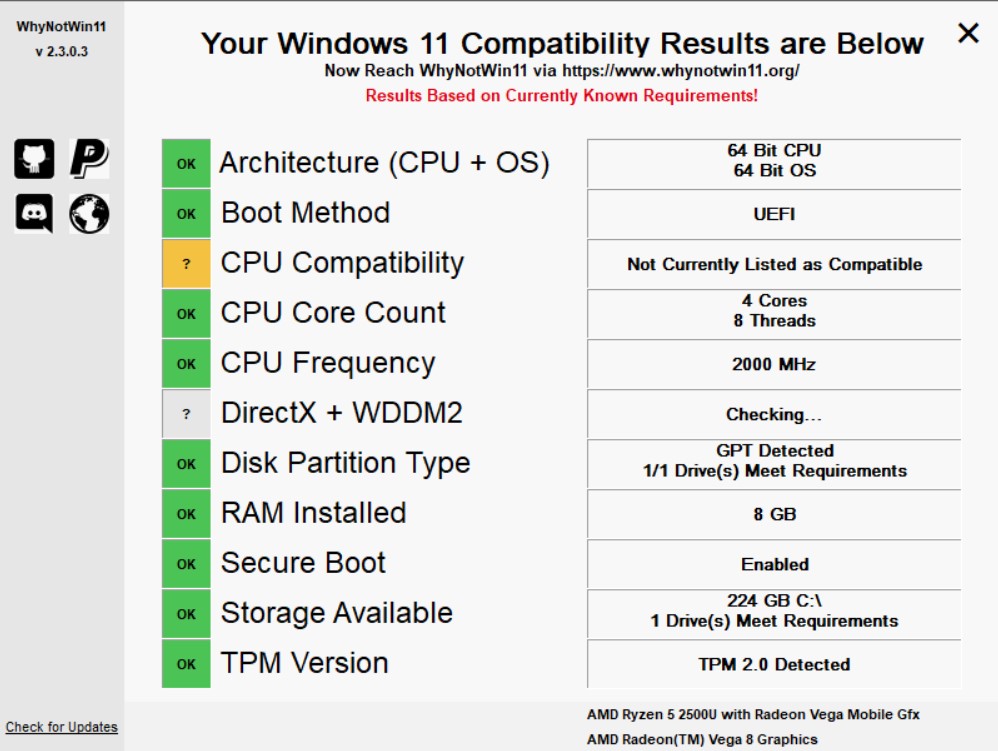
Windows 11 is on the horizon and in order to run this new operating system it needs something called TPM – Trusted Platform Module. This is causing some debate in technical circles. It’s a chip on your motherboard but if Windows 11 doesn’t find it compatible it won’t run. Microsoft have taken off their website the PC Health Check app with no explanation as far as I can see. I did find a version and ran it on an old Surface 3 device and then my 2 yr old laptop. Both failed compatibility! It may be because the app is giving false information or it’s Microsoft trying to convince us to buy compatible machines.
One thing we do know about the new operating system is that it will run Android apps. How well and how effectively we wait to see. A new start menu, and the use of Widgets feature . As far as accessbility features we wait to see. You can sign up for news of when this new operating system is released that is scheduled for the autumn but that could change based on previous release dates changing.
For more details go to:- https://www.microsoft.com/en-gb/windows/windows-11
My Colleague suggested using this little app to see how your computer fares in the compatibility stakes:-
https://github.com/rcmaehl/WhyNotWin11
scroll down the page and “Download latest stable release”.
www.podbean.com/ei/pb-ru8mk-107487e
Can you use the microphone on the Apple keyboard without being connected to the internet?
RNIB have designed a website for story telling for the visually impaired that allows the user to customise their own experience for a demonstration go to https://youtu.be/TGay5epHcvI
All of a sudden today I notice I have 35 views by people in Chile! How did that happen? If anyone can shed any light on that please let me know . Not that I am complaining. It’s a great honour to be popular in a place I know nobody or ever been there. In fact it’s the other side of the world.
Maybe, somebody could shed some light on it.
Hello! Hope you’re well!
Succeed With Dyslexia have recently launched #DyslexiaNews, where we round up news from the world of dyslexia. We’d love it if you could check it out and share! https://youtube.com/watch?v=jhL6dfJvnZo
Thank you, Chloe 🙂
I took part in Jessica’s study on her piece for her course on the elderly and the internet and the impact of COVID. An interesting study showing real life scenarios. Well done Jessica!

It’s true that you could run Office 365 through the Chrome browser on a Chromebook. But you could not run it offline. That is until now. Office on a Chromebook will allow you to run Microsoft Office 365 apps such as Word, Excel, Outlook, PowerPoint. OneDrive, Teams and even a Bing Browser which looks useful using speech recognition. All these apps can be obtained from Google’s Play Store. And they all run offline ( apart from Bing which needs the internet of course.
This also means the Chromebook has more potential use in schools where WiFi coverage is a problem and therefore a cost effective hardware solution for schools, colleges and universities to consider.
Yes, it’s now 10 years since the first chromebooks appeared in the shops . Now with Covid-19 and the need for more digital inclusion the Chromebook is seriously being considered as a viable tool. I have been advocating the use of Chromebook for years. Yes, they are cheap and yes they need wifi but are so so eays to use and setup and the loadtime from startup can be very fast compared to some pc’s.
Let’s hear it for the Chromebook – “Happy 10th Birthday !”
 AccessAbility Solutions