Assistive Technology in Homes and Schools

I am on Lucy Watson’s Podcast called ” SENTogether” which is for parents, teachers and professionals. I will be recording it this week. Watch out for it on Soundcloud. Here is a link to Episode 1:-

Assistive Technology is moving at such a pace that it’s hard to keep up with it. Busy parents and teachers would find this difficult so I have always tried to give useful information about assistive technology to both parents and teachers.

At Home

Things that work at home is speech recognition if the pupil doesn’t feel self-conscious using it. It’s 50% faster using your voice and nowadays it is built into your phone, your table and your computer. Combine that with text to speech where the technology you are using reads back to you will enable those with neurodivergency to succeed. Tools in your pocket like scanning pens can help to decode most printed text and speak it back to you.

It may help not to show any anxiety to your child if you are worried about their progress and you suspect a special need. The child will pick up your anxiety and respond negatively to it. Also pushing too hard can have the same effect because you are worried for them. The best approach if you are anxious is to ….. relax! I know it’s not easy but a simple mantra might be a little and often. We still need typing skills so 15 minutes a day to practise is all that is needed for about 6 weeks to improve your typing skills.

At School

For some pupils assistive technology is essential especially if you have a disability. For those with neurodiversity is a game changer and can in some case overcome their learning barriers. The old hot potato about mobile phones in school with the latest pronouncement not to be used in school is bad news for those with neurodiversity who could benefit enormously from copying from the board and just taking a picture so that it could be read to them or have the ability to listen again – a key use of assistive technology that can help their learning. I suppose the use of tablets and laptops can compensate for this lack of ability to record.

Of course schools face a tremendous problem with the lack of funding as well as knowledge of what can make a difference especially as their are a plethora of solutions and equipment that can make a difference at a cost. So having a strategy that focuses on what can be achieved with what you have and what might be worth investing in. At the very least the use of text to speech on a browser such as ReadAloud and ReadWrite as well as Immersive Reader in Microsoft 365 products can make a big impact for those who struggle with traditional methods of decoding text.

There are hardware solutions for personal scanning and hearing text from Scanning Pens and a app that does the same thing call; Claro ScanPen. Other devices as well that do moper than just scan like ScanMaker Pro which does translation as well which I think the newer versions of Scanning Pens do. This is carrying in your pocket technology that is discreet and doesn’t pick a pupil out as being different – it’s just an aid..

Help is at hand to make sense of all this for schools. The nassen at mini guide which is freely downloadable for schools can help show how to make AT work. As well the training and inspirational films called “ The Power of Assistive Technology” can help foster a culture in a school or college setting to using asssitive technology . Links to the resources are below:-

AT Minidguide for SENCO’s and Teachers

The Power of Assistive Technology films

Reading pens from Scanning Pens

App that scan’s text – Claro ScanPen £9.99 from the AppStore- their is also an android version on Google Play.

For the Professionals.

Those who help SEN pupils and parents. Just take on board the advice above and maybe encourage schools to develop a AT culture whereby it’s the standard that all teachers take a bit of the AT rope and model the technology to the pupils. It’s important that happens as then the pupils can make up their own minds and decide which technology to take on board.

Use the links to the the AT Miniguide and The Power off AT films. Encourage Teachers to Join “Teachers for AT” which creates a discussion area for asharing good practice. There is lots that can be done without spending lots of money. Both items are free to download and use. And of course, look through my website here. I do 5 -8 min podcasts called The Smyles Podcast that spotlights the latest Assistive Technology

At the end of this article all that we want to do is empower our children/pupils to achieve the best potential and tools . Assistive technology can really help that in a way that wasn’t possible years ago. It’s a golden age for assistive technology in both homes and schools
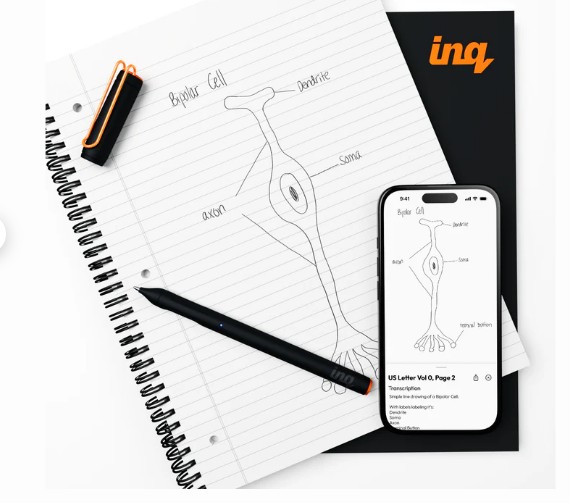
Livescribe inq smart pen

Smart pens have been around for a long time and I have written about them on this blog. Finding one that works seamlessly is not so easy but with inq pen this does work well. The pen needs a special book with all the electronic microdots on it to locate and make sense of information. It’s Bluetooth and so you can connect instantly to the book and also, through AI, directly links to the cloud making it a tool for handwriting recognition. It also links to your mobile phone and provides audio linkage to the information as well making it an all-round tool for the classroom.

For more information go to https://inq.shop/products/inq-writing-set.

Jo Rees on Tour

My good friends at Aventido and AT Superstore are putting on an event on Thursday 26th February at Bailbrook Hotel , Everleigj, Bath. Cost £137 per delegate and includes lunch the focus is Dyslexia and Literacy and is a SEND Conference .

“With a focus on dyslexia and literacy the day promises to empower and inspire educators to better understand dyslexia and literacy from a dyslexic perspective and provide you with armfuls of strategies and ideas to take back into your school and classrooms.”

Jo is a mum of 3 dyslexic children and qualified dyslexic assessor and social influencer .

For more details go to :-

https://dyslexiclifewithjorees.com/think-different-jo-rees-on-tour/

Episode 80 – Reminders App iOS

www.podbean.com/ei/pb-akk5i-1a08ffd

Using voice command commands in Reminders app can be actually quite difficult to be accurate so would always advise checking particularly dates and times to ensure that it doesn’t just pick up from the last day that you put the reminder in.

Also if you’re using shopping app then please note that market complete is the way to actually take out any objects that you don’t want in your shopping list 

smart glasses

At the time of writing there is excitement in this area for the blind and partially sighted.Words such as “ life-changing”  “ game changer” are being used. The meta ray bann wayfarer gene 2 is causing this excitement as AI is linked to it and through ear speakers in the arm and two cameras on the frame means that the world can be interpretation for the user  to understand and have more independence. The other impressive thing is the price. Most VI products are four figures in price but just like the IPad made assistive technology cool the Ray Bann WayFayer could make smart glasses cool and aaffordable. In terms of classroom use it would enable blind and pariially sighted to have access to the class board as well as research tools. The danger of course is plagiarism and personal data security as images of other children and people has to be considered as it’s looking all the time in front of the glasses. How that data can be controlled and how pupil’s personal data can be protected.

We shall definitely see more about this technology in the future.

nasen awards 2025

This is my fifth nasen awards event I have attended. Each one better than the last. My involvement is as a judge for the nominations in each category. There are three teams to look around 50 shortlisted entries which is then wittled down to a winner and then runners up (usually two or three). It’s a brilliant event and so needed in the field of special education. The reason I do this in my retirement is that I believe in the concept and the practise.

Special Educational Needs is a demanding and often unrecognised. Therefore, to have an evening where you can dressed up to the nines – in a dress suit in my case, have a wonderful three course meal and experiences first class entertainment and convivial company at your table of 6 other like minded individuals is a great honour and privilege.

This year it was held at the Vox Centre, NEC Birmingham. The Genting Hotel is where I am staying and it’s a moment of luxury for those of us who are lucky to stay there. During the event I was pleased to see that COSMO won the Inclusive Technology of the Year award. I watched this company since it’s inception grow and be used effectively in special schools. A glowing coloured switch that works in connection with a set of apps that are freely given to users when they purchase the switches. I’ve seen it being used in PE lessons effectively. A well-deserved award for a great piece of kit.

Thank you nasen for allowing me to judge your awards. Can’t wait until next year when we get to award 17 more deserving individuals, organisations and schools.

Supporting residents with sigjht loss in care homes:practical tips, case studies, and training insights

Supporting Residents with Sight Loss in Care Homes: Practical Tips, Case Studies, and Training Insights

By Dan Morgan-Williams, Founder of Visualise Training and Consultancy

With an ageing population and more people living longer, sight loss is becoming increasingly common in UK care homes. Over 2 million people in the UK live with visual impairment, and many are residents in care settings. Yet sight loss is often overlooked, leaving residents at risk of isolation, accidents, and reduced quality of life. This article offers practical guidance, case studies, and training-style tips to help care home owners, managers, and staff create environments where visually impaired residents can thrive.

Understanding Visual Impairment in Residents

Older adults are particularly affected by conditions such as age-related macular degeneration (AMD), glaucoma, cataracts, and diabetic retinopathy. Each condition affects vision differently. For example, AMD impacts central vision, glaucoma often reduces peripheral vision, and cataracts cause overall blurriness. Understanding these differences is crucial for tailoring support to individual residents.

Case Study: When Sight Loss Goes Unnoticed

Mrs H, an 82-year-old resident, had gradually lost her sight due to untreated glaucoma. Her care home staff assumed her withdrawal from activities was due to dementia. In reality, she avoided social spaces because poor lighting and cluttered walkways frequently caused her to fall. Without appropriate support, she became isolated, her mood declined, and her health needs increased. This example highlights the risks of failing to address visual impairment in care homes.

Environmental Adjustments: Quick Wins

Simple, low-cost changes can dramatically improve residents’ independence and safety:

✅ Place high-contrast strips on stair edges and bathroom grab rails.
✅ Ensure all areas have consistent, layered lighting (ambient + task).
✅ Avoid clutter and keep furniture in consistent locations.
✅ Use matt flooring to reduce glare and confusion.
✅ Label important areas such as toilets and dining rooms in large print or tactile signs.

Case Study: A Success Story

Mr L, a resident with macular degeneration, moved into a care home that had recently invested in staff training and environmental changes. The team installed brighter LED lighting, used high-contrast crockery, and trained staff in sighted guiding techniques. As a result, Mr L regained confidence, re-joined group activities, and reported a significant improvement in his wellbeing. This success demonstrates how small, thoughtful adaptations can transform daily life.

Staff Training & Awareness

Training staff to understand and respond to sight loss is critical. Many residents will not openly discuss their difficulties, so staff must learn to recognise the signs and adapt their communication accordingly.

✅ Always introduce yourself by name when entering a room.
✅ Offer your arm when guiding, rather than pulling or pushing.
✅ Describe surroundings and explain changes, e.g. “We are about to step into the lounge; the chairs are on your left.”
❌ Do not move furniture without informing the resident.
❌ Do not leave doors half-open — it creates hazards.
❌ Do not shout; speak clearly instead.

Emotional & Social Wellbeing

Supporting social inclusion is just as important as physical safety. Residents with sight loss may withdraw from activities if they feel excluded or isolated. Care homes can:
✅ Adapt group activities with large-print or tactile resources.
✅ Provide verbal descriptions of group events.
✅ Encourage peer support and involve family members in planning.

Partnerships & Resources

Care homes don’t need to tackle sight loss alone. Local authorities, sensory support teams, and charities such as RNIB and Guide Dogs offer valuable resources. Eye Clinic Liaison Officers (ECLOs) can also provide practical advice. Accessing grants or funding for equipment can reduce costs and improve outcomes for residents.

Conclusion: Taking Action

Supporting residents with sight loss doesn’t have to be complicated or costly. With the proper awareness, staff training, and environmental adjustments, care homes can dramatically enhance the quality of life, independence, and dignity of their residents.

At Visualise Training and Consultancy, we deliver tailored Visual Impairment Awareness Training for care teams. Our lived-experience trainers equip staff with the confidence and practical skills needed to provide outstanding, inclusive care.

OPTIONAL PARAGRAPH – To learn more about visual impairment awareness training for your staff team, check out our eLearning and face-to-face options at https://visualisetrainingandconsultancy.com/training

Notes to Editors:

A photo of Dan Morgan-Williams with his Guide Dog ZodiacDaniel Morgan-Williams

Visualise Training and Consultancy Ltd was established in 2014 by Daniel Morgan-Williams, who founded the company despite experiencing gradual vision loss due to retinitis pigmentosa.

Daniel’s motivation to start the business arose from his experiences of a lack of accessibility and inclusion within workplaces and broader society. This affects people with sight loss, hearing loss, tinnitus and those who are Deaf. Many disabilities are hidden, so they are not easily recognised.

What began as a focused approach centred on sight loss and its associated challenges has since grown to encompass all forms of sensory loss. This enables employees to develop their careers through workplace assessments that recommend reasonable adjustments and awareness training for colleagues.

To find out more, visit https://visualisetrainingandconsultancy.com

Tiny Routines, Big Shifts: How Creative Learning Sticks for Special Needs Kids

Image via Freepik 
 
Every child learns differently, but for parents of children with special needs, the challenge is often about finding the right fit—not just a good one. Traditional instruction can fall flat when attention, sensory needs, or emotional regulation come into play. That’s where creativity steps in, not as decoration, but as survival. It’s in the moment a finger-painting session becomes a breakthrough or when a quiet rhythm game unlocks a child’s voice.  

These aren’t just activities—they’re access points. In this guide, you’ll find ideas that feel doable, rooted in daily life and human rhythm. Whether you’re a working parent juggling too much or simply someone craving traction, this is for you. Let’s start where your child already is, and build from there. 

Sensory-Rich Hands-On Learning 
 
Start with what they can touch. Children with sensory processing differences often learn best when their bodies are involved, not just their eyes. That’s why everyday items—bins of rice, sponge shapes, fabric swatches—can become the heart of a lesson.  

Think less about instruction and more about invitation. Set up a low table, offer textures, and let their hands lead. These hands-on sensory activities not only build engagement but help reinforce memory and language through movement and touch. They transform the abstract into the real, anchoring lessons in experience rather than expectation. It’s not flashy, but it’s deep. 

Motor-Skill Building Through Creative Play 
 
If your child fidgets constantly or struggles with focus, they may not need to sit still—they might need to move smarter. Build in what their body craves. Obstacle courses made of couch cushions, finger painting with shaving cream on a window, or even just pouring water between cups in the bath can serve as activities that build motor skills.  

These aren’t filler. They’re foundational. Movement creates the rhythm for regulation. And when regulation comes, learning follows. These play-based practices help kids process frustration, build coordination, and connect with the world at their own pace. 

Inclusive Group Play for Connection 
 
Children with special needs are often unintentionally sidelined when group activities rely too much on verbal instruction or competitive pacing. But what if the group centered around presence instead of performance? Picture kids in a circle, each with a drum, responding to rhythms. Or moving scarves through the air with no right or wrong.  

These inclusive group music and movement experiences offer emotional access, not just cognitive engagement. They build trust, social mirroring, and shared energy without pressure. The goal isn’t mastery—it’s connection. And connection, in a safe space, builds everything else. 

Expressive Art as Emotional Outlet 
 
Sometimes words won’t work—but color does. Markers, clay, chalk—they can say what a child can’t yet speak. For many children with special needs, emotional regulation is a daily mountain. Art flattens it. By creating space for mess and meaning, creative outlets become more than “arts and crafts.” They’re scaffolds for emotional language.  

As kids draw themselves as superheroes, or swirl angry red paint without judgment, they make sense of internal storms. Over time, these rituals can reduce tantrums, boost confidence, and create entry points for conversations you never saw coming. 

Building Language with Tangible Symbols 
 
Verbal language isn’t the only language. Many kids communicate with objects, pictures, or gestures long before they form words. For some, those tools remain vital. Using symbol systems for communication development—like a soft spoon to request food or a textured square to say “I’m done”—makes expression concrete. These aren’t just backups for speech; they’re entire pathways.  

Tangible symbols create choice, reduce frustration, and offer a framework for understanding routines. They also give caregivers a shared toolset that invites interaction, not just interpretation. When a child controls how they’re understood, everything shifts. 

Outdoor Sensory Engagement 
 
The environment matters. Indoor activities can get stale fast, and not every child thrives under fluorescent lights. That’s why fresh air, texture, and movement work magic together. Imagine a path of different ground materials—grass, mulch, pebbles—that encourage slow, sensory exploration. Or a wind chime corner, built at child height, that turns wind into wonder. 

 Spaces like these aren’t random—they’re designed. Creating or accessing sensory-rich outdoor spaces gives your child room to regulate, recover, and reengage. These gardens aren’t retreats. They’re classrooms without ceilings. 

Balancing Needs and Busy Lives 

You don’t have unlimited time. You’re balancing IEP meetings with work calls, dishes with doctor visits, and it can feel like there’s no room left for intentional learning. That’s where rhythm—not schedule—can help. You don’t need an hour. You need three connected minutes, repeated often.  

Some days, reading a single page of a picture book while stirring dinner is enough. For working moms especially, balancing work and caregiving demands isn’t about perfection. It’s about picking the moments that matter, knowing that your child doesn’t need a Pinterest-worthy learning station—they need you, tuned in and present, even briefly. 

Conclusion 

Creativity in special needs parenting isn’t optional—it’s the operating system. You are improvising daily, not because you’re unprepared, but because your child is complex and alive. The strategies here aren’t prescriptions. They’re invitations. You’ll try some, tweak others, abandon a few—and that’s the point. These aren’t hacks. They’re tools for presence.  

Your child’s progress won’t look like a graph, but you’ll feel the shift in moments: the calm after a shared activity, the joy of a story retold, the tiny reach for connection. Keep building from those. The work you’re doing—imperfect, creative, relentless—is the curriculum. 
 

Discover the latest in assistive technology and empower your journey with AccessAbility Solutions, where innovation meets inclusivity for individuals with unique needs. 

Submitted by Suzanne Tanner

ray bann meta glasses

The famous sunglass makers have joined the AI world and produce some very normal looking glasses that describe what’s in front of you and also reads books for you. Called the Rauy Ban wayfarer it comes in at £300 . Check out the website at:-

https://www.ray-ban.com/uk/electronics/RW4006ray-ban%20%7C%20meta%20wayfarer-black/8056597982788

The above link will give you the information you need. Wouldlove to try one out! They look cool!

JAWS to become subscription based

News to JAWs users. From mky one of my blind cleints. He reports that JAWS is changing to a subscription model. This will take place after the 31st October this year. It will be a three figure sum for those users who want a professional version of JAWS. So if you were thinking fo changing JAWS or buying it best to do in the next few weeks!

JAWS has transitioned to a subscription-based model, alongside its sister products ZoomText and Fusion, offering flexible 1-, 2-, or 3-year terms that include software updates, security patches, and technical support. This new approach replaces the older model of purchasing one-time perpetual licenses and separate Software Maintenance Agreements (SMAs), making it simpler and often more cost-effective for users to stay up-to-date with the latest features and support. Professional Edition subscriptions also incorporate remote desktop access for Citrix/RDS environments at no extra cost.

What the change means for users:

  • Continuous Updates:Subscriptions provide all future software updates, security patches, and new features for the duration of the term, ensuring users are always on the latest version. 
  • Included Support:Full technical support is bundled into the subscription, eliminating the need for separate support agreements. 
  • Predictable Costs:The subscription model offers a lower upfront cost than traditional perpetual licenses and provides predictable, recurring expenses. 
  • No More SMAs:The mandatory Software Maintenance Agreements (SMAs) for perpetual licenses are replaced by the subscription model, which has these benefits built-in. 
  • Network Access (Professional Edition):Professional license subscribers gain integrated access to remote desktop environments like Citrix and RDS without additional costs. 

Why the change was made:

  • Simplified Software Management:The subscription model simplifies the process of keeping assistive technology current and effective. 
  • Enhanced User Experience:It ensures users receive continuous improvements, including new AI tools, OCR enhancements, and compatibility with the latest operating systems like Windows 11 and Microsoft Office. 
  • Addresses Security Risks:Staying on the latest version, guaranteed by subscriptions, is vital for security and continued functionality. 

For existing users:

It is important to ensure your software is on the latest version and to transition from an expired SMA to a subscription to maintain access to vital updates and support. 
 

Existing users with perpetual licenses are encouraged to explore the subscription model to benefit from continuous updates and support. 

This article has been generated by AI