Natural Reader Online (Dave Banes)

Thanks to Dave Banes for this post:-

Free and Low Cost Assistive Technology of the Week 32/17 – Natural Reader 

Natural Reader is a well established text to speech technology that works across a variety of platforms. Windows, Android, iOS and online.

NaturalReader Online is a text-to-speech web application with high quality premium voices for personal use only. Login from any computer to convert any written text such as MS Word, PDF files, non-DRM eBooks, and webpages into spoken natural sounding speech.
https://www.naturalreaders.com/online/index.html

Windows and Mac
NaturalReader is a text-to-speech software for personal use. This easy-to-use software with natural-sounding voices can read to you any text such as Microsoft Word files, webpages, PDF files, and E-mails.
https://www.naturalreaders.com/software.html

iOS
https://itunes.apple.com/gb/app/naturalreader-text-to-speech/id598798210?mt=8

Android
https://play.google.com/store/apps/details?id=com.naturalsoft.naturalreader&hl=en_GB

screenshot of Natural reader for IOS

Collaborative Inquiry for Teachers and Pupils

I usually write about ICT and SEN but found this article interesting both as a teacher and a researcher. I feel that collaborative inquiry  amongst teachers from similar disciplines a great way to engage and motivate teachers and students. It sounds simple but the usual excuses of not enough time or finances seems to impede such things. So why not consider the long view and get senior management teams to consider planning a three year programme. MirandaNet can help put the academic element together with you and this would benefit the school in several ways:-

  • relates the the real issues of classroom practise
  • combines theory and practise whilst teaching a theoretical method to those unfamiliar with it.
  • sense of achievement through being in control of the research
  • joint ownership of the approach that is…
  • .. non-threatening due to peer mentoring
  • fresh ideas and new directions can emerge through the process of research
  • and a nice carrot of a certificate or outcome that is tangible would be good but I am sure not always certain.

Anyway, why not read for yourself and make some enquiries from Dr Gary Jones, University of Bristol, about it as an alternative to your usual CPD:-

Collaborative Inquiry for Teachers and Pupils


Switcher Studio & Live Feed on Facebook

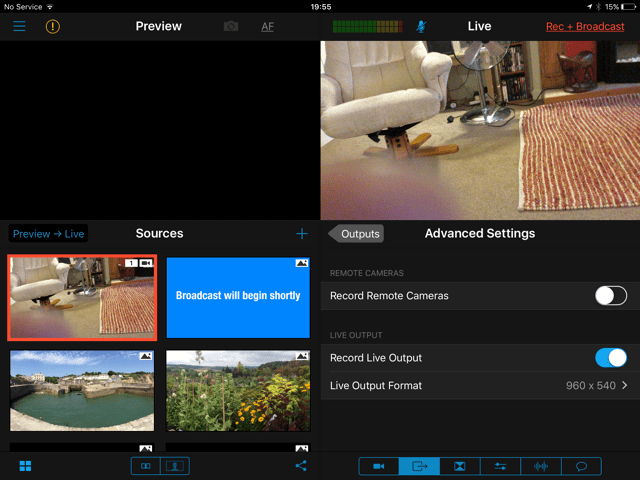
Having seen a live feed using this app I was impressed by the way it makes using  Facebook as a webinair tool a possibility. You can use one or two cameras which means you can have one camera showing the slides while the other camera can show how to do a task.

This makes running a live presentation a doodle and comments about the presentation can be fed back instantly to the user. It really is a powerful tool on the iPad and something I wanted to write about.

For more details take a look at:-

https://www.switcherstudio.com/how-it-works 

There is a 14 day free trial. I like the way you can make comments as you do the presentation,

IMG_2263

Useful resources for parents with special needs children

Hello there,

It’s tough for parents to find out their child might have a learning disability. Especially if it’s not something the parent has ever experienced before. Of course, there is so much information to sift through that it can become incredibly overwhelming, especially if the diagnosis is unexpected or comes later in the child’s academic career. Fortunately, there is an abundance of expertise available to help children and teens with learning disabilities overcome their obstacles.

To help eliminate some of the frustration parents face, I’ve gathered a list of resources. I think there is some great information here, and I’m hopeful you think your readers will benefit from what I’m sharing. This post is shared at http://aas123.org/online-resources/?

Understanding Dyslexia and How to Help Children Who Have It

The Importance of Self-Esteem for Kids With Learning and Attention Issues

Parenting Tips for ADHD: Do’s and Don’ts

How to Create an Autism-Friendly Environment for Kids

How to Discuss Puberty with Your Child Who Has Special Needs

Creating the Optimal Environment for a Kid with ADHD

Teens with ADHD: Recognizing Signs of Depression

ADHD and Addiction – What is the Risk?

Teaching the Person with Autism How to Drive

I hope you will find these resources useful and informative. Parents need all the information they can get, but parents with special needs children more so.

Submitted by Kathleen Carter , Educator Labs

This post is also shared on our resources page


Lightbulb moment? How Alex can be an Assistive Technology tool.

The link below takes you to AbilityNet’s website where Alex is being demonstrated via a Yotube video, Read and learn how Alex could be used as an Assistive Technology tool:-

Lightbulb Moment

Learn Anything (Almost) Through These Interactive Mind Maps

20 great iPad apps

See this article posted on Blogpost. Blogpost is a good source for ideas in the classroom and technology. Enjoy!

20 great iPad apps for the classroom

Windows 10 has eye control

The latest update to Windows 10 now has eye control built in for eye-gaze system

Eye control for Windows 10

BDA Training for non-medical staff

Just to let you know that the British Dyslexia Association is now able to offer training for Non Medical Helpers covering the key areas of
Confidentiality
Data Protection
Health & Safety
Lone Working
Safeguarding
Disability Awareness
The training is available via E-Learning and has a built in assessment leading to certification upon successful completion of the assessment process. The link to the course is http://www.bdaelearning.org.uk/enrol/index.php?id=87  and the training team can be contacted on 0333 405 4565, should you wish to share this information with your networks.

Windows 10 – update gives new features

The latest large update gives useful features to Windows 10 users . Read on :-

New Windows 10 Insider Preview features
Here are some recent highlights, including the build number where they first appeared.2 Go to the Windows Insider blog for more details on all the latest Insider Preview builds for both PC and Mobile.

▪ Stay better connected. Pinned contacts display a counter if there are unseen messages. To share a file, simply drag-and-drop onto a contact to start an email — or share directly via the share picker.3 (Build 16199)

▪ A new design. The UI for Start and Action Center includes elements of our new Fluent Design System such as Acrylic Material — a cool, translucent effect. (Build 16215)

▪ Pinned sites are back. We heard your feedback — and you can now pin a website to the taskbar from Microsoft Edge. (Build 16215)

▪ A better handwriting experience. The new handwriting panel has more gestures, easier editing, and emoji. Fill the panel and lift your pen off the screen — the text will shift so you have room to continue writing. (Build 16215)

▪ A clever way to keep track of events. Using visual intelligence, Cortana (with your permission) can prompt you to create a reminder when she notices event posters that you’ve added to your camera roll4 – or when you use your pen to circle event information for an event on a website.5 (16215)

▪ A totally new touch keyboard on PC. Enhanced text prediction, shape writing with the one-handed touch keyboard, and dictation on the desktop.6 (Build 16215) Plus the keyboard supports 26 languages, including Simplified Chinese, Traditional Chinese, Korean and Japanese. (Build 16226)

▪ OneDrive Files On-Demand. Access your files in the cloud without downloading and using storage space on your device. All your files, even online-only files, can be seen in File Explorer and work just like every other file on your device. (Build 16226)

▪ Currency converter in Calculator. One of the top customer feedback requests since the launch of Windows 10 is now available for Windows Insiders to try. (Build 16226)

▪ Narrator gets artificial intelligence. Now Narrator can do things like generate descriptions for images that lack alternative text. The service also includes the ability to extract text from images using optical character recognition. (Build 16226)

▪ Link your phone and PC. This first set of ‘linking’ features is focused on cross-device web-browsing using an Android phone. Give it a try and let us know your feedback. Follow these simple steps to have your browsing sessions from your phone automatically show up on the PC that you’ve chosen. Then register here, if you’d like to help us refine these features even further. (Build 16251)

In other news
▪ Listen to our latest Windows Insider Podcasts. Go to our podcast library to find out how experiential gaming builds empathy, and learn life lessons from a third grader on how gamifying coding builds friendships. If you like what you hear, subscribe and rate the episode on iTunes, Google Play, or Stitcher for the chance to win a NinjaCat T-shirt.7 Then, check back to hear more stories from Windows Insiders.

Info for IT Pros
▪ Windows Server — now available as an Insider Preview. We recently released the first version of the Windows Server Insider Preview Build. Download the latest version and explore improvements to: container and software-designed networking, HTTPs, time accuracy, networking transports and more. Plus, the Windows Server Core base image has been optimized and is now over 20% smaller.

▪ New security features. We have released several new preview security features for Windows Defender Application Guard and Windows Defender Security Center in Windows 10 Insider Preview Build 16232 – and we’d like to hear what you think. To discuss these new features, and get best use scenarios and practices, visit the Windows 10 security space on Microsoft Tech Community.

▪ Introducing Windows Analytics Upgrade Readiness. In this three-part video guide, you’ll learn to leverage powerful telemetry data, gain insights and recommendations about your organization’s upgrade readiness, and follow a guided workflow based on Microsoft best practices.

▪ The Ultimate Guide to Windows Server 2016. Download this free e-book to learn about the latest technology in Windows Server 2016 and what it means for your organization, including: better protection, improved datacenter efficiency, new modernization capabilities and more.