AAS good friends at Inclusive Technology have joined the VR bandwagon and provided what looks like a comprehensive and practical tool for special needs. As usual they don’t just sell the product without thinking about how it would work in a busy special needs classroom. Headsets don’t need a mobile phone. Sets come charged and ready to be used whenever they are needed. Only the price would put you off! £1,995! But look at what you get:-
Author: AccessAbility Smyles
Microsoft Soundscape
A free iOS app that enables the blind user to have navigational information to enable them to predict or avoid potential hazards. I found this intuitive and it uses 3D sound to indicate where the location being described is situated,
With “Seeing AI” this will be a powerful Assistive Technology tool for the sensory impaired. I can even see application to those in the learning disabled community as well.
https://itunes.apple.com/us/app/microsoft-soundscape/id1240320677?mt=8
For more information about Microsoft Soundscape go to:-
Finding AT solutions to real-life problems
Today has been a day to learn more about voice driven virtual assistants. I think that we need a forum whereby people post their real-life problems for AT professionals to solve. Just as the website http:// IFTTT.com
Today I got a “what’s new in Alexa” email and thought that this is a great way to send out a cry for problems needing a solution. Leading on for my last post it might look a bit like this:-
” How can I send a email message using only my voice”
” How can I watch audio description programs and freeview digital”
I think I call the website “solveaproblem.com ” Solutions using voice driven virtual assistant devices would be posted as a reply. Watch this space! This sounds like a Wiki!!
Sending posts to Facebook using your voice
That’s a question my blind client asks me and it sounds simple but you can’t currently do this with Alexa. That’s because , I think, Amazon has been a publisher not an operating system. Whereas Google is an operating system. That’s my theory. #
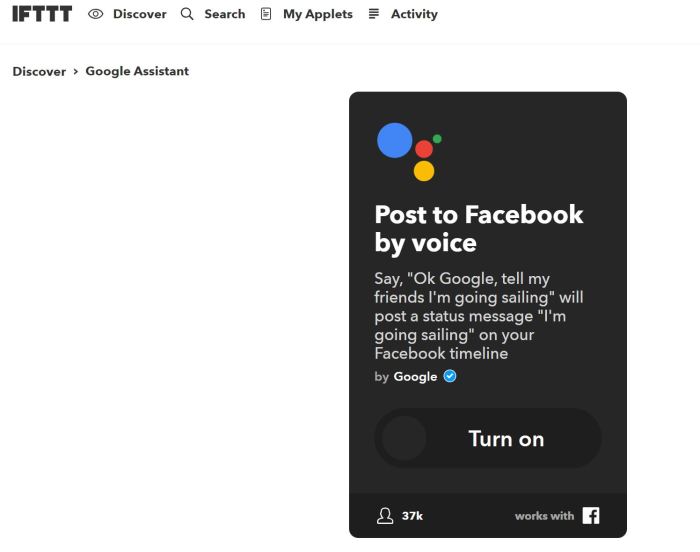
But you can do it via IFTTT ( love that website!) and OK Google by turning on this fix.
https://ifttt.com/applets/479257p-post-to-facebook-by-voice
If you were a blind user you would need to have your screen reader on to make sure you know what you have written. No unwanted or rude messages can be sent unintentionally!
Facebook AT Groups
There are number of groups out there that can provide a source of useful information all have to be joined I have listed a few I know that you can contact:-
Online communities give opportunities to broaden your vision and horizon’s . Here are a few, please add ones you use
RNIB & AbilityNet Volunteers Day
I am off to London today for the above Volunteer’s day which should prove to be very interesting with both Orcam [BATA member) and Amazon speaking on the Echo device at the event. Also the Family Fund will be there so I hope to catch up with some past colleagues when I was involved with their digital skills project. For more details :-
Volvo Ocean Race
This is not really the IT I usually describe in my blog I know but it is ICT – it does make smart use of a lot of tech which is built into the “blogging” station on board which is updated in realtime but I like the Ocean Tracker which I have given you a link below. It shows the race in progress and if you like this kind of thing it’s very good indeed.
I stumbled across this event in progress whilst on a personal photo shoot in Cardiff. It was a magnificent day in Cardiff Bay and I went along to the festival that was happening there. I bought Mapfre – the overall race leaders at the time. Here is there team :-
And now the Volvo Ocean Race Tracker
This will end when this leg of the race finishes. Presumable opens again when they set of on the next leg!
Timeline in Windows 10
Following a sequence of posts about Windows 10 I discovered the feature timeline. Try to remember what you worked on a week ago? You would like to date a piece of work you did and access it or maybe you forgot what the file name was and you needed to find it again . Then timeline is for you.
It’s located down at the bottom task tray next to the search windows:-

When this is clicked tiles appear with the things you have worked on. Useful for logging what you have done and when.
Bierley USB Mono Mouse
Henshaws have produced a video to explain what the mono mouse is and does so over to them – the cost is £200 but maybe cheaper than a MagnaLink or CCTV device.
New features in Edge will help dyslexics
In the latest update on Windows 10 there are some features built into Edge that will help dyslexics. The first is the browser can read aloud and not read out code. Also words are highlighted as spoken.
Text to speech is the no1 feature that most dyslexics ask for. So that has given a powerful tool at no cost to the user. It should help Edge to be the browser of choice for Dyslexics.

Another useful feature is making use of Learning Tools to make the browser a more useful learning tool. By analysing the text for its component grammar elements it allows users to see what makes good writing.