Also , if you have an Amazon music account you can create a playlist and add to your library but my client couldn’t tell me how she did it so I will investigate and add to this post when i have found out. Amazing things these smart speakers and what they can do !
Author: AccessAbility Smyles
Specialist ICT SEND Consultant,
Committed Christian,
Loves photography and computing
Plays piano and guitar - both badly!
Google plays music – for free!
” You didn’t tell me about this !”
This is my greeting with a blind client this week. But I am not offended easily and always on the lookout for new uses of the Google mini. If you say “Hey Google, Play music from the 50’s ” it will tell you that you haven’t got a subscription and then offer you a streaming station which plays non-stop music . Try it out yourself if you have a google mini. You can flip through the songs by saying ” next song” if you don’t like what it plays and tell it to stop when you have finished.
A Richer Curriculum..creating a culture of opportunity in a digital world. 11th / 12th July Winchester University
At a time when the government EdTech strategy has been released, educators, researchers, experts and organisations will come together to share ideas and plan actions.
Early career researchers and students are welcome most welcome as well.
A range of speakers will also join the debate:
Lord Storey, ex-head, discussing EdTech policy in schools
Caroline Wright, BESA, on working with the edtech industry.
Cat Scutt, CCoT, on EdTech research and practice
Professor Mike Sharples talking about innovation in pedagogy
Professor Ros Luckin about the evidence from the EDUCATE programme
Bernard Dady, Gaia Technology, talking about the principles of effective CPD strategies for EdTech professionals
Mike Forshaw, InnovateMySchool, with practice about sustaining vibrant e-communities for busy teachers
Sign up now for early bird prices http://conference.itte.org.uk/
Any questions to christina@mirandanet.ac.uk
Warm regards
Professor Christina Preston
Join us in conference this year
http://conference.itte.org.uk/
MirandaNet Founder, TPEA Chair, Naace BOM
You can join MirandaNet free here
http://mirandanet.ac.uk/joining-the-fellowship/
De Montfort University
http://bit.ly/2aMfoLo
MOB: +44 7801 336 048
SKYPE: christinapreston
@mirandanetter (Christina’s Twitterstream)
@mirandanet1 (MirandaNet Twitterstream)
https://www.linkedin.com/pub/dr-christina-preston/5/895/409–
Searching this website
To try and make things more accessible you can search this website for categories . Just take a look at the dropdown list on the right and try out things like “Workaround” which are practical assistive technology solutions to user’s needs and requests. Or you can take a look at “Assistive Technology” to look at assistive hardware and software. If you are a SENCO you can search to find information relevant to you.
There are over 700 posts from the last 6 years to look through. A mine of useful information and advice and it seems a shame to have it sitting there and not being used. Please do check it out.
Closing Apps Automatically at Restart, Shutdown or Sign Out in Windows 10
And this also works in Windows 7. A user who uses speech recognition to control her computer wanted to be able to switch off the computer with her voice but was unable to due to two things, Dragon showed a user profile save dialogue box and force shutdown window. Using the command “AutoEndTask” and adding it to the register did the trick and the computer was able to close everything down. In order to stop the user profile dialogue in Dragon to appear an option in the data section to “save profile automatically” enabled dragon to pass that stage. I could see it was saving the profile.
In order to add the AutoEndTask command follow the instructions on the link below:-
https://winaero.com/close-apps-restart-shutdown-signout-windows-10/
Visual Thesaurus
Finding that word or just trying to find an alternative word can be difficult and frustrating . This is why i like a visual thesaurus that shows the link between words that are related to the root word.
ThesaurusFree is an app that does just that. And as the title states its free as well.
Have this as part of your toolkit for pupils with special needs.

My work with AbilityNet

I feel fortunate to have had more than Andy Warhol’s 15 mins of fame! Here is an article written about me and my work as a volunteer for AbilityNet. There has been no cheque in the post though !
https://abilitynet.org.uk/news-blogs/help-your-tech-abilitynet-volunteer-offers-advice
Call routing on your iPhone


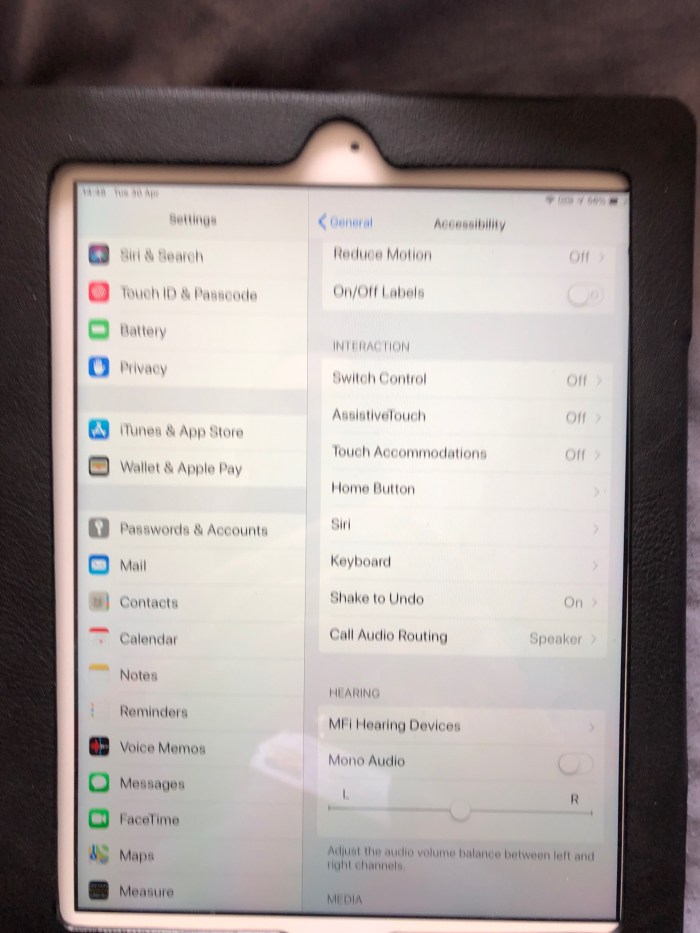
You can switch on auto-answer so that a phone call can be answered without any pressing or sliding of the screen! Useful if you have no hand function and you need to respond to calls coming into you. So with Siri you can call phone numbers and now with this option switched on you can answer the call as well
Netplwiz – bypass the login screen in Windows 10
A Windows command that I have found useful is “Netplwiz” which takes you to a dialogue box where you can enter the user’s details and if select the option that does not require a manual logon you can enable the device to loadup without the need to type a password. Useful if the user has a disability or cognitive processing errors.
ABLE Summit 2019, Beirut
The first Assistive Technology conference in the Lebanon has been a great success as speaker after speaker spoke of making things more accessible for everyone. Here is a screenshot from the local press showing a photo of the blind school giving one of several concerts delegates were given.


Daily Star, Lebanon and Microsoft Learning Tools
 AccessAbility Solutions