https://www.podbean.com/media/share/pb-qye9p-d0df4a
Dave is a head of computing at York House School Primary School
Author: AccessAbility Smyles
Specialist ICT SEND Consultant,
Committed Christian,
Loves photography and computing
Plays piano and guitar - both badly!
Using Assistive Technology to enable and empower pupils
My good friend and Colleague Dave Presky has sent me this article. Hope to have coffee with him today at BETT. Anyway, here is the article he sent:-
Breaking Down the Barriers
Something amazing is happening here at York House School. Dave Presky, Head of Computing, and I are working together to implement technology to help our SEND children break down the barriers they face in their day to day learning. Over the years I have learnt that enabling children to access their learning independently rather than using adult support is far more empowering and effective. We have begun to embed a variety technology tools to do this with astonishing results!
The C-Pen reading pen
The scanning reading pen has always been one of my favourites. I like the fact that children who struggle to read and understand, can scan the text and hear what is being said or asked of them. It has totally changed the way some of our SEND children access exams and reading texts. When one of the children who uses this tool said to me ‘using the reading pen has really made me feel confident with reading now Mrs Warren. I want to read more and feel so good about myself.’ I knew something must be working! Another child who used the exam reading pen felt so relieved that they didn’t have to keep asking for adult help that they confidently worked through a paper that I thought they would struggle with!
We have also had some really positive feedback from some of our parents whose children have used our pens for exams. One parent told me ‘My child was much more confident going in to the exam knowing that they could independently work through the paper.’ Another said ‘The use of a reader pen has given our daughter greater confidence when approaching her English work and improved her understanding of comprehension related tasks – with improved results. In recent months, it has also helped manage her anxiety ahead of exams, knowing she was able to use a reader pen to read questions and passages. This tool has been really valuable for our daughter and grateful her school has provided tools like the reader pen, overlays & computer apps to navigate the right strategies to help manage her dyslexia.’
Breaking down the barrier of the decoding of words and enabling the children to focus on the story itself and the comprehension of this has helped these children re-engage with reading!
Voice to text (Google Chrome)
If I am honest I was a little unsure of this tool before I used it. The idea of children speaking into a computer and then it transferring into a text that made sense was something I didn’t think could happen. How wrong I was! I have personally seen a child who, although has good creative ideas, always struggled with recording his work; this was due to processing the information and the speed he wrote. He went from writing 3-4 sentences in a 45 minute session to writing a 3 paragraph story in the same amount of time! When it comes to actually recording their ideas and purely by using this tool the children who have slower processing, have been enabled to speak their ideas and focus on the story development rather than spelling and speed of writing. A few members of staff have been using this tool across the curriculum and have had equally astounding results. One teacher said ‘I didn’t think the children understood much about the concept I was teaching and when I first attempted to get them to write something down, I didn’t get much out of them. After a staff training session on how tech can assist our SEND children’s learning I decided to try the voice to text tool on the chrome books. The results completing took away the barrier and I have never seen these children write so much and show how much they actually do take in.’
Using these 2 tools and embedding a few more, such as Clicker and widgit online , we are hoping to become a school where our SEND children are equally as independent and successful as their peers. I truly believe this can happen with the use of technology. We are only at the beginning of our journey, however, the results are already impacting on our most vulnerable children.
Mrs Helena Warren
Head of Learning Support
York House School.
BETT Show 2020 – Part 1
Here we are again at the BETT Show. I have been coming to this show since the 90’s. That means 20 years of BETT. This one by far is the biggest. North & South Halls are filled with exhibitors. Also, the speakers have quadrupled to what I remember from previous BETT.

First stop was to see my old colleague and friend Paul Hutton speaking about accessibility options on the iPad. Always informative and entertaining as he demonstrates with examples how these features help pupils with special needs, especially his own daughter .I learnt about a feature I didn’t know called Reader View in Safari which is great for student revision but also the blind who use screenreaders. You can also change the font and the background colour of the page. That in itself was worth train fare!

Next up as I walked around down North Hall I came past Scanning Pens. They are having a great year with being awarded “Company of the Year” at BETT this year. They are launching their Bluetooth enable Pen which acts like a scanner as text can be imported into your computer or mobile device. In turn that can be translated with Google Translate into any language and spoken out. Amazing for helping foreign students whose first language is not English. Not only can you edit text but you can manipulate it. Partially sighted users would find this a help. With the use of a ruler to guide the pen across the page it could provide them a way to enlarge any given printed material and have it read back. From menus to newspapers to books. Printed materials can be instantly accessible at the scan of a pen! It doesn’t stop there. You can also have a keyboard that makes it accessible to all your apps. Well done Scanning Pens for what looks like a great accessible tool!

Time to sit down and relax. A rarity at BETT! But the Arena affords a pleasant area to sit and listen to talks that can inspire. I listened to a teacher from Boston speak about his class which is organised more like a youth club as pupils don’t have fixed lessons and work on projects in answer to questions. Intrigued? Well if you want to discuss more about this ( and how does he control the classes?) that you can contact him direct on the slide below. His name is Kader Adjout.

Whilst trying to work out why my phone had stopped working on Exchange. Which was a pain and took most of the next session, I listened to a Q&A session chaired by Helen Skelton the presenter about the future jobs not yet invented yet and how schools need to adapt to this changing model. Ideas were shared- some idealistic, some practical. The problem lies with our draconian and rigid system. How do we break free enough to do this? Everyone has an idea how we could work more creatively and effectively and it was good to hear the phrase “digital learning,” being used again. To me computing AND digital learning should be taught in schools thus squaring ICT up. Oh, and I got my Exchange working again ( why did my email need verifying and authenticated.? It was authenticated this morning? That’s technology for you, eh?
Making connections
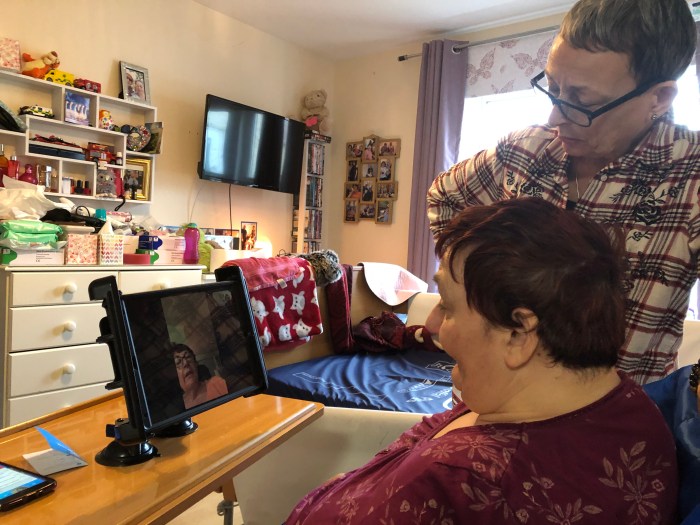
I love my job – it gives me a chance to meet some wonderful people. The lady above wanted to connect with her sister in Australia using Skype for iPad and so I enabled this using an iPad with an Ablenet Suction Pad clamp to keep it in position. We also made the screen more accessible by putting the app icons in the taskbar on the iPad.
Using a Google Chromecast she can access Holby City on Youtube as well as Casualty on BBC iPlayer and have it displayed on her flat screen TV. She also uses Niki Music it’s larger icons gives her easier selection to access music.

Staff in the home where the lady lives were trained in how to setup the clamp and what the different apps do. Job done!
Episode 11 – Smart TVs
https://www.podbean.com/media/share/pb-6vkgu-d02208
How smart is your TV when changing channels ? Can you do this from scratch using your voice
Episode 10 – Amazon Cube Fire TV – Part 2
https://www.podbean.com/media/share/pb-3tpw3-d02202
Reporting back on how the Amazon Cube was used by my blind client
Kialo Edu – The tool to teach critical thinking and rational debate
Kialo is a free tool used by educators world-wide to teach critical thinking, facilitate rational classroom debate and explain controversial issues.
— Read on www.kialo-edu.com/
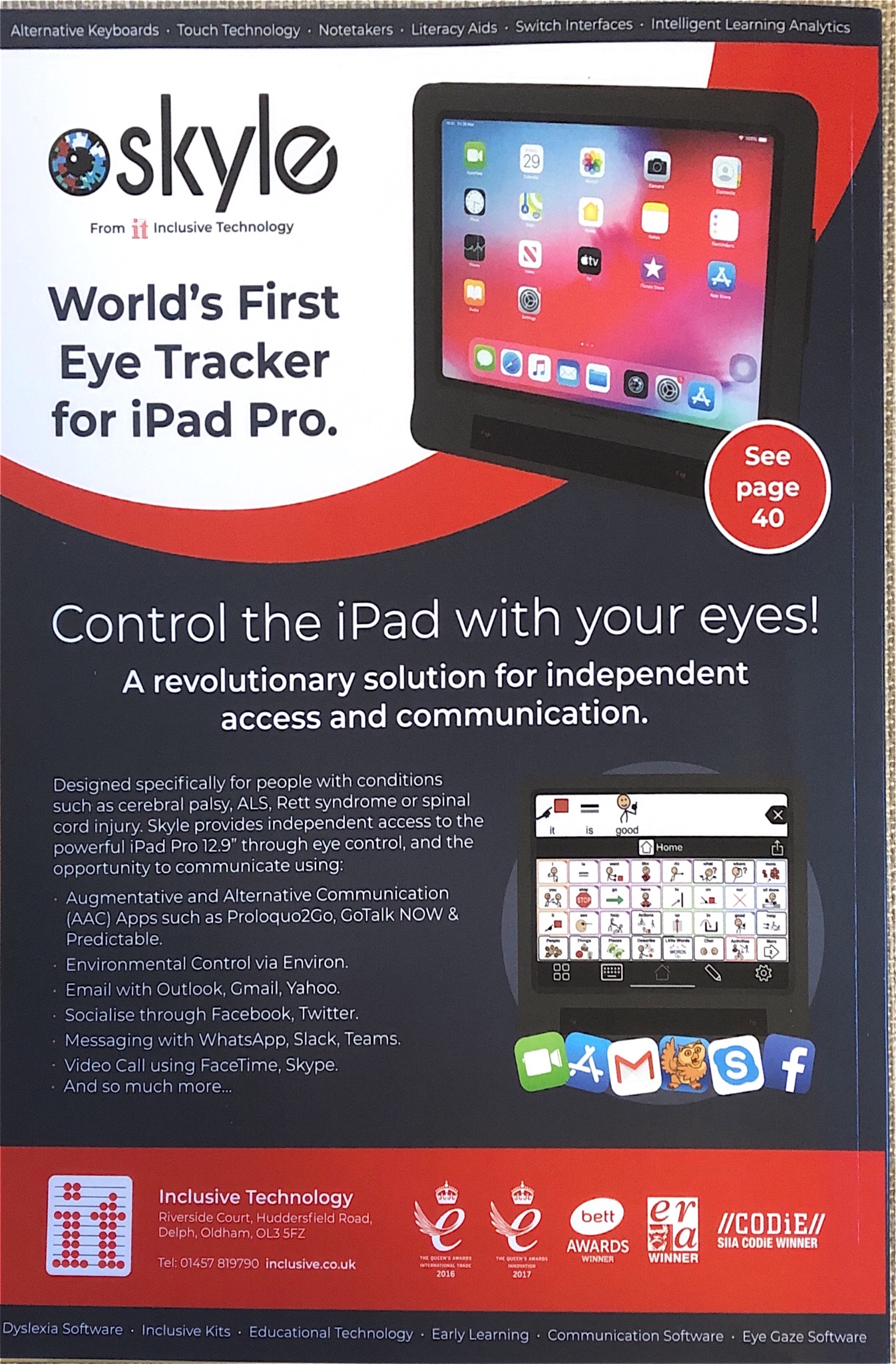
Skyline – World’s first Eye-Tracker for iPad Pro
Speech on the iPad
One of my clients had a change on her iPad that meant the good , well inflectional voice had gone and was replaced by a robotic monotone voice.
For fluent readers having a voice that gives meaning to the text by the rise and fall of the sentence as well as the pace and pause at commas aide reading.
So what had happened?
Speech and voices used to be visible on the accessible menu now it’s under a new item “Spoken text”
So that means you have a voice for Siri, a voice for spoken text and a voice for VoiceOver for the blind. Why not have one menu for speech that works for all uses? Come on Apple make this an addition .
As it is squirrelled away two or three menus down it is hard to find so here is the guide that I found after 30 minutes of searching
https://support.apple.com/en-us/HT202362
And I have written this on my phone using the WordPress app. So easy and functional for writing on the hoof or when watching football on TV!
Have a great AT day!
Inclusive Technologies 2020 catalogue
Inclusive technology who are a one-stop for Assistive Technology have published their 2020 catalogue:-
 AccessAbility Solutions